
 Ultrilliam:
Teaching some code
Ultrilliam:
@Bearclaws72
Ultrilliam:
You start a HTML doc with <!DOCTYPE html>
 Bearclaws72:
ok
Bearclaws72:
Got it
Bearclaws72:
Ok now how to I put words in it and graphics?
Bearclaws72:
<H1> ?
Ultrilliam:
next come the <HTML> tag, pretty much everything goes in here. <HTML> </HTML>
Bearclaws72:
Yah
Bearclaws72:
Then put the link adress in the middle right?
Ultrilliam:
Nope
Bearclaws72:
oh
Ultrilliam:
in HTML goes the body and head tag. the head tag is where the title of the page, scripts for the page, and CSS goes. the body tag is where the content of the page goes, so everything that goes in a page goes here.
Ultrilliam:
Now input that in, and screenshot what you get.
Bearclaws72:
How do I screen shot on windows I forgot
Ultrilliam:
printscreen
Ultrilliam:
then just hit ctrl+v here ^_^
Ultrilliam:
(while typing a reply)
Ultrilliam:
annnnnnnnnd he died
Bearclaws72:
No I didnt tryin to figure this out
Bearclaws72:
@Ultrilliam
Ultrilliam:
hit print screen
Ultrilliam:
and while typing a reply, right click and hit paste.
Bearclaws72:
<!DOCTYPE html> <HTML> </HTML>
Bearclaws72:
Thats whats on my note pad right now
Bearclaws72:
@Ultrilliam Is this correct?
Ultrilliam:
so far
Ultrilliam:
but you didn't add the body and head tags in
Ultrilliam:
btw, \``` insert code here \```
Bearclaws72:
What body and head tags like the name of the website?
Bearclaws72:
I came up with this code for the font
Bearclaws72:
h1 { font: bold 12pt times;}
Ultrilliam:
look up to where i mentioned the body and head tags
Bearclaws72:
ok
Bearclaws72:
So the head Tags Go where it says <!DOCTYPE html> <html>?
Bearclaws72:
|dw:1504123519449:dw|
Ultrilliam:
``` <!DOCTYPE html> <html> <head></head> <body></body> </html> ```
Bearclaws72:
So Body is what it says under the head? So replace the words Head with what I want it to be?
Bearclaws72:
@Ultrilliam
Ultrilliam:
that is the basic format of the HTML page
Ultrilliam:
what goes in the body tag is what is displayed
Bearclaws72:
So I was right with that response?
Ultrilliam:
what goes in the head tag is what is not displayed
Ultrilliam:
(I have no idea)
Bearclaws72:
ok
Ultrilliam:
Now, there are different elements that goes into the body tag, here are a few, <DIV> it is a container element, it divides the page in 2 (a horizontal split) <SPAN> this is another container element, however it's a INLINE container, unlike DIV it does not divide. <H1>-<H6> These are predefined header elements <HEADER> While this is a official element, it doesn't actually do anything, however it's mostly for organization purposes. <FOOTER> While this is a official element, it doesn't actually do anything, however it's mostly for organization purposes. <SECTION> This tag is to divide a page into sections, it can be used to divide a group of DIVs instead of using another DIV, but it can also be used to separate paragraphs or something like that <UL> this starts a unordered list, of which you would use <LI> for each list element <OL> this starts a ordered list, of which you would use <LI> for each list element <!--COMMENT--> This allows you to comment out things in HTML
Ultrilliam:
There are tables as well, which are formatted like this: <TABLE> the top most tag of a table <TR> this is the row of a table <TH> This is the header row of a table <TD> this is the body row of a table An example of a table would be this: ``` <table> <tr> <th>1</th> <th>2</th> <th>3</th> </tr> <tr> <td>one</td> <td>two</td> <td>three</td> </tr> <tr> <td>red</td> <td>green</td> <td>blue</td> </tr> </table> ```
Bearclaws72:
Alright its probaly gonna take me some time and experimentation to learn all this but thanks Ultri Sensai you dah bomb
Bearclaws72:
But we will continue tommorow
Bearclaws72:
@Ultrilliam Thanks for real tho lol
Bearclaws72:
Hopefully I can make a career out of this thats my dream at least
Ultrilliam:
^_^
Ultrilliam:
Np :P
Ultrilliam:
@dude
Ultrilliam:
hey read this post, then we can get stared on some more if you like x'D
 dude:
dude:
So much to read, doesn't help that I just started doing java
Ultrilliam:
x'D
Bearclaws72:
I would download bluej dude
dude:
K downloading...
Ultrilliam:
@ThewaffleBRO
Bearclaws72:
What are we learning today
Ultrilliam:
@Aureo
 Aureo:
Hellu
Ultrilliam:
Now then, Lets go about learning HTML attributes. Lets go for something like ``` <div id="idname"></div> ``` What this does is set the attribute of a element to be accessed later. in this example "id" is the attribute, and "idname" is the value of the attribute
Aureo:
Ah.
Bearclaws72:
Oh lessons Finally e_e
Aureo:
*gets notepad++ up*
Ultrilliam:
There are a few HTML attributes the browser will use for various things, and different elements have special attributes to it (for example the <form> element has "novalidate" attribute, which makes it so the input fields in the form is not validated before submission) Some examples of browser attributes: \(\sf\color{blue}{id}\): as the name implies, it is used to \(\sf\color{red}{identify~a~specific~element}\): Ids should only be used once, \(\sf\color{blue}{class}\): It also serves to \(\sf\color{red}{identify~multiple~elements}\), \(\sf\color{blue}{style}\): This attribute as the name implies is used to \(\sf\color{red}{style~a~element}\) \(\sf\color{blue}{title}\): This will give the element a title, when hovered a box will popup with the value \(\sf\color{blue}{onclick}\): This determines what will happen after a user clicks the element,
Ultrilliam:
HTML/CSS are not exclusive, to have one, you must have the other
Ultrilliam:
Now then, for the <a> tag (hyperlink) in order to give the <a> tag the data it needs to know where you want it to go, you would use the \(\sf\color{blue}{href}\) attribute Example: ``` <a href="url here">text displayed here</a> ``` or ``` <a href="https://questioncove.com/rules">Rules</a> ```
Aureo:
So that would make "Rules" blue and when you click on it it goes to https://questioncove.com/rules?
Ultrilliam:
Correct
Ultrilliam:
Special attributes for the <img> tag This one has 2 special tags \(\sf\color{blue}{src}\): This gives the browser the data to know where the image is located \(\sf\color{blue}{alt}\): If this image cannot be loaded, this will show. Titles should ALWAYS be used. Example: ``` <img src="url here" alt="text here"></img> ``` or you can shorten it to ``` <img src="url here" alt="text here"/> ``` That / before the end of the tag means the tag is self closing, and seeing as it's a image tag, you typically don't want to have anything in the tag, so this is fine. A example with it in use: ``` <img src="https://questioncove.com/images/qc/logo-xl.png" alt="QuestionCove Logo"/> ```
 Aureo:
I know some HTML.
 Ultrilliam:
you put <img twice
Aureo:
Whoops
Aureo:
Good catch.
Aureo:
How would I change the "Welcome to QuestionCove" text?
Ultrilliam:
>notices the `<title>Birthday Party Invitation!</title>`
Ultrilliam:
Oh, your in k12 and taking the web design course :P
Aureo:
Yea. How'd ya know? Lol
Ultrilliam:
I was in that course lol.. it was so easy ;~;
Aureo:
It's easy. I want to learn though. I'm not actually learning anything. :(
Ultrilliam:
Anyway, to change ``` <span class="titletext"> Welcome to QuestionCove! </span> ``` you would simply edit "Welcome to QuestionCove!"
Aureo:
Can you color the text?
Ultrilliam:
using CSS yes, in this instance if you wanted to change the color of welcome to questioncove, you would change the style property "color" for the class "titletext" that would look something like this: ``` .titletext { color:purple; } ```
Aureo:
Ahhh. Okay
Aureo:
I'm gonna try to do something from scratch. If you want to explain more (general stuff) that'd be awesome.
Ultrilliam:
Lets go onto the <style> element. The <style> element allows you to apply CSS styles without needing a external stylesheet. Before we can get to what goes into the style element, lets talk about how CSS identifies elements You can identify a element in the following means: using the element name to identify it, for example, you could style every <div> element by using div {} you can identify it using the id, to do this you would use #idname you can identify it using the class name, you can do this like .classname the . is used for classes, and # for id's Alternatively you can identify it by the attribute name/value Say I have ``` <a class="logo" href="study">QuestionCove</a> ``` and I want to identify it through the means of the "href" attribute being study. [href="study"] {} Now this can be all combined in pretty much any manor, however there is one rule the first identification method must be a the element name if element name is to be used. for example ``` <elmt class="class" id="id" attr="value"></elmt> ``` this could be identified with elmt.class#id[attr="value"] or just #id or #id.class or .class#id ETC however something like .class#idelmt will be looking for something with the class of class and the id of idelmt
Ultrilliam:
Almost forgot, you can identify specific element paths lets say you have ``` <elmt class="class" id="id" attr="value"> <a class="logo" href="study">QuestionCove</a> </elmt> ``` you could identify a in CSS using elmt a {} However this method would also pick up every a element no matter how deep you go under elmt if you wanted to select only the one DIRECTLY in elmt, and nothing below that in the DOM you would use elmt > a {}
Ultrilliam:
Does that make sense?
Aureo:
Yes! Thanks a lot!
Ultrilliam:
No problem, this should help me whenever someone asks me for lessons in the future as well :P Now then, I suppose I'll need to talk about CSS properties and their values...
Aureo:
I have one question. With external style sheets, can I put them in a folder and link them that way or do I have to link them on the web? I can't seem to find an answer on google.
Ultrilliam:
You can indeed put them in a folder and link to them, say you have index.html, and it links to a stylesheet in the location of /stylesheets/stylesheet.css you would only need to create a folder in the same location as index.html, name it stylesheets, and then create the stylesheet.css file in that location
Ultrilliam:
It is known as relative URLs
Aureo:
Ahhh. Okay. Thanks
Ultrilliam:
Lets go over some (basic) CSS Properties \(\sf\color{blue}{background}\): Sets the background, has sub-properties \(\sf\color{teal}{background-color}\): Sets the background color \(\sf\color{teal}{background-size}\): Sets the background size, syntax "width|height" \(\sf\color{teal}{background-image}\): Sets the background image, syntax url('urlhere') \(\sf\color{teal}{background-position}\): Sets the position of the background, syntax "x|y" \(\sf\color{orange}{background-position-x}\): Sets the position of the background, syntax "x" \(\sf\color{orange}{background-position-y}\)Sets the position of the background, syntax "y" \(\sf\color{teal}{background-repeat}\) Sets the repeat of the background, possible values ["no-repeat","repeat","repeat-x","repeat-y","round","space","unset"] \(\sf\color{orange}{background-repeat-x}\): Sets the repeat of the background, possible values ["repeat","no-repeat","unset"] \(\sf\color{orange}{background-repeat-y}\): Sets the repeat of the background, possible values ["repeat","no-repeat","unset"] \(\sf\color{blue}{border}\): Sets the border, has sub-properties, syntax is "width|style|color" \(\sf\color{teal}{border-bottom}\): Sets the border, has sub-properties, syntax is "width|style|color" \(\sf\color{orange}{border-bottom-color}\): Sets the color of the border at the location \(\sf\color{orange}{border-bottom-style}\): Sets the style of the border, possible values are ["dashed","dotted","double","groove","inset","none","outset","ridge","solid","unset"] \(\sf\color{orange}{border-bottom-width}\): Sets the width of the border at the location \(\sf\color{orange}{border-bottom-left-radius}\): Sets the radius of the border at the location \(\sf\color{orange}{border-bottom-right-radius}\): Sets the radius of the border at the location \(\sf\color{teal}{border-top}\): Sets the border, has sub-properties, syntax is "width|style|color" \(\sf\color{orange}{border-top-color}\): Sets the color of the border at the location \(\sf\color{orange}{border-top-style}\): Sets the style of the border, possible values are ["dashed","dotted","double","groove","inset","none","outset","ridge","solid","unset"] \(\sf\color{orange}{border-top-width}\): Sets the width of the border at the location \(\sf\color{orange}{border-top-left-radius}\): Sets the radius of the border at the location \(\sf\color{orange}{border-top-right-radius}\): Sets the radius of the border at the location \(\sf\color{teal}{border-left}\): Sets the border, has sub-properties, syntax is "width|style|color" \(\sf\color{orange}{border-left-color}\): Sets the color of the border at the location \(\sf\color{orange}{border-left-style}\): Sets the style of the border, possible values are ["dashed","dotted","double","groove","inset","none","outset","ridge","solid","unset"] \(\sf\color{orange}{border-left-width}\): Sets the width of the border at the location \(\sf\color{teal}{border-right}\): Sets the border, has sub-properties, syntax is "width|style|color" \(\sf\color{orange}{border-right-color}\): Sets the color of the border at the location \(\sf\color{orange}{border-right-style}\): Sets the style of the border, possible values are ["dashed","dotted","double","groove","inset","none","outset","ridge","solid","unset"] \(\sf\color{orange}{border-right-width}\): Sets the width of the border at the location \(\sf\color{teal}{border-color}\): Sets the color of the entire border \(\sf\color{teal}{border-image}\): Creates a border from a image, value syntax is "source|height|width|repeat" \(\sf\color{orange}{border-image-repeat}\): Sets how to repeat the image, possible values are ["repeat","round","space","stretch","unset"] \(\sf\color{orange}{border-image-source}\): Sets the url of the image of the border, value syntax is url('urlhere') \(\sf\color{orange}{border-image-width}\): Sets the width of the image for the border \(\sf\color{orange}{border-image-height}\): Sets the height of the image for the border \(\sf\color{teal}{border-radius}\): Sets the radius for the entire border \(\sf\color{teal}{border-style}\): Sets the style of the border, possible values are ["dashed","dotted","double","groove","inset","none","outset","ridge","solid","unset"] \(\sf\color{teal}{border-width}\): Sets the width for the entire border \(\sf\color{blue}{color}\): Sets the color of text
Ultrilliam:
That took forever and half to type
dude:
"and a half" What half of forever?
Aureo:
Made this. Normal version uses an external CSS stylesheet. (Made this one so it's only one file.)
 Aureo:
Based on what Ultri said, I made a box with rounded corners and have an image with the width and height forced to be a certain px. Also changed background, paragraph, and header attributes.
Aureo:
@Ultrilliam
 Ultrilliam:
Do you see the issue?
Ultrilliam:
while it does work, on some browsers this would just error.
Aureo:
Hmm. No quotes?
Ultrilliam:
Not quite, you closed the p tag with a h1 tag ``` <p id="rc">Box with rounded corners</h1> ```
Ultrilliam:
It should have been ``` <p id="rc">Box with rounded corners</p> ```
Aureo:
Oh. Wow how'd I do that? Lol
Ultrilliam:
x'D
Ultrilliam:
Another thing I noticed ``` p { font-family: Comic Sans; font-size: 16pt; color: #000000; font-weight: normal; text-align: center } ``` `font-family: Comic Sans;` this should be `font-family: Comic Sans MS;`
Ultrilliam:
Comic Sans is a Microsoft font, which is why it has the MS at the end there
Aureo:
Ah.
Aureo:
I'm looking at flex boxes now. They look like they are easy to mess up.
Ultrilliam:
I'm just gonna leave this here http://ultrilliam.com/random/canvas_testing.html For a cool effect, scroll :P
Aureo:
Cool!
Aureo:
Would you recommend flexboxes or floats for making a site?
Ultrilliam:
I'd stay away from flexboxes unless you want limited browser support, and do it the complicated way. With math and %'s
Aureo:
Ah. Okay.
Ultrilliam:
Post the code again here :P
Aureo:
<html> <head> <title>CSS Example</title> <style type="text/css"> .pagetitle { font-size: 16 pt; font-family: Times; font-weight: bold; color: black; text-align: center; } .paragraph { color: green; font-weight: bold; font-size: 12 pt; } </style> </head> <body> <p span class=“pagetitle”>This makes the title larger, black, and centered.</p> <p span class="paragraph">This makes the paragraph text green and bold (strong).</p> </body> </html>
Ultrilliam:
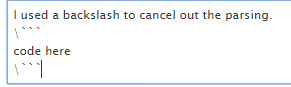
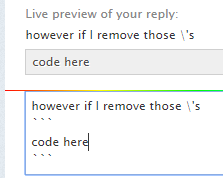
Protip \``` code here \```
Aureo:
?
Ultrilliam:
``` <html> <head> <title>CSS Example</title> <style type="text/css"> .pagetitle { font-size: 16 pt; font-family: Times; font-weight: bold; color: black; text-align: center; } .paragraph { color: green; font-weight: bold; font-size: 12 pt; } </style> </head> <body> <p span class=“pagetitle”>This makes the title larger, black, and centered.</p> <p span class="paragraph">This makes the paragraph text green and bold (strong).</p> </body> </html> ``` ^output
Aureo:
Ah. K
 Aureo:
Just like discord. :^)
Ultrilliam:
I'm not seeing the issue, you said the second p wasn't working?
Aureo:
The first.
 Aureo:
On all browsers.
Ultrilliam:
Ah I see the trouble now. You used unicode version of " somehow for the first one.
Ultrilliam:
(for the class)
Aureo:
Interesting. How'd I do that? Hmm..
Ultrilliam:
That typically only happens if your using microsoft word though
Ultrilliam:
(or other word processing software, rather then programming software)
Aureo:
Nope, just notepad++.
Ultrilliam:
Then that is strange, either way it happened
Aureo:
Thanks.
Ultrilliam:
your welcome :P
Ultrilliam:
Lemme know if you have any other issues :)
Aureo:
Will do!
Aureo:
Another thing: When I do this: ``` <html> <head> <title>Webmaster Roles CSS Assignment</title> <style type="text/css"> .title { color: darkorange; font-family: Arial; font-weight: bold; font-size: 16 pt; } .paragraph { font-family: Arial; color: orange; font-size: 12 pt; } .cit { font-family: Arial; color: darkorange; font-size: 10 pt; </style> </head> <body span class=" "> <h1 span class="title">Webmaster Roles</h1> <p span class="paragraph">The role of a webmaster that I would enjoy the most would be web design. I enjoy designing non-internet creative devices so I believe I would also enjoy designing web pages. However, I understand that as a webmaster I would not only have to design the site from an aesthetic side, but also make sure that the technology behind the site is not out-of-date and that its performance is excellent. Also, the pay for the average webmaster is a comfortable $73,134, so I would be able to support myself in this field.</p> <p span class="paragraph">The responsibilities for this role are an understanding of current technology, creativity, mastery of the programming behind webpages, knowledge of the website's target audience, and the ability to communicate efficiently with clients. If I was employed as a webmaster, I would have to continue to stay involved in the HTML and similar communities to make certain that I understood current technologies. I would also have to have an eye for detail along with the ability to maintain website performance. To ensure that my clients are satisfied with my work I would have to know what the target audience for the website is, and revolve the website design around that. However, before all of those talents can be put to use, I must be able to talk to my clients in a polite and effective manner to assure that I fully understand my expectations for the job. If I use all of these in a smart manner, I will be able to make money and enjoy myself as a webmaster.</p> <p span class="cit">http://www1.salary.com/Webmaster-Salaries.html</p> <p span class="cit">https://www.divisionx.com/wp/professional-webmaster/</p> <p span class="cit">https://blog.udemy.com/webmaster-job-description/</p> </body> </html> ``` The cit <p>s do not change color like the CSS tells it to do so, why would this be?
Ultrilliam:
Changes color for me fine. However I do have a few things to point out. why are you putting p tags for urls and not a tags? why is there a space between the number and pt for all the sizes (this is a syntax error)
Aureo:
1. This is for school, they want p tags. 2. Didn't realize that was a syntax error.
 Aureo:
Yes.
Ultrilliam:
Also, for the Syntax error for the space in between the number and pt, without that it would look like this
 Aureo:
Haha.
 Aureo:
Too bad marquee is no longer supported. Doing that in CSS is a lotta lines.
Ultrilliam:
Well, I mean, its not that it's not "supported" It's deprecated and frowned upon. Same as the center tag, and yet I still use it lol
Aureo:
Yeah. HTML doesn't like it. Browsers are okay with it.
Aureo:
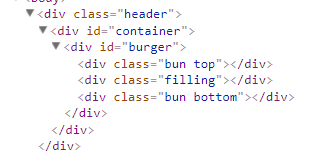
It should have a black header that has the webpage name + hamburger menu
Ultrilliam:
?
 Aureo:
Scroll up. Lotsa code
Ultrilliam:
you mean the "Webmaster Roles CSS Assignment"?
Ultrilliam:
I got the notification that you posted something, but didn't see anything... strange, perhaps it failed to post O.o
 Ultrilliam:
Yea, from the looks of it that failed to post even now. I can see it because it got through the even system though, strange.
Aureo:
hmm
Ultrilliam:
Strange, anyway I'll get on looking at that
Ultrilliam:
is that really all the CSS? if it was working before, then perhaps you accidentally deleted some stuff?
 Ultrilliam:
(tag me when you reply)
Aureo:
That is on another CSS file, they're separated. That thing is okay.
Aureo:
@Ultrilliam
Ultrilliam:
Ah I see what you mean now, you have this ``` .header { background-color: #222222; color: white; padding: 10px; } ``` yet for some reason its not being applied to ``` <div class="header"><h>Awesurio Home Page</h></div> ```
Ultrilliam:
I noticed for ``` <h>Awesurio Home Page</h> ``` it's a h tag (which doesn't exist) and not a h1, which is likely what you meant. However I'm stumped as you on why .header class is not being applied to that div actually... that is strange... Even in inspect element, if I try to add a CSS class to it, it won't even let me do anything, and disappears before I can edit anything... strange
Aureo:
The h1 thing was an accident. No clue why .header isn't working
Ultrilliam:
Nor do I, very strange indeed
Aureo:
@Ultrilliam I figured out why the header wasn't working. The CSS was mad because I forgot to close the P tag attributes. So it ignored everything after P (which included .header).
Ultrilliam:
oh! I didn't even notice that!
Ultrilliam:
How did such a simple syntax error slip past me? O>o
Aureo:
Ikr, me neither.
Ultrilliam:
Usually I'm good at catching syntax errors
Aureo:
I noted that img was white instead of the red color my program makes it, but I didn't know why. XD
Aureo:
I also figured out how to wrap words to the size of the screen.
Aureo:
Now that I have my framework I need to figure out what to put in my site.
Ultrilliam:
You could use percentages, vh or vw to change text size based on screen size
Ultrilliam:
Although that is much more difficult to pull off properly. VH = vertical height, VW = vertical width.
Aureo:
Not sure what vh or vw is, but I used percentages along with making divs wrap in the CSS.
Ultrilliam:
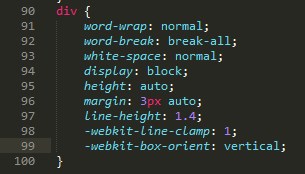
for example 32vw text

 Ultrilliam:
Be careful with -webkit properties, you also need the other property versions for compatibility reasons!
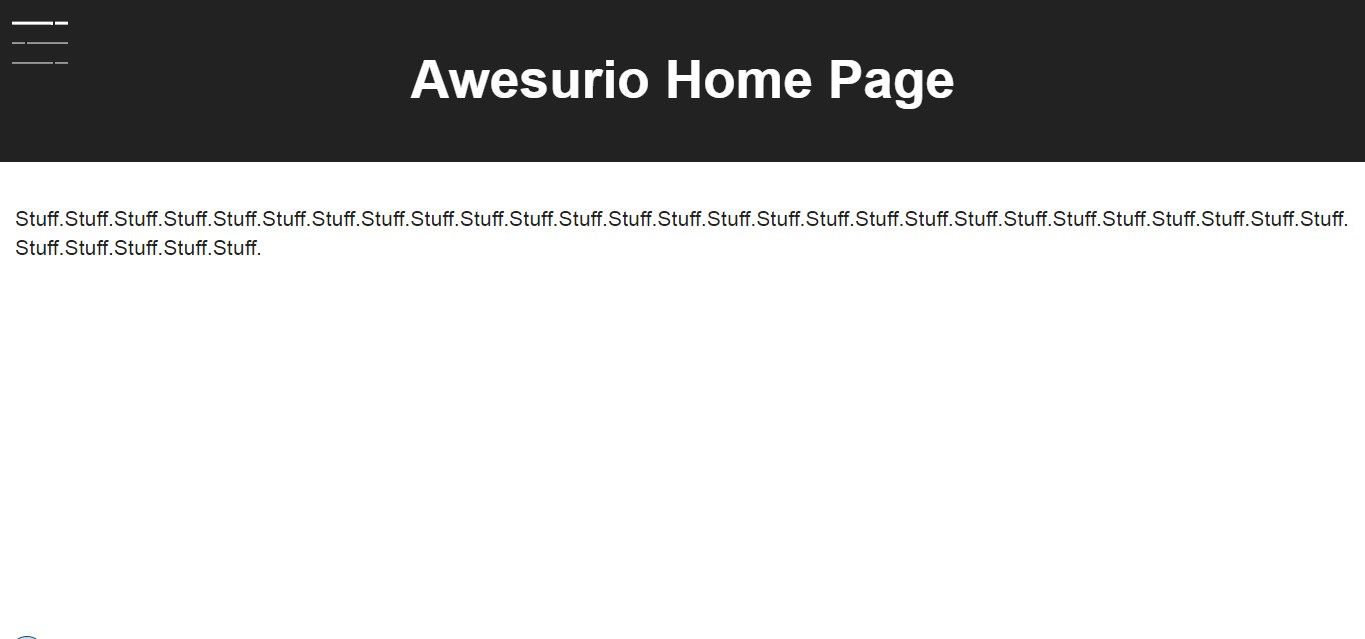 Ultrilliam:
:ok_hand:
Aureo:
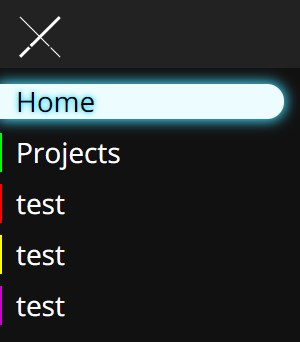
This is really exciting. I borrowed some code and changed it a little for the hamburger menu. It turns into lightsabers lol.
Ultrilliam:
x'D


 Ultrilliam:
I see you discovered box shadows and shadows x'D
Aureo:
Yes I did. Lol
 Ultrilliam:
one sec
Aureo:
k
Aureo:
My problem is that from the invitation page I can't get back to the main "My Profile" page.
Ultrilliam:
change ``` <a href="Portfolio_C_Steele/MyPortfolio.html">My Portfolio</a> ``` to ``` <a href="MyPortfolio.html">My Portfolio</a> ``` and you should be golden
Ultrilliam:
@Aureo ._____. you alive?
Ultrilliam:
@jaynater
 jaynater:
I forgot how to link .css and .html
 Ultrilliam:
@EvieSwan2405
 EvieSwan2405:
\(\color{#0cbb34}{\text{Originally Posted by}}\) @Ultrilliam @EvieSwan2405 \(\color{#0cbb34}{\text{End of Quote}}\) Hey where am I supposed to do this coding???? xD
Ultrilliam:
You can upload HTML files to questions evie ¯\_(ツ)_/¯
Join our real-time social learning platform and learn together with your friends!
 VERNEISH:
Two objects are moving along separate linear paths where each path is described by position, d, and time, t.
VERNEISH:
Two objects are moving along separate linear paths where each path is described by position, d, and time, t.

 Maci:
what are the best stock apps for people who want to start investing?
Maci:
what are the best stock apps for people who want to start investing?
 Twaylor:
genuienly how do i get better self control i keep watcing youtube and theres this
Twaylor:
genuienly how do i get better self control i keep watcing youtube and theres this
 IzzyCookie:
|dw:1792074056138:dw| Uhm, I don't know where to ask this, but I'm in college welding at my community college, and I need help learning vertical welding for
IzzyCookie:
|dw:1792074056138:dw| Uhm, I don't know where to ask this, but I'm in college welding at my community college, and I need help learning vertical welding for

 thehearken:
not sure if this is considered spam, im sorry if it is, but does anyone have tips
thehearken:
not sure if this is considered spam, im sorry if it is, but does anyone have tips