
 wo1f0mon:
hey i need help uninstalling this program "K9 WEB PROTECTION" idk what it is but i tried ending the task in task manager but then it wont let me use the internet then if i want to uninstall it i have to have a passcode. No one in my family signed me up for this "web protection" and its messing up with my settings and i can do work now. Can someone give me some help?
 Ultrilliam:
I can help you break the lock, as I tried to help psi with this, It's a family safety program, however schools also install this software to prevent their students from accessing stuff they do not want, and stuff that is not appropriate.
wo1f0mon:
its on my pc no one but me has access how the heck did it get on my pc? And how do you break the code?
wo1f0mon:
because its messing with my browser and i cant acess my school work
Ultrilliam:
Is it a school computer?
wo1f0mon:
nope
Ultrilliam:
Hm
wo1f0mon:
its messing with my book marks blocking websites i can use instagram but not twitter
Ultrilliam:
Well I can help you break the lock, however I'm not responsible for:
- Damages
- Loss of data
- Engagement of parents
- Engagement of school
- Any other misfortune that comes as a result of this
wo1f0mon:
im fine how ever you do this i just need to know how your gonna fix it
Ultrilliam:
First off, see if you can find what email address it is paired to
wo1f0mon:
i tried
Ultrilliam:
I'm writing a script that should work, one moment.
Ultrilliam:
Alright this is going to be complicated, do you know how to boot your system into safe mode? Were gong to have to do a lot of operations while you have no internet connection, and while it's not running.
wo1f0mon:
would you think if i downloaded the thing twice and made a passcode for the newer one would it end both?
Ultrilliam:
No, you need to get rid of all traces from it, registry and otherwise.
Ultrilliam:
This also means that we will have to edit the registry of your computer, if this goes wrong it can BRICK THE COMPUTER. Are you sure you want to continue?
wo1f0mon:
wait can you see if you can trace the thing from this http://127.0.0.1:2372/blockpage?id=136
Ultrilliam:
No, that is just a local IP address on a local port that k9bluecoat uses to show files to that specific computer.
wo1f0mon:
oh ok
Ultrilliam:
Alright, so do you want to continue?
wo1f0mon:
well if you brick my computer my rents might get mad but maybe i should ask my mom is she did this i doubt it but my mom is unpredictable shes sleeping now can we do this tomorrow or wednesday plz im sorry to ask you of all this ?
wo1f0mon:
ignore the qustion mark
Ultrilliam:
If you do, I will go in depth on what you need to do, and upload it as as word document, so you can access it while in safe mode. If you follow it to the letter, it should not brick the computer. It would be user error if it went wrong most likely
wo1f0mon:
oh ok its kinda late could we do this tomorrow?
Ultrilliam:
Sure
wo1f0mon:
thanks
Ultrilliam:
Alright, I got the file ready, so I'm just going to upload them here
Ultrilliam:
Hold that thought, I forgot a step
wo1f0mon:
thats ok
wo1f0mon:
i think i might want to start the file then it might be finished in the morning
Ultrilliam:
This is the (fixed) instructions and the CMD file that you will need to run after entering safe mode. I estimate the whole process will take between 20-30 minutes if done right

 wo1f0mon:
ok
Ultrilliam:
I tried to make the instructions as clear as possible.
wo1f0mon:
what is safe mode
Ultrilliam:
It is VERY IMPORTANT this is done in safe mode as well, if there is anything unclear in the instructions let me know
Ultrilliam:
Safe mode is a mode where nothing but what windows needs to run is running. So k9bluecoat won't be running, and that is why it's important you do this, or k9 will [b]BREAK[/b] your internet connection
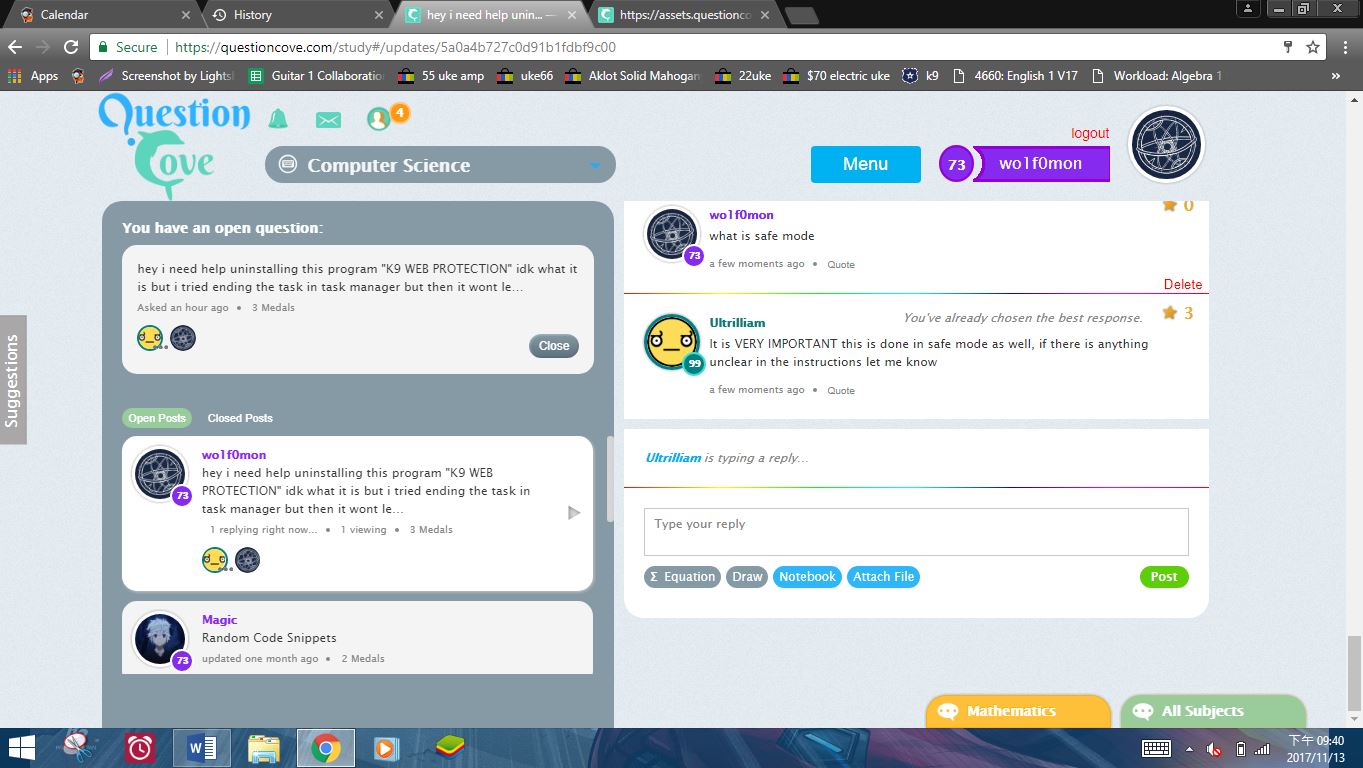 wo1f0mon:
idk how to run safe mode
Ultrilliam:
Are you on windows 10 or windows 8? And at the bottom of the instructions I told you how to on windows 8 & 10
Ultrilliam:
Oh hey bluestacks lol
wo1f0mon:
you know bluestacks?
Ultrilliam:
Ofcs, I'm a techie
wo1f0mon:
lol
Ultrilliam:
I have a solution to many problems as you can see lol
Ultrilliam:
Anyway, read the instructions of how to enter safe mode at the bottom of the word doc
Ultrilliam:
SRSLY windows 10 or windows 8 though
Ultrilliam:
Judging by the big logo, 8?
wo1f0mon:
i dont really know
wo1f0mon:
im not a great computer guy
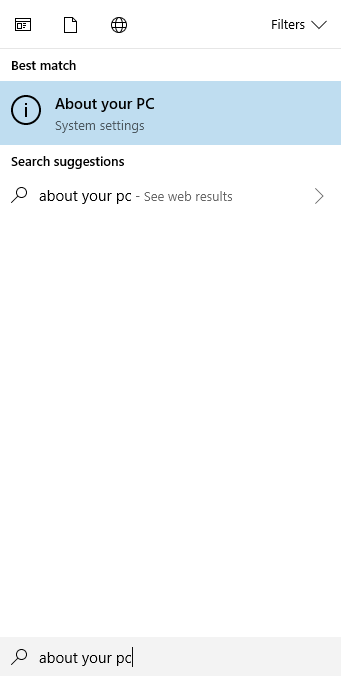 Ultrilliam:
It's probably windows 8 now that I think about ti
Ultrilliam:
Cause it doesn't have that lol
Ultrilliam:
but I think it can be hidden on 10
wo1f0mon:
im windows 8
Ultrilliam:
Ah :P
Ultrilliam:
Alright that safe mode method should still work
wo1f0mon:
i asked ffor help it sent me this https://support.microsoft.com/en-us/products/windows?os=windows-8.1
wo1f0mon:
were do i run the script?
wo1f0mon:
notepad?
Ultrilliam:
Its a command file, just run it, the instructions go further into how to run it
 Elsa213:
\(\color{#0cbb34}{\text{Originally Posted by}}\) @Ultrilliam Well I can help you break the lock, however I'm not responsible for: Damages Loss of data Engagement of parents Engagement of school Any other misfortune that comes as a result of this \(\color{#0cbb34}{\text{End of Quote}}\) And death
wo1f0mon:
your instruction are kinda confusing after this i might make a dummies version of this for people
wo1f0mon:
ok so i ran refedit
Ultrilliam:
Oh of course, how could I forget death? Thank you elsa :P
wo1f0mon:
reg*
Ultrilliam:
WAIT WOLF STOP YOU NEED TO BE IN SAFE MODE
Ultrilliam:
If your in safe mode you can't be talking to me on the same computer, because it won't have internet access ._.
wo1f0mon:
how tf do you go into save mode
Ultrilliam:
Please tell me you didn't run the script already ._.
wo1f0mon:
no i havent im still stuck on number 1
wo1f0mon:
still
Ultrilliam:
Ok good, cause if you did you would be screwed LOL
wo1f0mon:
great
Ultrilliam:
Scroll to the very bottom of the word doc
wo1f0mon:
very positive
Ultrilliam:
Do you see the instructions wolf?
wo1f0mon:
can you just take over my screen
Ultrilliam:
Yes, but once you got into safe mode, I would not be able to do anything
wo1f0mon:
i just need you to get me in safe mode
Ultrilliam:
You NEED TO READ THIS, YOU NEED TO KNOW THIS, BECAUSE ONCE IT RESTARTS THERE ARE STEPS YOU NEED TO GO THROUGH
wo1f0mon:
ok ill read your guide
Ultrilliam:
Here, read this, it might help. the shift+restart method is your best bet.
Ultrilliam:
https://www.digitalcitizen.life/5-ways-boot-safe-mode-windows-8-windows-81
Ultrilliam:
though my guide pretty much says the same thing
wo1f0mon:
weres the restart button
wo1f0mon:
shift the key + and restart button?
wo1f0mon:
...ultri
Ultrilliam:
Yes, press shift on your keyboard, and hit restart at the same time
wo1f0mon:
you men the power button
wo1f0mon:
wait so after i go into safe mode will i be able to talk to you?
Ultrilliam:
No, hit the power button then hit restart. While holding shift. and NO YOU WILL NOT BE ABLE TO TALK TO ME
Ultrilliam:
This is why you need to understand this word doc and have it somewhere you can access while your offline
wo1f0mon:
oh Anime i need your guidence
wo1f0mon:
could you call me?
Ultrilliam:
No, I don't think I could do that right now
wo1f0mon:
oh ok so if i Pizza up what do i do?
Ultrilliam:
Do you have a smartphone with wifi?
wo1f0mon:
no
wo1f0mon:
i have a ukulele
wo1f0mon:
and a kindle
wo1f0mon:
but the kindle cant reach your site i tried
Ultrilliam:
Alright, well, I guess hope you do it right, you can text my google voice number if something goes horribly wrong
wo1f0mon:
what will i be able to do when i go into safe mode? and how do i turn that off?
Ultrilliam:
After you get into safe mode, you go down the checklist
Ultrilliam:
To turn off safe mode, you simply restart the PC
Ultrilliam:
(which is the last step in the guide)
wo1f0mon:
ok witch do i chose? https://www.digitalcitizen.life/sites/default/files/img/win8_safe_mode/w8sm9.png
wo1f0mon:
when im at that point?
Ultrilliam:
FOR THE LOVE OF HAVE YOU EVEN LOOKED AT THE WORD DOCUMENT?
wo1f0mon:
yes
wo1f0mon:
sorta
wo1f0mon:
sorry i will
wo1f0mon:
wait when i run this https://assets.questioncove.com/attachments/1510627082-5a0a4b727c0d91b1fdbf9c00-k9bluecoatstep1.cmd where do i run it?
Ultrilliam:
You would hit the number key 4 on windows 8
wo1f0mon:
oh regedit?
Ultrilliam:
No
Ultrilliam:
I'm talking about when you get to that screen
Ultrilliam:
you want "safe mode" regular safe mode, so you would hit the number key 4
wo1f0mon:
ok but after im in safe mode were do i run that thing?
Ultrilliam:
Place that script on your desktop, and thats where you can run it, but it doesn't actually matter where you run it so long as you run it as a admin
Ultrilliam:
Go through the checklist in the file step by step
wo1f0mon:
ok
wo1f0mon:
why do you have a bunch of blank pages?
Ultrilliam:
After all the blank pages is the guide to restarting in safe mode
Ultrilliam:
(in windows 10)
Ultrilliam:
BTW do you want to upgrade to windows 10 for free? you still can :)
wo1f0mon:
ok... so in step how do i run it as admin and on regedit what do i run?
Ultrilliam:
you don't run anything on regedit
Ultrilliam:
and i show a screenshot of what you have to click
wo1f0mon:
then why do i have to change Nyan Cat
Ultrilliam:
do you not see the screenshots?
wo1f0mon:
yes
wo1f0mon:
so just change the name of someting can i do that befor i do safe mode?
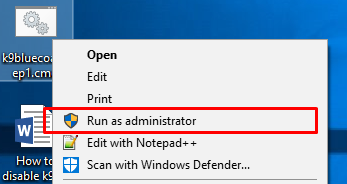 Ultrilliam:
You don't need to change the name of anything
Ultrilliam:
It's as simple as right click and run as admin
wo1f0mon:
at times like this i wish i could just ship you my computer
Ultrilliam:
LOL
Ultrilliam:
Just start the process, if your confused with anything, just text me using your phone and the number I sent you ok?
wo1f0mon:
can i call you on that number?
Ultrilliam:
No.
wo1f0mon:
i dont own a smart phone
Ultrilliam:
I can't talk right now
Ultrilliam:
Any phone can text though ._.
wo1f0mon:
dude i only have a home phone
Ultrilliam:
Oh
Ultrilliam:
That... complicates things
Ultrilliam:
Good luck!
Ultrilliam:
LOL
wo1f0mon:
yeh so if every thing goes south can i just restart my pc?
Ultrilliam:
Doing so before finishing the process would break the computers internet
wo1f0mon:
so im screwed
Ultrilliam:
If you don't follow the proper steps
Ultrilliam:
I know it's scary, but you got this :P
wo1f0mon:
what if i take the battery of the computer would i still be screwed?
Ultrilliam:
Yes, the problem is once you started the computer, k9 would see that it has been tampered with and disable internet.
Ultrilliam:
Thats why once its started it must be finished
wo1f0mon:
if i mess up im going to just spill milk on this computer
Ultrilliam:
LOL
Ultrilliam:
Well good luck
Ultrilliam:
Lemme know how it went
wo1f0mon:
first ill do this tomorrow i wan to see if my mom planted the k9 is so i wont need to do this if not ill will do it
wo1f0mon:
i wanna play it save
wo1f0mon:
thanks
Ultrilliam:
Your very welcome!
 Aureo:
Ahhh K9.. I remember messing up my PC doing something similar to this. But I fixed it. :^)
Ultrilliam:
I wonder what ever happened to wolf :|
Aureo:
Prob something bad.
Elsa213:
He probably died or his parents secretly installed it, Ultrilliam. cx
wo1f0mon:
hello so didn't do it cuz i am going to owe my parents even more money and i am most likely going to kill my computer
 Mollymcbutter619:
this is confusing me
Ultrilliam:
Feel free to ask any questions you have... I'll answer them after I was the dishes
Aureo:
>_> I can help as well.
Ultrilliam:
^Did you understand my instructions
Aureo:
Indeed Ultri.
Mollymcbutter619:
no i am so confused
Mollymcbutter619:
like i know nothing about tech stuff
Aureo:
Alright. If you were to search for a word doc or a program, is the little icon circular?
Mollymcbutter619:
i have windows 10
Aureo:
Alrighty. At least you know that. XD
Aureo:
Okay so what you want to do is DOWNLOAD the word doc and the .cmd file
Mollymcbutter619:
i have the word doc but what is the .cmd
Aureo:
The .cmd is the script you will run to get k9 off the PC.
Aureo:
You still there?
Mollymcbutter619:
ok how do i run it?
Aureo:
Have you read the word doc at all? DO NOT RUN IT until you are in safe mode
Ultrilliam:
I just realized - I should write a registry file that will do the registry operation for them
Aureo:
Probably Ultri.
Aureo:
Not trying to sound rude, just don't want you to break anything Molly
Ultrilliam:
give me a few to do that
Aureo:
Alright.
Ultrilliam:
Ok, this script is updated and should do everything. Simply boot to safe mode and run it, it will take care of the rest.
 Ultrilliam:
Actually, one second... let me edit that once again
Ultrilliam:
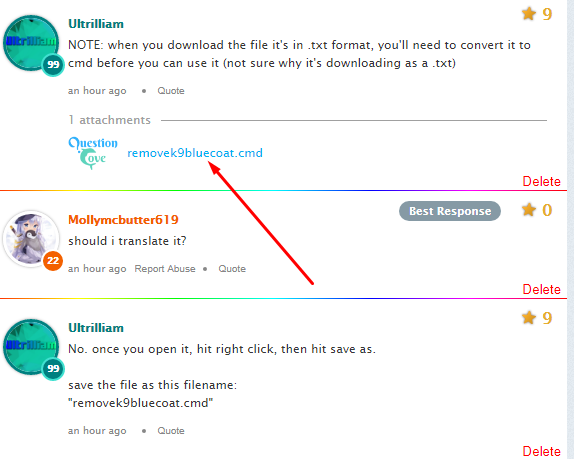
NOTE: when you download the file it's in .txt format, you'll need to convert it to cmd before you can use it (not sure why it's downloading as a .txt)
 Mollymcbutter619:
should i translate it?
Ultrilliam:
No. once you open it, hit right click, then hit save as. save the file as this filename: "removek9bluecoat.cmd"
Mollymcbutter619:
ok then once i get into safe mode what do i do next?
Ultrilliam:
simply run the file, that's it.
Ultrilliam:
then you can restart windows and it should be gone :)
Mollymcbutter619:
but how do i run it?
Mollymcbutter619:
?
Ultrilliam:
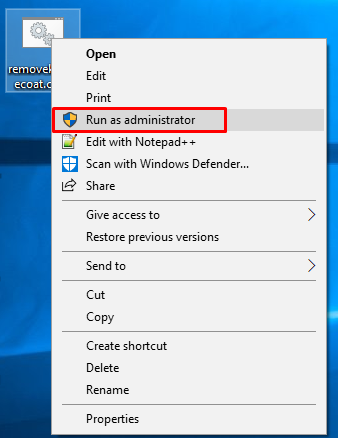
Right click it, hit "RUN AS ADMINISTRATOR" you will need to say yes to the prompt asking for admin permission
Mollymcbutter619:
ok how do iget into safe mode?
Mollymcbutter619:
?
Ultrilliam:
Follow this guide: https://www.digitalcitizen.life/4-ways-boot-safe-mode-windows-10
Ultrilliam:
Use method number 2
Ultrilliam:
(or method number 3)
Ultrilliam:
Welp she disappeared, guess we'll see how it goes soon
Mollymcbutter619:
it didnt work
Mollymcbutter619:
i tried to restart in safe mode and it didnt work!
Mollymcbutter619:
i am going to try again brb
Mollymcbutter619:
ok so i got it in safe mode but i cant see the doc becz i dont have internet HELP!
Ultrilliam:
that's why you were supposed to download it so you would have it offline... oh well Anywho, if you have the program downloaded, run the program
Ultrilliam:
Right click, hit "Run as Administrator"
 Mollymcbutter619:
how do i get the program ?
Ultrilliam:
You should have already downloaded it...
 Mollymcbutter619:
yes but it is a doc
Ultrilliam:
You were supposed to download that file too... >_>
Mollymcbutter619:
it opens in word pad
Ultrilliam:
Ah, ok
Ultrilliam:
You didn't save it as a CMD
Ultrilliam:
That's ok, we can salvage this
Ultrilliam:
Right click, and hit properties
Mollymcbutter619:
ok i saved it again but like u said
Ultrilliam:
Wait, are you on your computer right now?
Mollymcbutter619:
yes i left safe mode to come back and figure out how to do it
Ultrilliam:
Ah, ok, in that case...
Mollymcbutter619:
can u post the doc again plz
Ultrilliam:
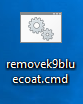
Open this file in a new tab, right click it, hit "SAVE AS" and type in "removek9bluecoat.cmd" as the file name, this is important. Make sure to switch the filetype from text file to all files


 Mollymcbutter619:
ok next?
Ultrilliam:
Does it look like that on your desktop?
Mollymcbutter619:
mhm
Ultrilliam:
Alright, your going to want to boot into safe mode, once your in safe mode run the program by right clicking it, and hit run as administrator. It is VITAL that you do not do this while not in safe mode, otherwise you will break your computer.
Mollymcbutter619:
ok after that ?
Ultrilliam:
Just restart the computer, k9bluecoat should be gone :)
Mollymcbutter619:
thanks so much. btw it has a password do i need that? and if my aunt tries to check on me and k9 anyway to get it back just for her?
Ultrilliam:
You don't need the password no
Mollymcbutter619:
anyway to get it back?
Ultrilliam:
I mean, if for some reason you want to get it back, you'll need the password yes
Mollymcbutter619:
so basically once i do this it is gone forever?
Ultrilliam:
Correct
Mollymcbutter619:
this could be very good and very bad
Ultrilliam:
It's your decision if you want to go through with it =P
Mollymcbutter619:
thanks
Ultrilliam:
You're welcome! Do let me know if it works and if you go through with it please =P
Mollymcbutter619:
:)
Mollymcbutter619:
will do
Join our real-time social learning platform and learn together with your friends!
 VERNEISH:
Two objects are moving along separate linear paths where each path is described by position, d, and time, t.
VERNEISH:
Two objects are moving along separate linear paths where each path is described by position, d, and time, t.

 Maci:
what are the best stock apps for people who want to start investing?
Maci:
what are the best stock apps for people who want to start investing?
 Twaylor:
genuienly how do i get better self control i keep watcing youtube and theres this
Twaylor:
genuienly how do i get better self control i keep watcing youtube and theres this
 IzzyCookie:
|dw:1792074056138:dw| Uhm, I don't know where to ask this, but I'm in college welding at my community college, and I need help learning vertical welding for
IzzyCookie:
|dw:1792074056138:dw| Uhm, I don't know where to ask this, but I'm in college welding at my community college, and I need help learning vertical welding for

 thehearken:
not sure if this is considered spam, im sorry if it is, but does anyone have tips
thehearken:
not sure if this is considered spam, im sorry if it is, but does anyone have tips