
 gabbykae:
side lengths of 2 inches and 1 inch and which has angle measures of 120° and 60°
 Shadow:
@gabbykae is there an image associated with this problem?
gabbykae:
no its asking for a parallegram idk why it didnt post the whole thing
Shadow:
Can you upload the image here using the "Attach File" function?
gabbykae:
theres no image heres the full question : Draw a parallelogram that has side lengths of 2 inches and 1 inch and which has angle measures of 120° and 60°. Label all measurements and mark the parallel sides on your drawing. Include your drawing in your answer
Shadow:
Oh there we go
Shadow:
A parallelogram is essentially a figure which has a set of parallel sides
Shadow:
|dw:1524605215532:dw| For example
Shadow:
A square and a rectangle are also examples of a parallelogram. Since the side lengths are two and one, we should be looking to make a rectangular shape. But since all angles of a rectangle are 90 (and this problem was 120 and 60), we should go with the shape that I drew above.
Shadow:
Do you know where the angles and side measures would go?
gabbykae:
well i know that the angles would go in the corners and the side measures would go on the outside by the side that it represents
Shadow:
Try look at the drawing I posted above. If you click on the pencil in the top right corner of the drawing, you can add to what I drew. Try show me where you would put the measurements.
Shadow:
Do you see the pencil?
gabbykae:
yes when i try to write where the angles would go it moves it down or in a different direction from where i first typed it
Shadow:
Oh, yeah that's a glitch we're looking to get fixed. That's why I just draw out numbers.
gabbykae:
oh ok let me try that then
 Ultrilliam:
Where you click it is where it actually types, it just displays it above where your typing until your done typing, this is indeed a bug that I'm working on fixing.
gabbykae:
|dw:1524605845044:dw|
Shadow:
The side lengths are good. The bottom 120 angle is good, but the top 60 angle isn't. In this parallelogram, there are two obtuse angles and two acute angles. An obtuse angle has a value greater than 90. An acute angle has a value less than 90. 120 > 90 60 < 90 |dw:1524606000423:dw| |dw:1524606014524:dw|
Shadow:
For reference, this is a 90 degree angle |dw:1524606044020:dw| In math they are usually characterized as having a box written in it's corner, denoting that it is in fact a 90 degree angle.
gabbykae:
that makes sense so it would be the angle that had 60 would be 120 as well?
Shadow:
Correct
gabbykae:
so in a final image it would be this |dw:1524606318960:dw|
Shadow:
Perfect
gabbykae:
thank you so much on the quick answer and for helping me understand what to do here
Shadow:
No problem. Your instructions also say to "mark parallel sides on your drawing" Do you know how to do that?
gabbykae:
hmm im not sure i know a parallel side is one that is the same length as another but im not sure how to mark it
Shadow:
Parallel sides are sides that have the same slope So the following sides are parallel |dw:1524606494754:dw| The way you note sides as being parallel, is by drawing an arrow on them. For example: |dw:1524606518359:dw|
gabbykae:
ohhh ok that helps
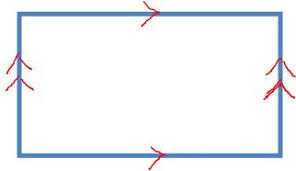 Shadow:
^another example
Shadow:
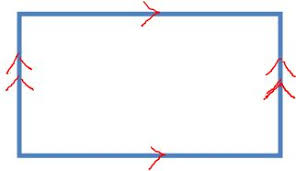
When there are multiple parallel sides in a figure, you just put more arrows for the next parallel sides. Pretty simple.
gabbykae:
quick question...i have to upload the sketch and it doesnt take the kind of file these images are is there a way i can make it a jpg or a different kind of file?
Shadow:
@Ultrilliam
Ultrilliam:
The attach file button should accept any file?
Shadow:
I think he means to upload the file for the assignment, and @gabbykae is trying to download these sketches for the assignment.
 Flamo:
Its A She
gabbykae:
|dw:1524606816434:dw| i have the finished picture but it says it doesnt accept the kind of file it is..
Shadow:
Oh, be sure to mark the sides with a length of 1 as parallel too
gabbykae:
|dw:1524606926608:dw|
Shadow:
Remember, lines are parallel when they have the same slope.
Ultrilliam:
Are you using the attach file button gabby?
gabbykae:
it has a choose a file button then a select one and have to click upload
Shadow:
Be sure to add an additional arrow. Remember, when there are multiple sets of parallel lines, you need to differentiate between them. Like this example:
 gabbykae:
oh ok heres what the page says once i try to upload the image Sorry, we don't support '.png' files. Try again with one of the types listed below: Adobe Reader — .pdf Apple iWork — .pages, .numbers, .key Image file — .jpg, .jpeg Microsoft Access — .mdb, .accdb Microsoft Excel — .xls, .xlsx Microsoft PowerPoint — .ppt, .pptx Microsoft Publisher — .pub Microsoft Word — .doc, .docx, .rtf Open Office — .odf, .odt, .ods, .odp Text file — .csv, .txt
Flamo:
Maybe Send a Screen Shot?
gabbykae:
im guess ing what ill have to do is open openoffice and put the image in there and then use that page?
gabbykae:
i used firefox screenshot to take the image and for some reason it doesnt work either
Flamo:
o
Shadow:
LightShot is a screenshot program that a lot of users utilize on this site.
Shadow:
You could try that
gabbykae:
finally got it thank you guys and keep working on that writing glitch
Join our real-time social learning platform and learn together with your friends!
 KBaby:
Verse 1 We left our names in the dust of the driveway Watched the old town shrink
KBaby:
Lyrics Generator Use AI to write the lyrics for a song. Suggested Genres: Pop Hip
KBaby:
Verse 1 We left our names in the dust of the driveway Watched the old town shrink
KBaby:
Lyrics Generator Use AI to write the lyrics for a song. Suggested Genres: Pop Hip

 aitexturegenerator:
How are you all handling AI-generated textures for 3D models and game assets without losing the hand-made feel? I've been doing a small stylized environment
aitexturegenerator:
How are you all handling AI-generated textures for 3D models and game assets without losing the hand-made feel? I've been doing a small stylized environment

 Demon25:
Woke up feeling like that girl and that dude well he still aint crap pluse the du
Demon25:
Woke up feeling like that girl and that dude well he still aint crap pluse the du
 playtsec:
how do I get rid of stress from teachers... I just feel like running out the classroom and leaving on my own.
playtsec:
how do I get rid of stress from teachers... I just feel like running out the classroom and leaving on my own.
 JohnnyLFowler0812:
What type of gamer would play something and then get off for a while. Why not sta
JohnnyLFowler0812:
Which is better? Metallica Rap Country R&B hiphop Medal Gospel Chill Which 3 opti
JohnnyLFowler0812:
What type of gamer would play something and then get off for a while. Why not sta
JohnnyLFowler0812:
Which is better? Metallica Rap Country R&B hiphop Medal Gospel Chill Which 3 opti