
 Jason64:
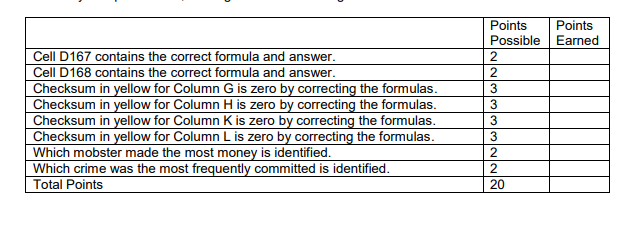
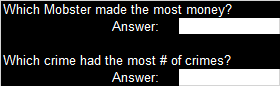
You have just been hired by the FBI to analyze a list of different mobster crimes to determine where the FBI should prioritize their work. The previous analyst made some mistakes in creating formulas and you need to identify and correct the mistakes. A spreadsheet is supplied for this assignment in Calc and Excel. Save the spreadsheet as Mobsters_1_Your_Name. (Note: The mobster names may be real historical names, but the rest of the data in this spreadsheet is fictional!) Your job is to analyze the sheet, add some formulas, find the errors, and fix them. There is a lot of information on this sheet, so let’s break it down, so it doesn’t seem so overwhelming. • Columns A, B, C, and D all refer to the mobsters’ activity, and is considered one set of data. Remember the need to select all the data in a set when sorting. This data contains the month the mobster committed a crime, the name of the mobster, the crime they committed, and the amount of money involved. • Columns F, G, and H use the information from Columns A, B, C, and D to calculate the total number of crimes the mobster committed and the total amount of money involved per mobster. • Columns J, K, and L give a list of the different types of crimes committed, the number of times they were committed, and the total amount of money involved per crime. Let’s get started analyzing this information. 1. Do not modify any data in columns A, B, C and D. You will modify formulas in columns G, H, K, and L. 2. In cell D167, use the SUM function to add the total amount of the payouts. 3. In cell D168, use the COUNT function to calculate the number of crimes committed. 4. Analyze and fix any formulas that are wrong. The cells highlighted yellow are your checker cells; if they go to zero, then you have corrected the errors. The following cells have formulas you should check: G3:G26, H3:H26, K3:K7, and L3:L7. (Hint: Remember the difference between relative and absolute reference.) 5. After you have updated the spreadsheet, answer the questions that are in the reverse (white on black) text in the spreadsheet. Simply type in the answers in the white cells. Submit your spreadsheet, making sure it meets the guidelines below.
 Jason64:
@Ultrilliam
 Ultrilliam:
OH GOOD LORD, that's a nice wall of text, one sec while I read that
Jason64:
lol
Jason64:
i am so confused with this
Ultrilliam:
I'm pretty sure I've done this exact assignment before... hang on
Ultrilliam:
*searches mobsters on hard drive*
Ultrilliam:
*gets archive drive*
Jason64:
did you go to k12?
Ultrilliam:
I'm still in k12
Jason64:
what grade are you in?
Ultrilliam:
12th, I'm pretty sure I took this as a 7th grade elective
Jason64:
lol im in 9th
Jason64:
so did you find it?
Ultrilliam:
My computer is indexing my archive drive before I can search in it... apparently might take a while x-x
Jason64:
its okay as long as i do it
Ultrilliam:
Alright let's first just break this into steps: In cell D167, use the SUM function to add the total amount of the payouts. Le'ts navigate to D167
Ultrilliam:
Now let's type =SUM in the D167, and click and drag through the entire "payout" column, this will add it all together.
Ultrilliam:
Next lets do 3: 3. In cell D168, use the COUNT function to calculate the number of crimes committed. in 168 lets type `=COUNT` and then click and drag the entire names column (b)
Ultrilliam:
The questions in black you should be able to answer yourself, and batta bang batta boom, your done.
Ultrilliam:
If your confused at all with any of those steps let me know ^_^
Jason64:
still confused lol
Ultrilliam:
What are you confused with?
Ultrilliam:
When you're back, if you could tell me what part your confused with I might be able to help, x-x
Jason64:
everything
Ultrilliam:
Ok, open the document.
Jason64:
yeah
Ultrilliam:
Are you familiar with how the cell system works? (so how to get to say, cell D, 167)
Jason64:
no
Ultrilliam:
At the top of the program you should see a bunch of letters, A B C D E F G, right?
Jason64:
uhhh
Jason64:
yeah
Ultrilliam:
Now, on the left you should see numbers going down, 1 2 3 4 5 6 etc, right?
Jason64:
yeah
Ultrilliam:
The letters at the top are columns, the numbers on the left is the row. So if I say D167, it means to go to column D, and scroll down to the number 167, where D and 167 intersect is the cell I want you to go to, make sense?
Jason64:
okay
Ultrilliam:
Have you selected cell D167?
Jason64:
yes
Jason64:
that box is blank
Ultrilliam:
Great, now type `=SUM()` and put the typing cursor in between ( and ), then select all the cells with money in it that is directly above that cell by clicking and dragging, ok?
Jason64:
its not letting me
Ultrilliam:
Could you be more specific?
Jason64:
i cant type
Ultrilliam:
Double click the box, and try again
Jason64:
it still doesnt let me
Ultrilliam:
Do you have a bar at the top of the document that has a button that says "Enable Editing"?
Jason64:
i clicked it before it doesnt work
Ultrilliam:
Did it go away after you clicked "Enable Editing"?
Jason64:
yeah
Jason64:
but it still doesnt let me type
Ultrilliam:
Hm
Jason64:
i really need to finish this by today and i cant use google docs
Jason64:
so how do i fix it?
Ultrilliam:
Hm, I'm not sure. Give me your answers for the two questions on the doc and I'll put them in and upload it here, I guess
Jason64:
what questions?

 Jason64:
1. Add row shading to the Mobster Activity by Date table similar to how we described it for the ledger. Have every other row have a subtle coloring format, using a color of your choice. 2. Add conditional formatting to the Analysis by Mobster table to highlight all payouts greater or equal to $3,000,000 in one color and payouts greater or equal to $4,000,000 in a different color. (Hint: You will only be adding formatting to Column H.) Make sure your document meets the assignment goals below and submit it to your teacher. Points Possible Points Earned Ledger formatting correct for the left table 10 Formatting for $3M and $4M correct for the middle table 10 Total Points 20
Jason64:
theres parts to this
Ultrilliam:
Any more?
Jason64:
yeah i think
Ultrilliam:
Instruction for this? Or other things
Jason64:
let me see because there r three
Jason64:
so that one
Jason64:
Save this assignment document as Mobsters_2_Your_Name. Open the spreadsheet Mobster_1_Your_Name. Highlight cells A2:D165 and apply the Auto Filter command. Answer the following questions, using the filter commands. Remember to Select All after you answer each question, so all of the data is included in the next filter. 1. How many crimes were committed during the month of October? 2. How many crimes were committed during the month of June that were extortion? 3. How many crimes were committed that had a take of less than $60,000? 4. How many extortion crimes were committed by mobsters whose last name starts with B? Submit the answers to your teacher. Points Possible Points Earned Question correct (5 points for each question) 20 Total Points 20
Jason64:
then that one thats it three of them
Jason64:
? you there

Join our real-time social learning platform and learn together with your friends!
 KBaby:
Verse 1 We left our names in the dust of the driveway Watched the old town shrink
KBaby:
Lyrics Generator Use AI to write the lyrics for a song. Suggested Genres: Pop Hip
KBaby:
Verse 1 We left our names in the dust of the driveway Watched the old town shrink
KBaby:
Lyrics Generator Use AI to write the lyrics for a song. Suggested Genres: Pop Hip
 aitexturegenerator:
How are you all handling AI-generated textures for 3D models and game assets without losing the hand-made feel? I've been doing a small stylized environment
aitexturegenerator:
How are you all handling AI-generated textures for 3D models and game assets without losing the hand-made feel? I've been doing a small stylized environment

 Demon25:
Woke up feeling like that girl and that dude well he still aint crap pluse the du
Demon25:
Woke up feeling like that girl and that dude well he still aint crap pluse the du
 playtsec:
how do I get rid of stress from teachers... I just feel like running out the classroom and leaving on my own.
playtsec:
how do I get rid of stress from teachers... I just feel like running out the classroom and leaving on my own.
 JohnnyLFowler0812:
What type of gamer would play something and then get off for a while. Why not sta
JohnnyLFowler0812:
Which is better? Metallica Rap Country R&B hiphop Medal Gospel Chill Which 3 opti
JohnnyLFowler0812:
What type of gamer would play something and then get off for a while. Why not sta
JohnnyLFowler0812:
Which is better? Metallica Rap Country R&B hiphop Medal Gospel Chill Which 3 opti