
 misty34:
I'm doing Trigonometry in my Geometry class and I'm unsure how to get regular Sin, Cos, And Tan to work on my calculator, I can do the intervals on it. My calculator is (Texas Instruments TI-30XA) Can someone help me find out how to get it to work on my calculator? I know how to do most of the equations. the Tan one's kind of confuse me.
 Vocaloid:
can you be a bit more precise about the problem? is the function itself not working at all, is it giving you the wrong result, etc? have you tried resetting the memory?
misty34:
My calculator when I try to type it into my calculator gives me a different answer than what the teacher gets when we are doing notes. I haven't tried resetting the memory yet, I'll try that
Vocaloid:
you are most likely not in the right mode most scientific calculators are in radians by default but if you are working with degrees you need to switch now, I don't know this model off the top of my head but you should be able to find an online manual
misty34:
Alright, currently my calculator is in Deg mode
Vocaloid:
can you try inputting cos(90) now? you should get 0
Vocaloid:
if not there's something wrong w/ your calculator
misty34:
I imputed that and got 0
Vocaloid:
perfect, you should be good to go
misty34:
Alright. Thank you
misty34:
In my notes \[\frac{ 7 }{\tan 46 }\] Is the equation and If I type that into my calculator I get 7.2 and in my notes it says X=6.8. I typed 46 then tan times 7
Vocaloid:
in order to evaluate this you need to type 7, then divide, then tan, then parentheses around 46 7/tan(46)
Vocaloid:
it might also automatically supply parentheses for you
Vocaloid:
the angle you want to evaluate always goes right after the cos/tan/etc. function
misty34:
It gives me 0.152 when I type that
Vocaloid:
oof I don't really know how to explain this press 7, then press the divide button, then tan, then parentheses around 46, then enter
Vocaloid:
try this? 7/(tan(46))?
misty34:
It still gives me 0.152. At one point I somehow got 336.
Vocaloid:
gonna try something a bit different press 7 then the enter key then the divide key then tan, then open parentheses, then 46, then closed parentheses)
Vocaloid:
if that doesn't work then idk what's wrong
misty34:
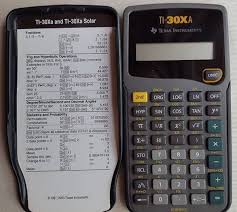
I got the same thing. My calculator is one of the older ones. Maybe I could find some tutorials?
 Vocaloid:
alright I actually think I might know what's up, yours might be one of the ones where you put the angle first and then tan
Vocaloid:
46, then tan, then the invert function button (it might look like 1/x or f^-1) then multiply by 7?
misty34:
That worked. Thank you for helping me figure this out
Join our real-time social learning platform and learn together with your friends!
 KBaby:
Verse 1 We left our names in the dust of the driveway Watched the old town shrink
KBaby:
Lyrics Generator Use AI to write the lyrics for a song. Suggested Genres: Pop Hip
KBaby:
Verse 1 We left our names in the dust of the driveway Watched the old town shrink
KBaby:
Lyrics Generator Use AI to write the lyrics for a song. Suggested Genres: Pop Hip

 aitexturegenerator:
How are you all handling AI-generated textures for 3D models and game assets without losing the hand-made feel? I've been doing a small stylized environment
aitexturegenerator:
How are you all handling AI-generated textures for 3D models and game assets without losing the hand-made feel? I've been doing a small stylized environment

 Demon25:
Woke up feeling like that girl and that dude well he still aint crap pluse the du
Demon25:
Woke up feeling like that girl and that dude well he still aint crap pluse the du
 playtsec:
how do I get rid of stress from teachers... I just feel like running out the classroom and leaving on my own.
playtsec:
how do I get rid of stress from teachers... I just feel like running out the classroom and leaving on my own.
 JohnnyLFowler0812:
What type of gamer would play something and then get off for a while. Why not sta
JohnnyLFowler0812:
Which is better? Metallica Rap Country R&B hiphop Medal Gospel Chill Which 3 opti
JohnnyLFowler0812:
What type of gamer would play something and then get off for a while. Why not sta
JohnnyLFowler0812:
Which is better? Metallica Rap Country R&B hiphop Medal Gospel Chill Which 3 opti