
 justjm:
How to obtain coursehero files? As requested by @Shadow and probably several other desperate high school and college students - Disclaimer: This can only help you you in finding a bit of extra information or prevent you from having to pay a membership for that one extra line that was blurred
justjm:
1. Open the links on an incognito page. The incognito will reset the views everytime you need to look at a file. You will no longer need to see the '2 views remaining for the month' because the incognito opens a new proxy. The site records views based on the proxy server. Everytime your incognito page gets filled, you will need to close the incognito tabs OR install a google chrome extension that lets you clear your incognito search history.
justjm:
2. If the portion of the file requested is blurred, right click on the file and hit save as.... Then, go online and search up 'sharp image converter'. This will sharpen the blurred portion.
justjm:
3. Although it is now mostly patched, you can still use a bit of inspect element to try and extract more answers. Right click and go to inspect element. If the file is not an image and the text can be, for instance, highlighted, then you can sometimes see a bit more of the text on the image when going on inspect element.
justjm:
4. Spam refresh the page and at the same time, screenshot. The loading time can sometimes reveal text
 mhchen:
Bro....I just found out that the "incognito" method can bypass news sites that require subscriptions after a set number of views.
justjm:
Yep it can. It's the best method imo
justjm:
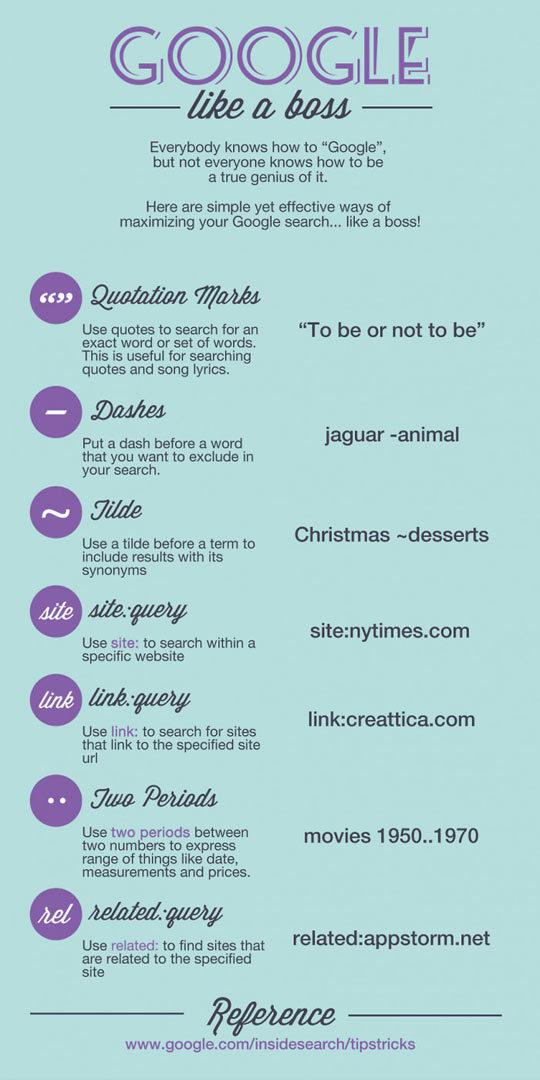
5. Once you find some text on the first page and you want to find more, highlight and copy and paste that text. Then go to Google specifically, and place quotations around what you are about to paste. For instance, you have the information, the mitochondria is the powerhouse of the cell. Go to google, and do "the mitochondria is the powerhouse of the cell" It will look for exact searches and find other pages. Then if you find more coursehero pages, go to the images and you'll see a better picture of it than you would on the site.
justjm:
^ The quotation method is useful for anything. If you find a problem in a textbook and feel it is online but difficult to find, search it up with quotes.
justjm:
Few more google search tricks on this infographic that might help you find stuff. I use the quotations the most.
Join our real-time social learning platform and learn together with your friends!
 KBaby:
Verse 1 We left our names in the dust of the driveway Watched the old town shrink
KBaby:
Lyrics Generator Use AI to write the lyrics for a song. Suggested Genres: Pop Hip
KBaby:
Verse 1 We left our names in the dust of the driveway Watched the old town shrink
KBaby:
Lyrics Generator Use AI to write the lyrics for a song. Suggested Genres: Pop Hip

 aitexturegenerator:
How are you all handling AI-generated textures for 3D models and game assets without losing the hand-made feel? I've been doing a small stylized environment
aitexturegenerator:
How are you all handling AI-generated textures for 3D models and game assets without losing the hand-made feel? I've been doing a small stylized environment

 Demon25:
Woke up feeling like that girl and that dude well he still aint crap pluse the du
Demon25:
Woke up feeling like that girl and that dude well he still aint crap pluse the du
 playtsec:
how do I get rid of stress from teachers... I just feel like running out the classroom and leaving on my own.
playtsec:
how do I get rid of stress from teachers... I just feel like running out the classroom and leaving on my own.
 JohnnyLFowler0812:
What type of gamer would play something and then get off for a while. Why not sta
JohnnyLFowler0812:
Which is better? Metallica Rap Country R&B hiphop Medal Gospel Chill Which 3 opti
JohnnyLFowler0812:
What type of gamer would play something and then get off for a while. Why not sta
JohnnyLFowler0812:
Which is better? Metallica Rap Country R&B hiphop Medal Gospel Chill Which 3 opti