
 dude:
dude:
How to use Theme Creator on QC [Subscriber feature]
dude:
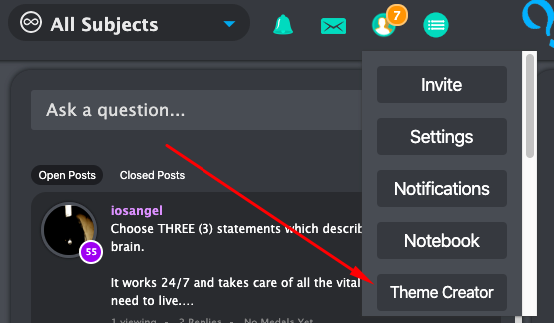
How to get to Theme Creator: If you are completely new to Theme Creator, it is located within the Menu button below your notebook
 dude:
dude:
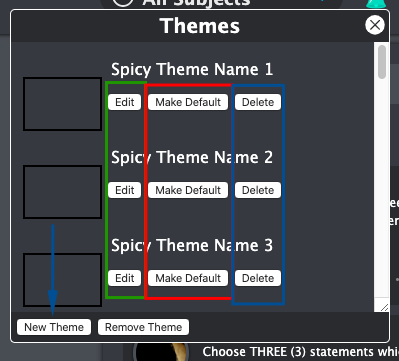
Menu Select `New Theme` if you are starting a new theme `Remove Theme` to reset the background to the standard QC layout `Edit` if you are editing a specific theme you've created `Make Default` to set the specific theme `Delete Theme` to remove a theme you've created `Delete Theme` is not the same as `Remove Theme`
 dude:
dude:
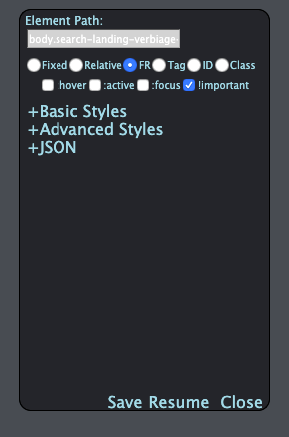
Theme Creator Tool: If you choose to edit or create a new theme you'll be greeted to the tool that looks like this. [Click over something to show the tool] For most themes you'll only need `Basic Styles`, `JSON` and the Save, Remove, and Close options To stop the highlighting over everything, click `Pause` [If you want to stop editing, press close after you paused**]
 dude:
dude:
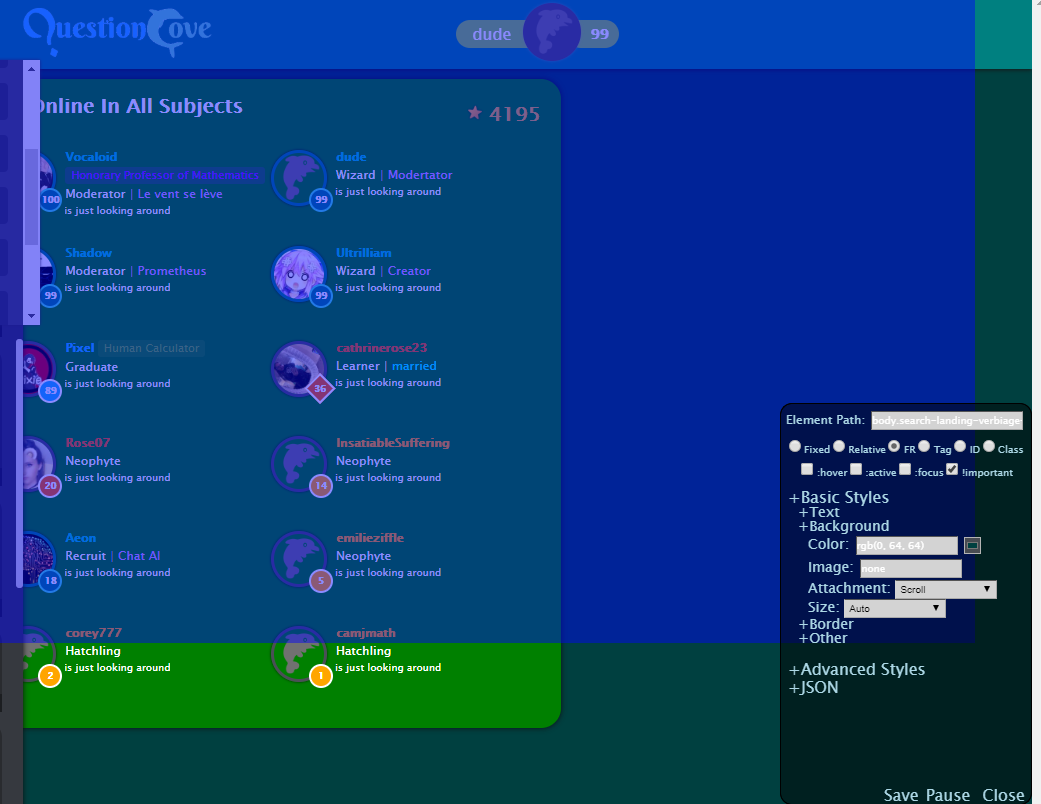
To change the background: Highlight over the top section of the site (as shown) [This is for the main background, you can highlight any section to change that specific background] You should see a list of options [Color, Image, Attachment, Size] To change to another basic color, you can change the rgb values within the parenthesis [You can use hexes (like #eee) or rgba()/rgb() {a is for transparency values values 0-1}]
 dude:
dude:
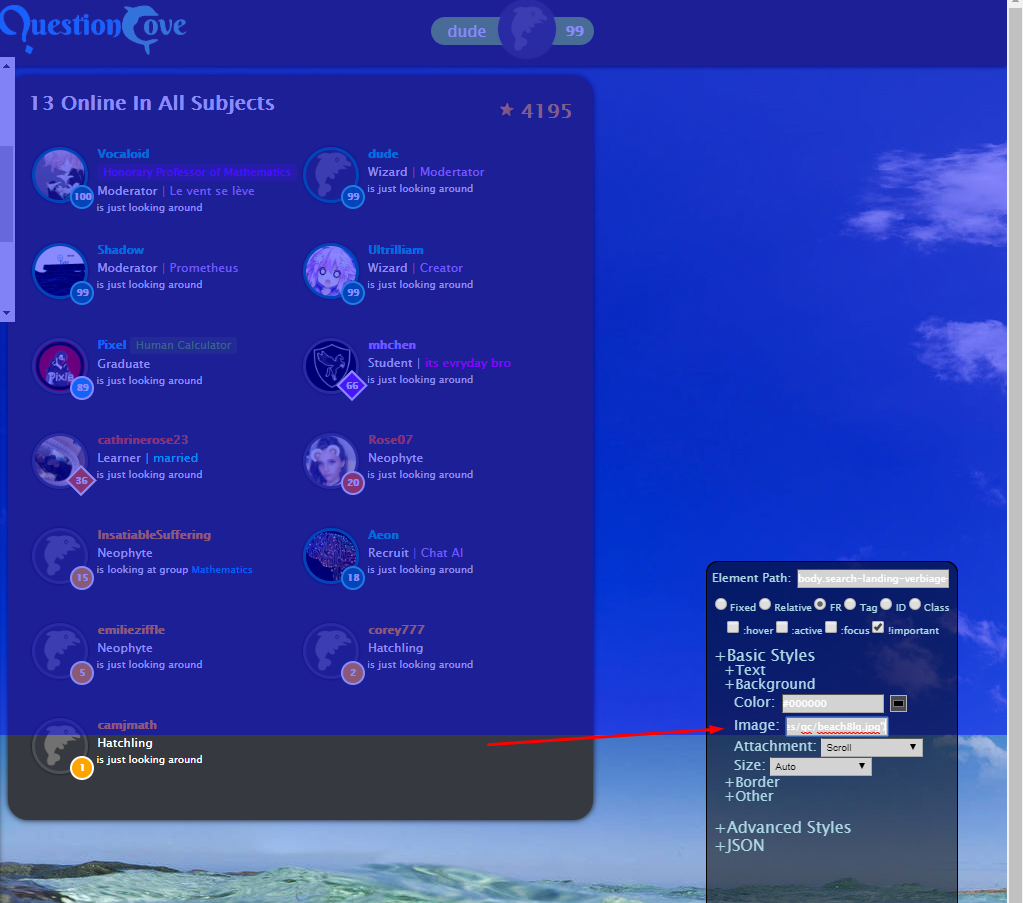
If you want to change the background to an image, go to Image Type out: `url(' ')` Insert an image link(.png, .jpeg, .jpg, .gif work -- .gif might slow down your computer depending on your system) within the quotations (This only works with online links. If you want to use a specific image on your computer you can upload it to QC using your chat and copy the link)
 dude:
dude:
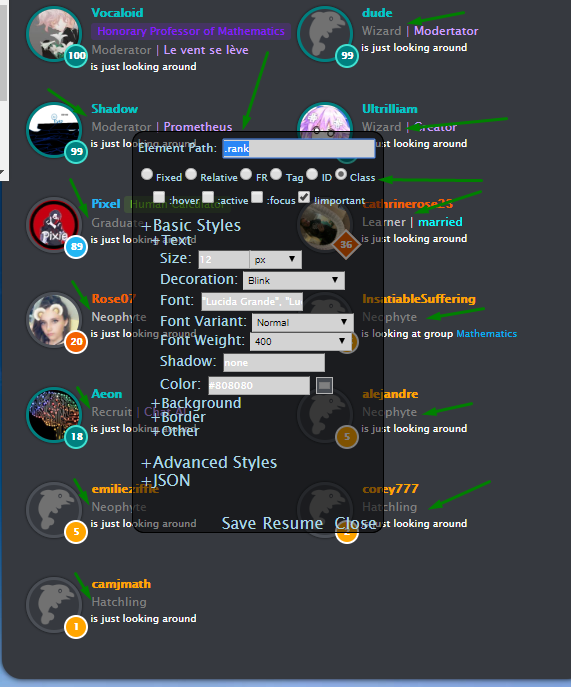
To change text color This one is a bit more complicated You have to be careful with your selections, if you want to edit all of one specific type of text [In this case rank] You will need to select Class. Otherwise you can select `FR`
 dude:
dude:
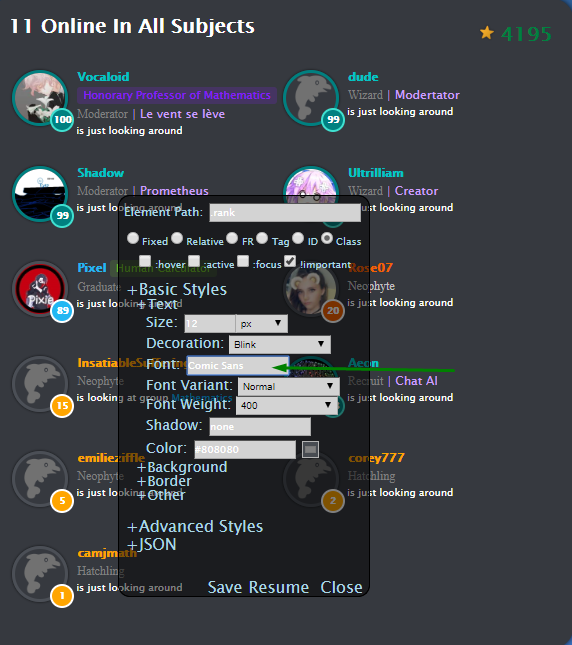
To change text font (and size) This is straightforward In the text settings you can head to font and type the name of a specific font. [Some fonts might not work and will require additional text] You can change font size at font size. *Just don't make it too large or too small for you to see* You can play around with text shadow and weight [I can make a Part 2 for borders but this should be enough to start]
 dude:
dude:
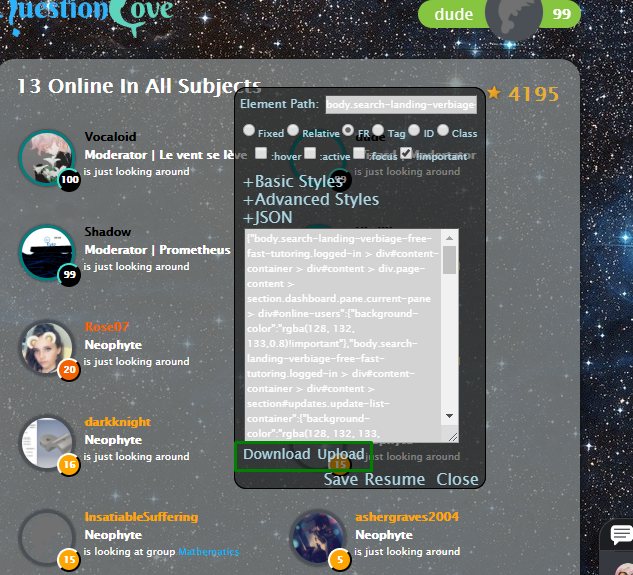
Sharing themes other subs made If you want to share an a theme you've created or want to experience one created by another person you can use the JSON feature. Select download to share your theme or upload to use one It should be a .json file
 dude:
dude:
Right click and download the file not sure why that glitched out
 Pixel:
medal me if you think dude is massive brain
 BlankSpace:
https://cdn.discordapp.com/attachments/641798382985412642/697601260882231357/themeCreator.json
BlankSpace:
shrek theme
 LakersForever865:
Thanks
 Timothykisel:
Thanks @dude
LakersForever865:
ion get it
 justus:
This is a pretty convenient post.
justus:
I will use it so thank you dude.
 ramen:
Thanks dude
 Laylalyssa:
By the time I learn how to do this, my subscription will be over but thanx u so much dude 😂
Laylalyssa:
@jkmiec26 this is how to do it
 Timmyspu:
Thanks dude
 sxdsouls:
I am lost already-
 xxDeppressionxx:
Follow the instructions and it will help
sxdsouls:
is there an option that a mod can do it for me- I am breaking my screen-
dude:
Hmm you can upload a theme using the JSON feature
 BestBoiKirby:
e.e
 CocoCammron:
@dude My thing dont say that
dude:
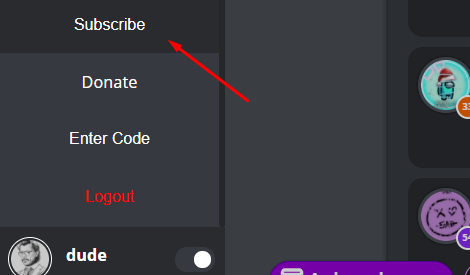
You have to be subscribed to QC first
CocoCammron:
oop how do i do that
 CocoCammron:
OOP i dont wanna pay money
 TETSXPREME:
confusing
 foreverizzy2020:
DUDEEEEEEEEEEEEEEEEEEEEEEEEEEEEEEEEEEE
 weeeeee:
\(\color{#0cbb34}{\text{Originally Posted by}}\) @TETSXPREME confusing \(\color{#0cbb34}{\text{End of Quote}}\) very
 boredfr:
\(\color{#0cbb34}{\text{Originally Posted by}}\) @weeeeee \(\color{#0cbb34}{\text{Originally Posted by}}\) @TETSXPREME confusing \(\color{#0cbb34}{\text{End of Quote}}\) very \(\color{#0cbb34}{\text{End of Quote}}\) Facts
 24kgold:
oop nvm im late
BestBoiKirby:
thanks dude!
 CocoCammron99:
thanks
 Extrinix:
Any way to change opacity?
 simsharrison:
thx breh
 sophia333:
Thanks! You mods are amezing *^*
 YECR:
YECR:
Bro your Legitimately Smart Holyy
 todoroki1:
I'm going to subscribe some time. Probably when I get my bother to buy it for mw
todoroki1:
Me
Extrinix:
also i never got a response on that opacity response ;-;
dude:
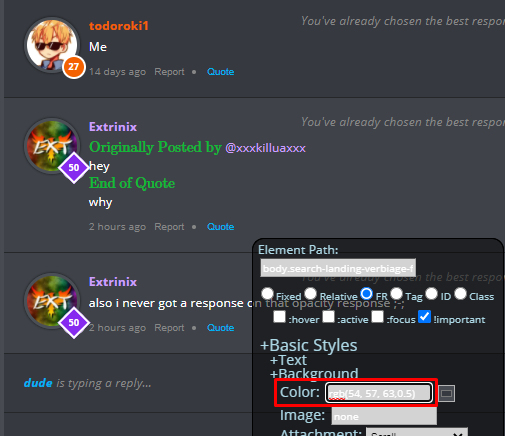
When you're in the background color setting, you should see a format of `rgb(#,#,#)` You can make it lighter by adding a fourth value between 0 and 1 `rgb(#,#,#,0.5)`
 Extrinix:
ohhhhhhhh ok ty
 Theboss5:
can you do this even tho your acc isn't verified or can everyone do it cuz all i see under notebook is push notifications
Theboss5:
@dude
dude:
You have to be subscribed first
Extrinix:
*me sitting over here making themes whilst everyone else tryna figure it out*
 Astrid1:
I can't do it.. I've tried.. o-o
 200082741:
Thank youuuu
YECR:
\(\color{#0cbb34}{\text{Originally Posted by}}\) @Pixel medal me if you think dude is massive brain \(\color{#0cbb34}{\text{End of Quote}}\) frfr
AnimeDude1738:
wow great thanks for ur help
 Imagine:
we had the same idea.
 abbyluvspuppiessssss:
thx!
Extrinix:
SpeccyIsBored:
I can't access it?
Extrinix:
SpeccyIsBored:
sxdsouls:
@uhhhkhakis
TETSXPREME:
I still have no idea
 Rylee88:
ty
 NineTailedFox:
@dude it deltes when i refresh and either way it deletes when i try to do another thing
 uniqueislove:
I have absolutely no idea what any of this means -_-
 madz2345:
 mrwhskers:
This helps a lot. Thanks dude
 Dolphan:
This is honestly so hard to do. My thing wont work
 lovinggabsxx:
i dont have that?
 shelovejayy:
thanks
 StevenisGhost:
Configure Next Experience display preferences. Configure Next Experience accessibility preferences. Configure Next Experience debugging preferences. Configure Next Experience language and region preferences. Select a theme in Next Experience. Configure Next Experience notification preferences.
 K1NGGG:
so confusing smh
 DUXK:
DUXK:
Join our real-time social learning platform and learn together with your friends!
 KBaby:
Verse 1 We left our names in the dust of the driveway Watched the old town shrink
KBaby:
Lyrics Generator Use AI to write the lyrics for a song. Suggested Genres: Pop Hip
KBaby:
Verse 1 We left our names in the dust of the driveway Watched the old town shrink
KBaby:
Lyrics Generator Use AI to write the lyrics for a song. Suggested Genres: Pop Hip
 aitexturegenerator:
How are you all handling AI-generated textures for 3D models and game assets without losing the hand-made feel? I've been doing a small stylized environment
aitexturegenerator:
How are you all handling AI-generated textures for 3D models and game assets without losing the hand-made feel? I've been doing a small stylized environment

 Demon25:
Woke up feeling like that girl and that dude well he still aint crap pluse the du
Demon25:
Woke up feeling like that girl and that dude well he still aint crap pluse the du
 playtsec:
how do I get rid of stress from teachers... I just feel like running out the classroom and leaving on my own.
playtsec:
how do I get rid of stress from teachers... I just feel like running out the classroom and leaving on my own.
 JohnnyLFowler0812:
What type of gamer would play something and then get off for a while. Why not sta
JohnnyLFowler0812:
Which is better? Metallica Rap Country R&B hiphop Medal Gospel Chill Which 3 opti
JohnnyLFowler0812:
What type of gamer would play something and then get off for a while. Why not sta
JohnnyLFowler0812:
Which is better? Metallica Rap Country R&B hiphop Medal Gospel Chill Which 3 opti