
 kittybasil:
[ Computer Science | EXCEL ] Part 2 Which formulas should I use to extract data that can help me answer these questions? Files attached in first comment
kittybasil:
Data file: Excel spreadsheet (I'm using Google Sheets) Questions: PDF. I am on the last question of Part 1

 kittybasil:
@Hero sorry, what were you saying about numerical conversion?
kittybasil:
Also, if anyone can check that my work so far is correct... 😅
 Razor:
Something just occurred to me about the pivot chart thing. Do you know where you can insert one at?
 kittybasil:
Oh great. Does Sheets not have this function...
Razor:
FFff- what are you using, thought Excel.
kittybasil:
Nah, Hero told me Sheets is easier. And it is, tbh
Razor:
Oh sweet. Well with the information you have now, I assume you just apply it to the pivot table they give you or the ones that are available, right? I dunno I never used google sheets.
kittybasil:
Oh no... this pivot table is complicated 💀
Razor:
:kanaoh: ._.
kittybasil:
That didn't work.
kittybasil:
I'm working on the Pivot table now
kittybasil:
But I don't get Part 1's last question yet... and part 3 also makes little sense
 Razor:
This?
 Hero:
Hero:
You have to make a separate column with the income of African American Females income only. Then use the MEDIAN function on that column.
kittybasil:
@Razor Yeah, that's part 3
kittybasil:
I do understand that, but I'm not sure how to work that out @Hero
Hero:
Type it out manually. It shouldn't be that much data to copy and paste to a new column.
kittybasil:
There are 2500 rows
Hero:
Another option is to use the SORT function to order the data for the Race column. That way you can easily copy the data
kittybasil:
So I was wondering if there's a grab-all formula...
kittybasil:
Oh? I will look into that
Hero:
Yes use the SORT function. First do it for the race column. Then do it again for the Gender column.
kittybasil:
Okay, thank you. I'll try that
Hero:
For the gender column you have to sort the data only for the particular range that you want which is African Americans only
kittybasil:
Wait, so... SORT the race column to African-Americans, then select the relevant parts of the gender column to SORT?
Razor:
Da... I'm assuming he means for each race take each gender together and- Wait... |dw:1589143573635:dw|
Razor:
or something like that
kittybasil:
Um, no. He said SORT function 😂
kittybasil:
Thank you for trying to help explain, though
Hero:
Yes
kittybasil:
There's a multi-column options here, would that work? ...wait, so it's the menu option or the Function described in that link? ^
Hero:
No, don't do multi-column.
kittybasil:
Eh? What would that do?
kittybasil:
Oh, right. So single-column SORT function?
Hero:
Correct
kittybasil:
This isn't the same as the right-click dialog "Sort range" is it?
Hero:
You ask a lot of questions. You could have already finished this task already.
kittybasil:
I have to make sure before I make an error... 😰
Hero:
All the other stuff is confusion right now for you. Just learn how to use the single column SORT function first. Afterwards, you can learn how to use the other related functions.
kittybasil:
👌🏻 Got it
Hero:
If I say "Perform this particular task", then you say, "What about this and this and that", you're setting yourself up to be confused about what needs to be done.
kittybasil:
Just need to make things clear, I had a parameter error earlier on so I wanted to avoid making unnecessary mess. I have the Race column sorted
Hero:
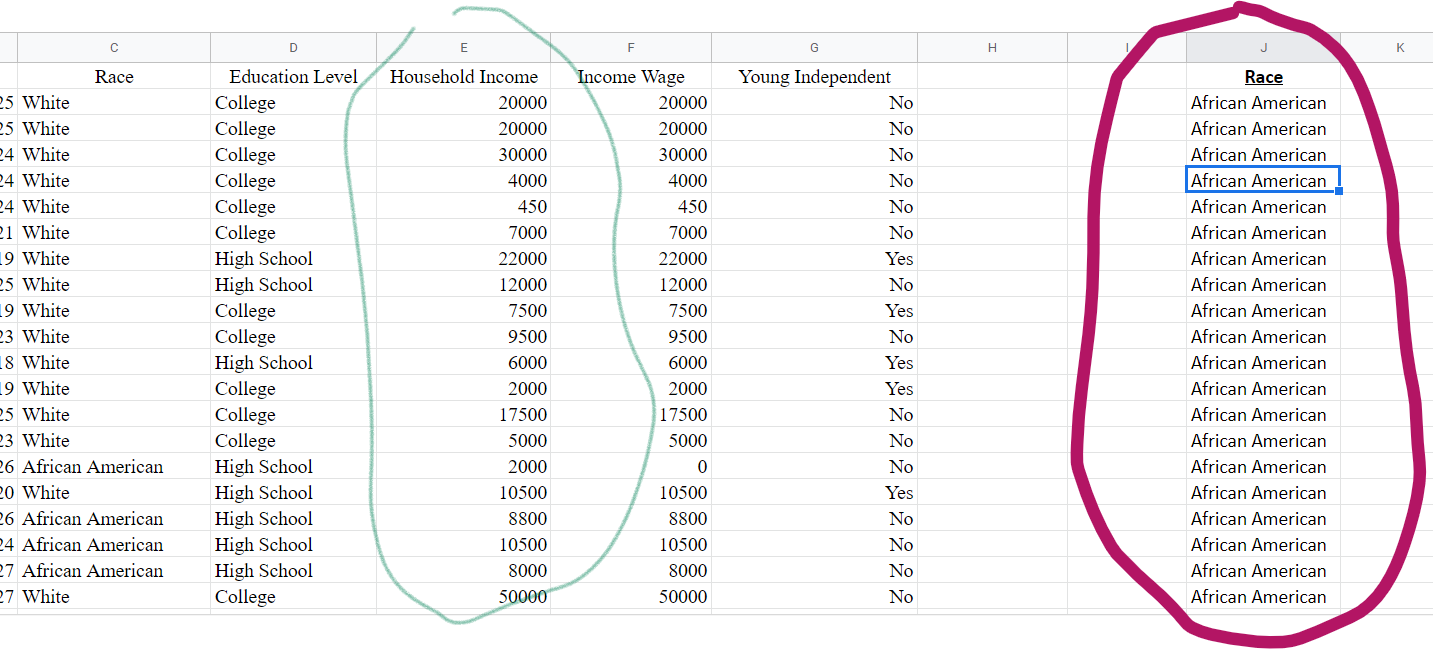
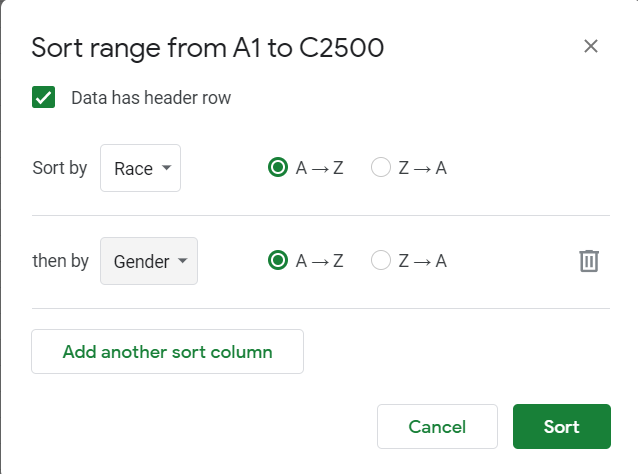
Very good. Now sort the data for the gender column but only for the range of African American rows.
Hero:
The right click might work for that
 Hero:
Hero:
Did you sort the GENDER Column yet?
kittybasil:
I don't think I am able to sort it
kittybasil:
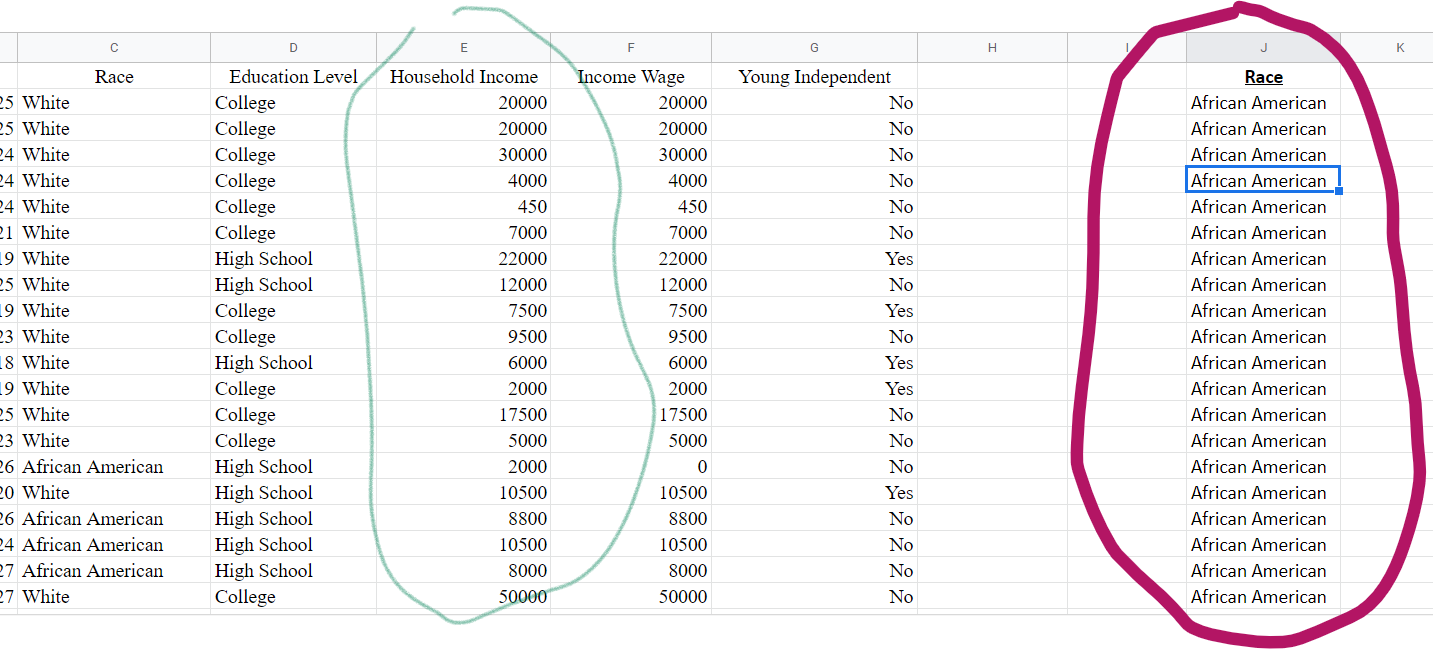
My Race column is entirely outside the data table... I attempted to put the function into the table but it gave me an error
Hero:
That's impossible. The African American data is only a subset of the data
 kittybasil:
The red-circled is my SORT column
kittybasil:
Should I use the right-click dialog "Sort Range" instead?
Hero:
I already mentioned the right click option might work for the gender column.
Hero:
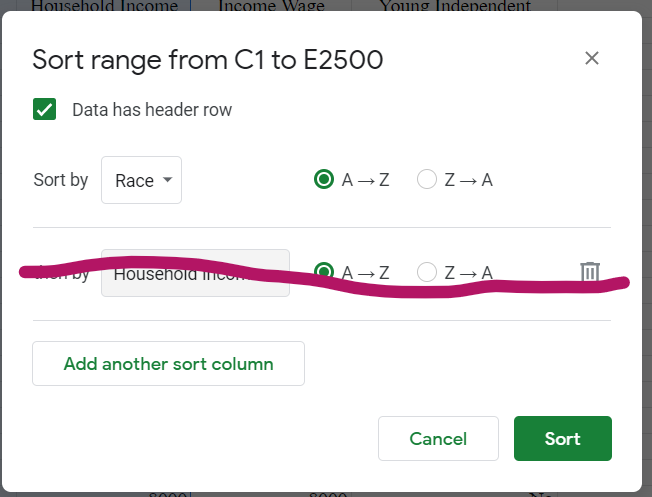
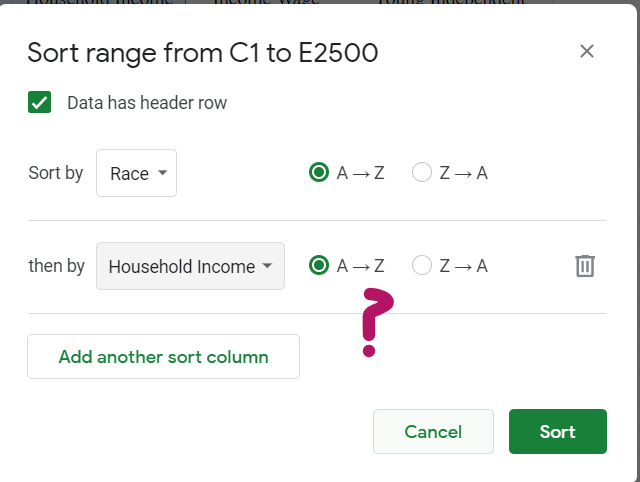
Add Another sort column.
 kittybasil:
Oh I shouldn't remove the crossed-out section?
kittybasil:
It's only got "A-Z" or "Z-A" formatting though...
Hero:
Yes remove Household Income You're only sorting Race and Gender
 Hero:
Hero:
ONly thing is, It's not going to work that way.
kittybasil:
Oh, I just sorted the Race column and everything in the other 2 columns was sorted with it. I guess that works
Hero:
You have to do it the way I mentioned originally.
Hero:
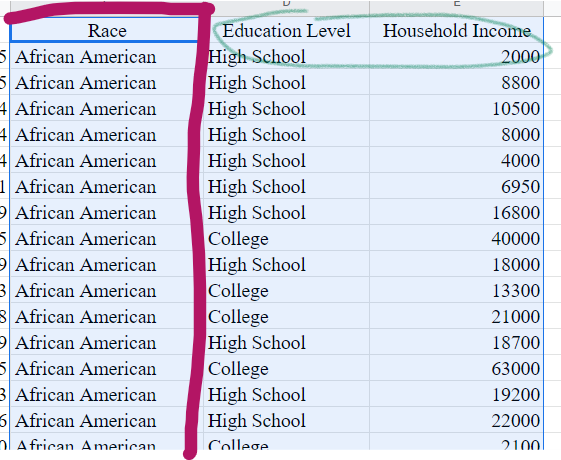
Share the sorted document.
 Hero:
Hero:
You need to sort African American Females
kittybasil:
...oh, right. 🤦🏻♀️
 kittybasil:
Oh, this question thread is getting a little long. I'll make a new one after I finish this problem...
Hero:
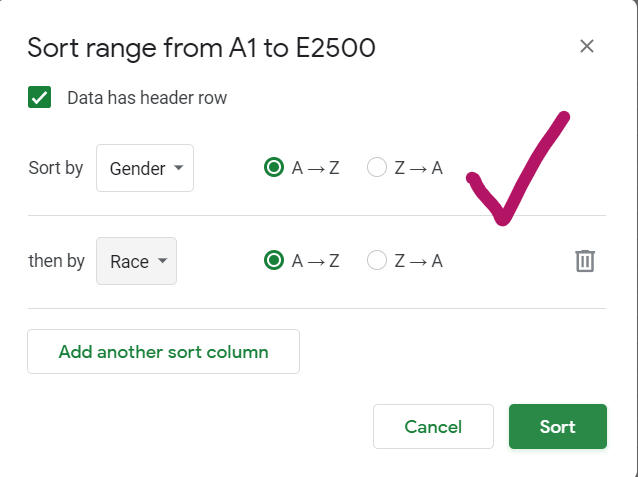
It's sort by Race then by gender. You have it backwards.
kittybasil:
Darn, I think I made an error in another question... Er, would it make a difference if they are backwards?
Hero:
Yes. Order matters when it comes to sorting.
kittybasil:
Ah, ok. I'll fix that after I fix the other question...
Hero:
Screenshot afterwards. Make sure Columns of Race and Gender are adjacent to each other.
kittybasil:
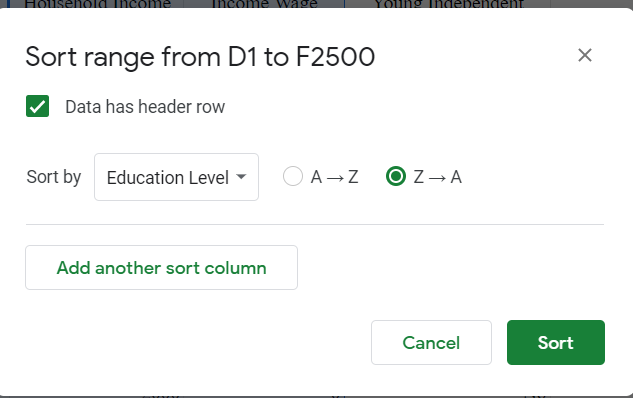
For "Median Income Wage of those who did not go to college" I realized I had not calculated the second factor in, is this the proper sorting to get the correct median?
 kittybasil:
I also moved the columns adjacent for this one
Hero:
It doesn't matter whether you sort A-Z or Z-A in this case, as long as those who went to college are excluded from the MEDIAN calculation
Hero:
Okay now back to what we were working on.
kittybasil:
I think I have both of them; I'll update the open question post when I finish working on these two Sort questions
kittybasil:
Ok, I finished By the way, I got the same result with Race-Gender as I did with Gender-Race But I'll follow the order of categories stated from now on.
Hero:
Screenshot
Hero:
@kittybasil
kittybasil:
Oh. Er... I already hit undo because I moved on to the Pivot table. 💀 One second...
Hero:
It's not right unless I approve
 Hero:
Hero:
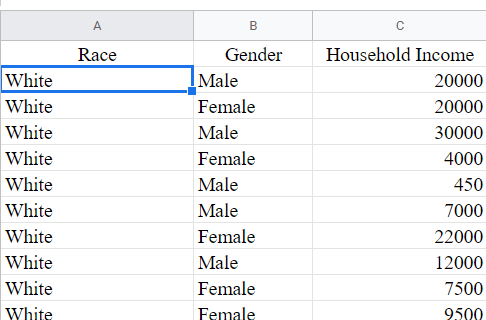
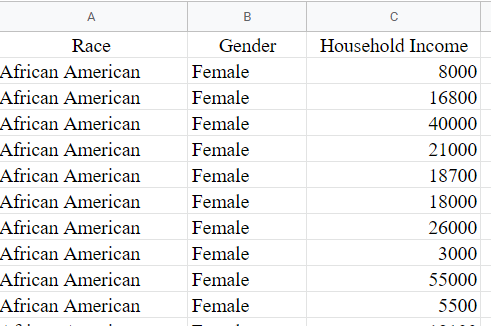
No, that's not right. If it were right, it would look something like this: African American Female African American Female
Hero:
You did not correctly sort gender
kittybasil:
Eh? That was prior to sorting. I also uploaded a screenshot of my sorting method
Hero:
Why would I want anything PRIOR to sorting?
kittybasil:
I thought you had wanted to see if I did things correctly
 kittybasil:
I moved all respective columns adjacent and then sorted them accordingly, and that's what I got
Hero:
All I want is the correct sorting. I don't need to see anything prior to that. Yes you have it correct now finally.
kittybasil:
I'm just sharing it so it makes sense if I made any errors in the process... I guess it was fortunate I had not
kittybasil:
Should I post results of the "Median Income Wage of those who did not go to college" question as well?
Hero:
I'm pretending to be your boss by the way. That's how they will talk to you when you are working for them.
kittybasil:
Thanks, but this isn't a workplace assignment though...
Hero:
The assignment is workplace TRAINING. Everything you're doing is Workplace TRAINING.
kittybasil:
What do you mean? I won't be doing this in the workplace.
Hero:
Hence the word "Training". No one said you will be asked to do this particular task in the workplace. However, as part of a project you might work on for a company, it may require knowing how to Sort data in the same manner as you are being tasked with now.
kittybasil:
Ok, understandable. But... I am on here asking for help on each step so I don't make absolutely ridiculous errors when I do have to experience that scenario in a workplace setting... That's fine, right?
Hero:
\(\color{#0cbb34}{\text{Originally Posted by}}\) @kittybasil Should I post results of the "Median Income Wage of those who did not go to college" question as well? \(\color{#0cbb34}{\text{End of Quote}}\) If the results of this calculation is the answer to one of the questions you've been asked to answer, then yes.
Hero:
I don't need to see it since I was only helping you with the sorting.
Hero:
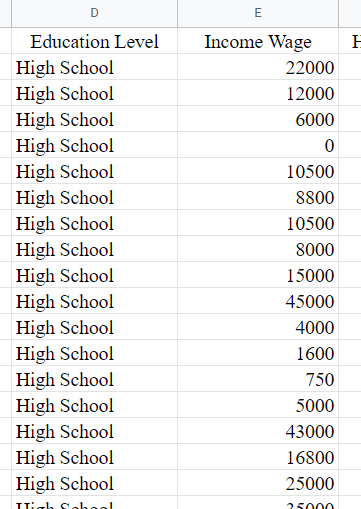
Now that you've completed the sorting task, you are now able to calculate the Median of African American women income.
 Hero:
Hero:
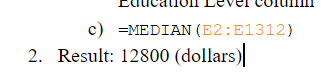
That's a list of income of those who did not go to college, but not the median income. You have to calculate that using the MEDIAN function in excel.
 kittybasil:
This is also in the other post. I'll go there now.
Join our real-time social learning platform and learn together with your friends!
 KBaby:
Verse 1 We left our names in the dust of the driveway Watched the old town shrink
KBaby:
Lyrics Generator Use AI to write the lyrics for a song. Suggested Genres: Pop Hip
KBaby:
Verse 1 We left our names in the dust of the driveway Watched the old town shrink
KBaby:
Lyrics Generator Use AI to write the lyrics for a song. Suggested Genres: Pop Hip

 aitexturegenerator:
How are you all handling AI-generated textures for 3D models and game assets without losing the hand-made feel? I've been doing a small stylized environment
aitexturegenerator:
How are you all handling AI-generated textures for 3D models and game assets without losing the hand-made feel? I've been doing a small stylized environment

 Demon25:
Woke up feeling like that girl and that dude well he still aint crap pluse the du
Demon25:
Woke up feeling like that girl and that dude well he still aint crap pluse the du
 playtsec:
how do I get rid of stress from teachers... I just feel like running out the classroom and leaving on my own.
playtsec:
how do I get rid of stress from teachers... I just feel like running out the classroom and leaving on my own.
 JohnnyLFowler0812:
What type of gamer would play something and then get off for a while. Why not sta
JohnnyLFowler0812:
Which is better? Metallica Rap Country R&B hiphop Medal Gospel Chill Which 3 opti
JohnnyLFowler0812:
What type of gamer would play something and then get off for a while. Why not sta
JohnnyLFowler0812:
Which is better? Metallica Rap Country R&B hiphop Medal Gospel Chill Which 3 opti