
 RomMosher:
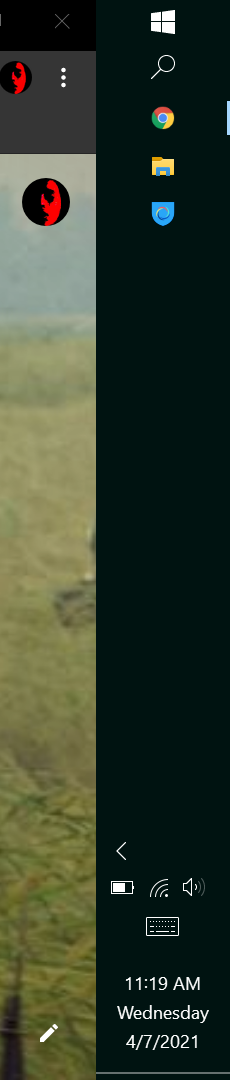
Does someone mind telling me how to change this back?
 kingjayden:
Pfft lol
kingjayden:
how did u manage to do that
 Florisalreadytaken:
firstly check if it is locked
RomMosher:
Idk i did on my pc as well
RomMosher:
\(\color{#0cbb34}{\text{Originally Posted by}}\) @Florisalreadytaken firstly check if it is locked \(\color{#0cbb34}{\text{End of Quote}}\) How?
Florisalreadytaken:
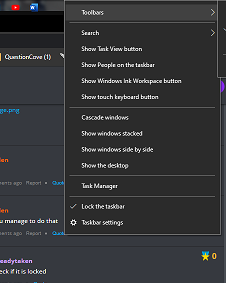
rightclick on the black space
RomMosher:
It's not
 AddyM:
lmao what did u do
 Florisalreadytaken:
if it is locked, just lick on it, and then it will unlcok -- if you do not see a tick on the "lock taskbar"then just drag it to the bottom
kingjayden:
Yeah Lick all over it
RomMosher:
\(\color{#0cbb34}{\text{Originally Posted by}}\) @Florisalreadytaken if it is locked, just lick on it, and then it will unlcok -- if you do not see a tick on the "lock taskbar"then just drag it to the bottom \(\color{#0cbb34}{\text{End of Quote}}\) Drag?
Florisalreadytaken:
\(\color{#0cbb34}{\text{Originally Posted by}}\) @kingjayden Yeah Lick all over it \(\color{#0cbb34}{\text{End of Quote}}\) click 😂💀
Florisalreadytaken:
\(\color{#0cbb34}{\text{Originally Posted by}}\) @RomMosher \(\color{#0cbb34}{\text{Originally Posted by}}\) @Florisalreadytaken if it is locked, just lick on it, and then it will unlcok -- if you do not see a tick on the "lock taskbar"then just drag it to the bottom \(\color{#0cbb34}{\text{End of Quote}}\) Drag? \(\color{#0cbb34}{\text{End of Quote}}\) yes!
kingjayden:
\(\color{#0cbb34}{\text{Originally Posted by}}\) @Florisalreadytaken \(\color{#0cbb34}{\text{Originally Posted by}}\) @kingjayden Yeah Lick all over it \(\color{#0cbb34}{\text{End of Quote}}\) click 😂💀 \(\color{#0cbb34}{\text{End of Quote}}\) lol
RomMosher:
Ain't workin
kingjayden:
oof
Florisalreadytaken:
why? -- can you do a recording?
 DomyB1:
NAH I'M TO DUM!
kingjayden:
LMAO
kingjayden:
Rip Domy task bar
RomMosher:
Bro theres 3 people with the sal as their pfp
kingjayden:
lol
AddyM:
\(\color{#0cbb34}{\text{Originally Posted by}}\) @RomMosher Bro theres 3 people with the sal as their pfp \(\color{#0cbb34}{\text{End of Quote}}\) yep
AddyM:
lmao
Florisalreadytaken:
\(\color{#0cbb34}{\text{Originally Posted by}}\) @DomyB1 NAH I'M TO DUM! \(\color{#0cbb34}{\text{End of Quote}}\) did you fix it yet? its really easy mate
AddyM:
\(\color{#0cbb34}{\text{Originally Posted by}}\) @Florisalreadytaken \(\color{#0cbb34}{\text{Originally Posted by}}\) @DomyB1 NAH I'M TO DUM! \(\color{#0cbb34}{\text{End of Quote}}\) did you fix it yet? its really easy mate \(\color{#0cbb34}{\text{End of Quote}}\) ill help him later
RomMosher:
\(\color{#0cbb34}{\text{Originally Posted by}}\) @Florisalreadytaken \(\color{#0cbb34}{\text{Originally Posted by}}\) @DomyB1 NAH I'M TO DUM! \(\color{#0cbb34}{\text{End of Quote}}\) did you fix it yet? its really easy mate \(\color{#0cbb34}{\text{End of Quote}}\) That aint me
AddyM:
yeah they know
DomyB1:
\(\color{#0cbb34}{\text{Originally Posted by}}\) @AddyM yeah they know \(\color{#0cbb34}{\text{End of Quote}}\) they know wat doe wat?
DomyB1:
?
AddyM:
\(\color{#0cbb34}{\text{Originally Posted by}}\) @DomyB1 \(\color{#0cbb34}{\text{Originally Posted by}}\) @AddyM yeah they know \(\color{#0cbb34}{\text{End of Quote}}\) they know wat doe wat? \(\color{#0cbb34}{\text{End of Quote}}\) that there multiple pepole with sal as their pfp
DomyB1:
the cult has been exposed by AddyM
DomyB1:
HOW DARE U
DomyB1:
SAL IS INFINATE
DomyB1:
ok bye
 0mega:
Alright to fix task bar location you want to click a blank portion of the bar, than you want to click your primary mouse button and drag to where you want it to be
0mega:
make sure it isn't locked though
Florisalreadytaken:
ah apparently there is a new windows bug
Florisalreadytaken:
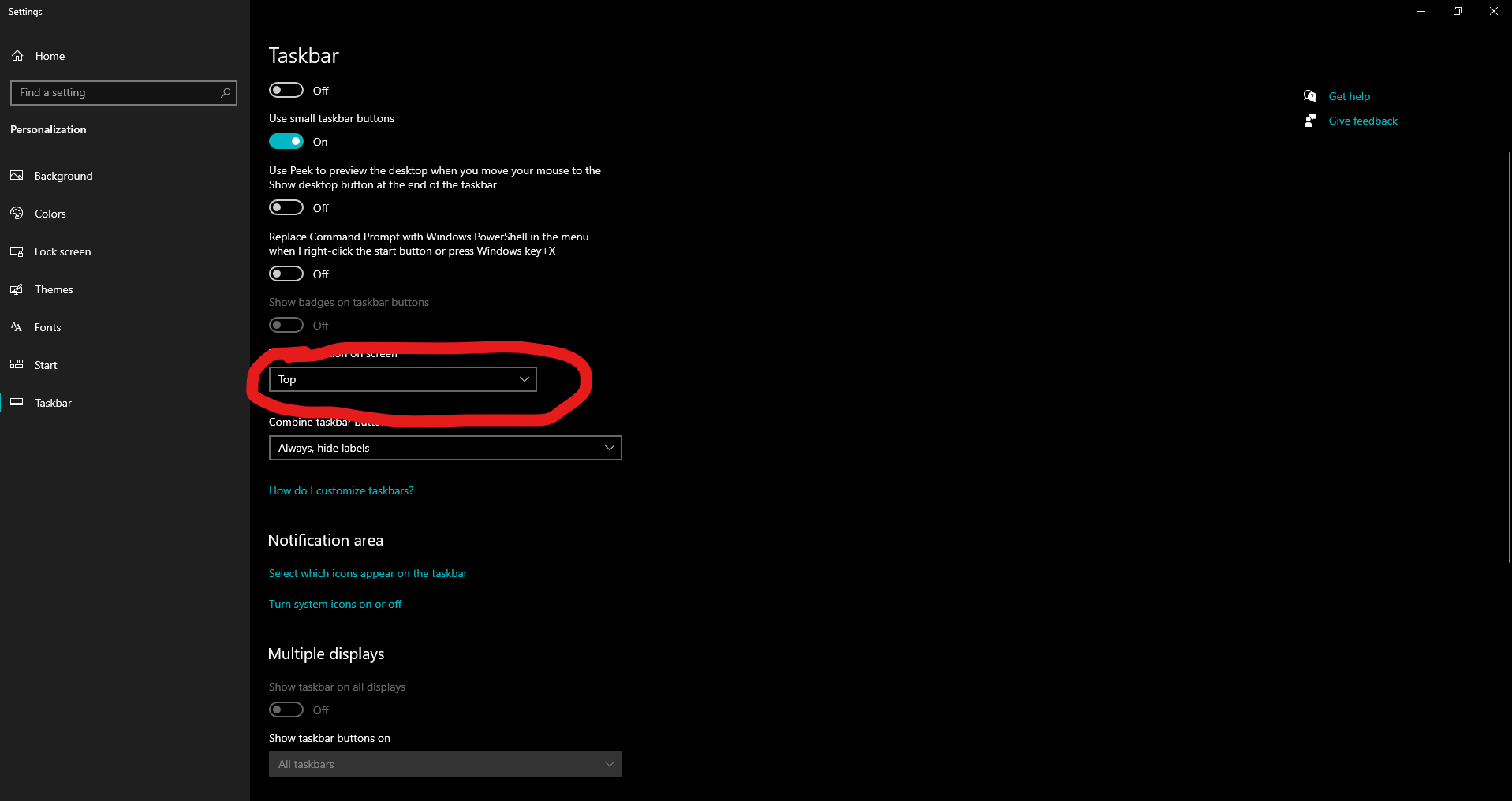
you cannot drag it -- unless you restart the machine itself -- what you can do is right click, and then click on "taskbar settings"
 0mega:
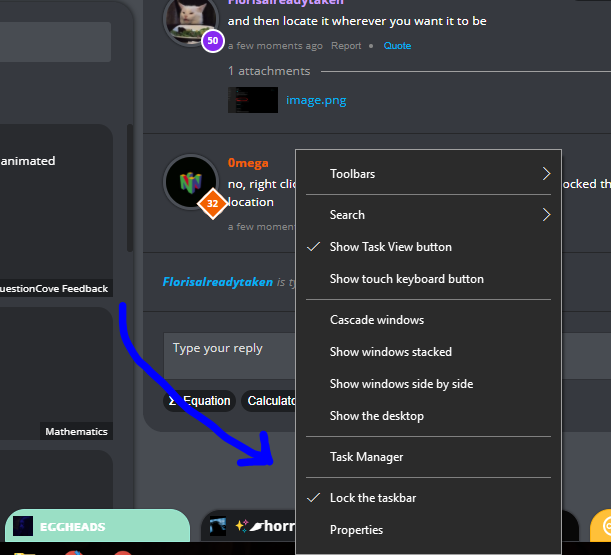
no, right click on task bar, make sure "Lock Taskbar" is unlocked than drag it to the location
Florisalreadytaken:
what did i just say -- its a bug many machines have
 Florisalreadytaken:
did you just click this and scrolled all the way to the bottom? look up
Join our real-time social learning platform and learn together with your friends!
VERNEISH:
Two objects are moving along separate linear paths where each path is described by position, d, and time, t.

 Maci:
what are the best stock apps for people who want to start investing?
Maci:
what are the best stock apps for people who want to start investing?
 Twaylor:
genuienly how do i get better self control i keep watcing youtube and theres this
Twaylor:
genuienly how do i get better self control i keep watcing youtube and theres this
 IzzyCookie:
|dw:1792074056138:dw| Uhm, I don't know where to ask this, but I'm in college welding at my community college, and I need help learning vertical welding for
IzzyCookie:
|dw:1792074056138:dw| Uhm, I don't know where to ask this, but I'm in college welding at my community college, and I need help learning vertical welding for

 thehearken:
not sure if this is considered spam, im sorry if it is, but does anyone have tips
thehearken:
not sure if this is considered spam, im sorry if it is, but does anyone have tips