
 Joe348:
how do open messages on phone..!
 MrMudd183:
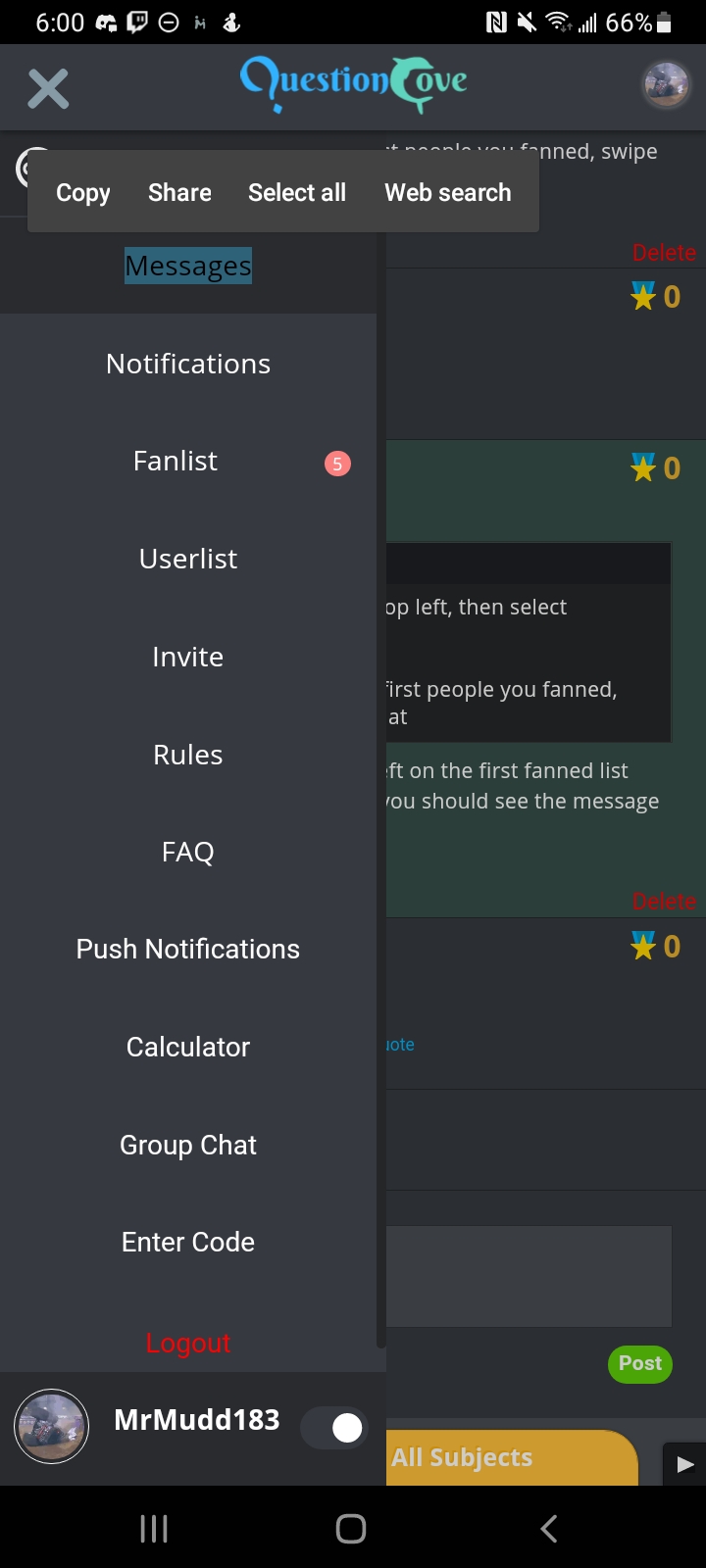
Swipe over to the left or tap the three lines in the top left, then tap messages
 ri2005:
Scroll down and double click it
Joe348:
ooo ok
MrMudd183:
Then swipe left again and that'll show your message list
Joe348:
ah ty
MrMudd183:
You're welcome
Joe348:
not working
 Complex:
dang
MrMudd183:
Tap the three bars in the top left, then select messages...try it that way It then should pull up the first people you fanned, swipe left when you see that
Joe348:
omg that’s too complex
MrMudd183:
Complex:
yoo..u said my name?
 Vocaloid:
Are you on iphone? IPhone is slightly bugged and you need to go to someone's profile first and then hit the triple bar to make the menu come up.
Joe348:
yessir
Joe348:
see john simple
MrMudd183:
When you tap the triple bar, tap this here... I was giving a detailed way to do it, i was trying to make it simple step by step
 Joe348:
ah i see, cool thxs
Joe348:
i got it
MrMudd183:
 Cornisgoodforyou:
they got rid of msgs
Join our real-time social learning platform and learn together with your friends!
 VERNEISH:
Two objects are moving along separate linear paths where each path is described by position, d, and time, t.
VERNEISH:
Two objects are moving along separate linear paths where each path is described by position, d, and time, t.

 Maci:
what are the best stock apps for people who want to start investing?
Maci:
what are the best stock apps for people who want to start investing?
 Twaylor:
genuienly how do i get better self control i keep watcing youtube and theres this
Twaylor:
genuienly how do i get better self control i keep watcing youtube and theres this
 IzzyCookie:
|dw:1792074056138:dw| Uhm, I don't know where to ask this, but I'm in college welding at my community college, and I need help learning vertical welding for
IzzyCookie:
|dw:1792074056138:dw| Uhm, I don't know where to ask this, but I'm in college welding at my community college, and I need help learning vertical welding for

 thehearken:
not sure if this is considered spam, im sorry if it is, but does anyone have tips
thehearken:
not sure if this is considered spam, im sorry if it is, but does anyone have tips