
 Astrid1:
Help pls So I have to basically code a lil newsletter and I need to setup a line of code with their signup date, but I can't remember how to do so.
 karissafrazier:
beats me child, sorry
karissafrazier:
@nishio
Astrid1:
@extrinix help
 Extrinix:
Explain further, what exactly is the newsletter suppose to do? Record a date of publishing? Or record the date of joining the site?
Astrid1:

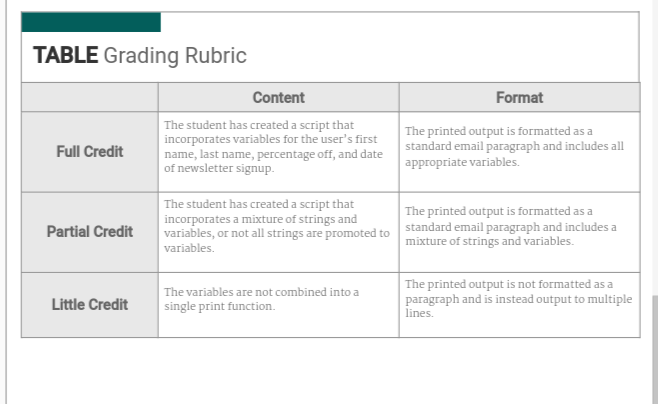 Extrinix:
What programming language are you using?
Astrid1:
Python
Extrinix:
Okay so, is it a print func for each time the user joins the site? Or is it a database logged join?
Astrid1:
Oi, I'm still new. But I think that we've only learned print function. So I'm gonna go with the first one,
 ShadowOfDeath:
Ah. Python. Hold on, I have a flashdrive with some Python basics on it. I can see if I can send the file to you.
Astrid1:
Basically the day the user joined th site, you know how our user profile has date joined? Thats what we gotta do
Extrinix:
Okay so database logged, that's a bit more complicated.
ShadowOfDeath:
Not necessarily.
ShadowOfDeath:
So you have the name then two "print" functions with the phrases "Hello and Welcome" + UserName and "Goodbye and Thank you" + UserName. With Database logging it's: db_server = 'servername' db_user = 'db_user' db_password = 'db_pass' db_dbname = 'db_name' db_tbl_log = 'log' log_file_path = 'C:\\Users\\Yourname\\Desktop\\test_log.txt' log_error_level = 'DEBUG' # LOG error level (file) log_to_db = True # LOG to database? class LogDBHandler(logging.Handler): [...] # Main settings for the database logging use if (log_to_db): # Make the connection to database for the logger log_conn = pymssql.connect(db_server, db_user, db_password, db_dbname, 30) log_cursor = log_conn.cursor() logdb = LogDBHandler(log_conn, log_cursor, db_tbl_log) Courtesy of: https://stackoverflow.com/questions/2314307/python-logging-to-database
Astrid1:
Bye bc what, we haven't learned any of that.
Astrid1:
How am I supposed to put that together when it's nothing we've learned
ShadowOfDeath:
You have to realize that I've done advanced Python.
ShadowOfDeath:
This is easy for me. I just have not done it in a while.
Extrinix:
Per what we did a few days ago in dms: Import your `datetime` and `Path` (from `pathlib`). ``` import datetime from pathlib import Path ``` Set the date to the current time, and define the username of the user (per `userName`). ``` DATE = datetime.datetime.now().strftime("%Y-%m-%d") userName = "Astrid" ``` Print the date (not needed), define the path to the user's file, and define it's path using the `Path()` function. ``` print(DATE) path_to_file = userName+'.txt' path = Path(path_to_file) ``` `If` the variable path's value exists as a file, then we print out the welcome message, the leave message, and then the date of join + coupon messages. ``` if path.is_file(): print("Hello", userName+",", "We appreciate you subscribing to our newsletter!") print("Thank you for being a loyal customer! Have a nice day!") d = open(userName+".txt", "r") dr = d.read() print("User Joined:", dr) print("\nAll of our products are 90% off! Limited time only!") ``` Otherwise ( `else` ), open a new file using the username + '.txt' (we use `"w"` instead of `"x"` because x would give an error function, an if-else statement would work for a more smooth functioning. Then, we write the `DATE` variable to the file, and close it. (Then we continue what was in the `if` statement. ``` else: f = open(userName+".txt", "w") f.write(DATE) f.close() print("Hello", userName+",", "We appreciate you subscribing to our newsletter!") print("Thank you for being a loyal customer! Have a nice day!") d = open(userName+".txt", "r") dr = d.read() print("User Joined:", dr) print("\nAll of our products are 90% off! Limited time only!") ```
Join our real-time social learning platform and learn together with your friends!
 VERNEISH:
Two objects are moving along separate linear paths where each path is described by position, d, and time, t.
VERNEISH:
Two objects are moving along separate linear paths where each path is described by position, d, and time, t.

 Maci:
what are the best stock apps for people who want to start investing?
Maci:
what are the best stock apps for people who want to start investing?
 Twaylor:
genuienly how do i get better self control i keep watcing youtube and theres this
Twaylor:
genuienly how do i get better self control i keep watcing youtube and theres this
 IzzyCookie:
|dw:1792074056138:dw| Uhm, I don't know where to ask this, but I'm in college welding at my community college, and I need help learning vertical welding for
IzzyCookie:
|dw:1792074056138:dw| Uhm, I don't know where to ask this, but I'm in college welding at my community college, and I need help learning vertical welding for

 thehearken:
not sure if this is considered spam, im sorry if it is, but does anyone have tips
thehearken:
not sure if this is considered spam, im sorry if it is, but does anyone have tips