
 Paofumiistrash:
Could someone help with my Theme Creator thingy, i cant seem to figure it out.
 Lura:
Lura:
dtf
 FrogGirlEmmy:
@extrinix tell this kiddo how to mess with theme creator.
 xXAikoXx:
In order to use theme creator, I think you need to subscribe.
FrogGirlEmmy:
He has a Sub
xXAikoXx:
Oh, I don't know.
FrogGirlEmmy:
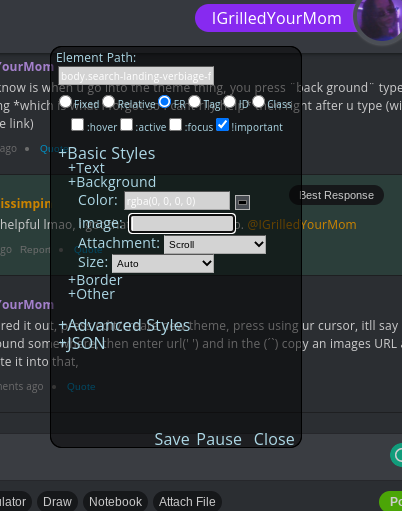
but all i know is when u go into the theme thing, you press ¨back ground¨ type in something *which is what I forgot so I cant rlly help* then right after u type (with the image link)
Paofumiistrash:
Not that helpful lmao, i got that far and gave up so. @froggirlemmy
FrogGirlEmmy:
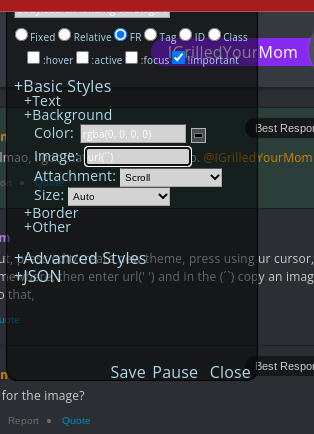
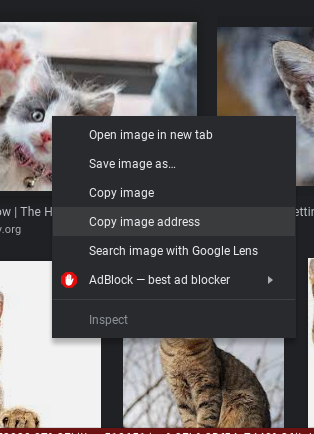
Nvm figured it out, press edit/create new theme, press using ur cursor, itll say ¨background somewhere, then enter url(' ') and in the (´`) copy an images URL and copy-paste it into that,
Paofumiistrash:
Url as in the link for the image?
FrogGirlEmmy:
yes
 FrogGirlEmmy:
then copy paste into url(' ')
 Extrinix:
I'll make a couple of clips, and then explain (in writing) what's going on. As you have already found your way to the theme creator, I'll explain how it works (plainly in text). Okay so, to start off, let's make a list of what the theme creator contains and what each of these mean. You'll start off using mainly the `+Basic Styles` area \(\begin{array}{|l|l|}\hline \sf{\text{Element Path}}&\sf{\text{this is the path to what you clicked on}}\\\hline \sf{\text{:hover}}&\sf{\text{you can add or change an effect when the mouse}\\\text{hovers over it}}\\\hline \sf{\text{:active}\\\text{:focus}}&\sf{\text{similar choices, except focus is for text boxes}\\\text{and active is for buttons and other items}}\\\hline \sf{\text{!important}}&\sf{\text{you MUST keep this on, it is what allows your}\\\text{theme to show!}}\\\hline \sf{\text{+Text}}&\sf{\text{contains all text changing items (except actually}\\\text{changing the text), including font, size, and color}}\\\hline \sf{\text{+Background}}&\sf{\text{contains all background changing items, including}\\\text{color, image (explained after), attachment & size}}\\\hline \sf{\text{+Border}}&\sf{\text{used for outlines of certain elements that are}\\\text{chosen, it includes size, color, and style}}\\\hline \end{array}\)
Extrinix:
\(\huge{\sf{\text{+Basic Styles}}}\) \(\large{\sf{+Text}}\\ \begin{array}{|l|l|}\hline \sf{\text{Size}}&\sf{\text{0 to infinity, recommended sizing is PX}}\\\hline \sf{\text{Decoration}}&\sf{\text{where underline, overline, and line-through are}}\\\hline \sf{\text{Font}}&\sf{\text{sure you can figure this one out, fonts go in}\\\text{parenthesis, and fallback fonts go after with a comma}}\\\hline \sf{\text{F Variant}}&\sf{\text{automatically capitalize or not}}\\\hline \sf{\text{F Weight}}&\sf{\text{how bold the font is (thickness)}}\\\hline \sf{\text{Color}}&\sf{\text{can use color names (lightskyblue), rgb (rgb(0,0,0)),}\\\text{rgba [opacity] (rgba(0,0,0,0.5)), and}\\\text{hex (#fff / #f2f2f2)}}\\\hline \end{array}\) \(\large{\sf{+Background}}\\ \begin{array}{|l|l|}\hline \sf{\text{Color}}&\sf{\text{can use color names (lightskyblue), rgb (rgb(0,0,0)),}\\\text{rgba [opacity] (rgba(0,0,0,0.5)), and}\\\text{hex (#fff / #f2f2f2)}}\\\hline \sf{\text{Image}}&\sf{\text{grab an image from anywhere, and get the image url}\\\text{use ' url("image.url/image.link") ' to show the image}}\\\hline \sf{\text{Attachment}}&\sf{\text{likely to used fixed or scroll}}\\\hline \sf{\text{Size}}&\sf{\text{likely to use cover, contain, and auto}}\\\hline \end{array}\) \(\large{\sf{+Border}}\\ \begin{array}{|l|l|}\hline \sf{\text{Width}}&\sf{\text{Sizing, basically, adjust the thickness of the border }}\\\hline \sf{\text{Color}}&\sf{\text{can use color names (lightskyblue), rgb (rgb(0,0,0)),}\\\text{rgba [opacity] (rgba(0,0,0,0.5)), and}\\\text{hex (#fff / #f2f2f2)}}\\\hline \sf{\text{Style}}&\sf{\text{dashed, dotted, solid, there are many different styles}}\\\hline \sf{\text{Radius}}&\sf{\text{how curved the corners are (how "soft" they are)}}\\\hline \end{array}\)
Extrinix:
\(\huge{\sf{\text{+Advanced Styles}}}\) I would recommend just ignoring this area, as it's for more experienced and more CSS (What is CSS?) knowing people (the only reason I know the theme creator so well is because I know CSS). \(\large{\sf{+Text}}\\ \begin{array}{|l|l|}\hline \sf{\text{Decoration}}&\sf{\text{<f variant> <style> <color>}}\\\hline \end{array}\) \(\large{\sf{+Background}}\\ \begin{array}{|l|l|}\hline \sf{\text{Background}}&\sf{\text{<color> <img> [argumentatives]}}\\\hline \end{array}\) \(\large{\sf{+Border}}\\ \begin{array}{|l|l|}\hline \sf{\text{Border}}&\sf{\text{<size> <img> <color>}}\\\hline \sf{\text{Radius}}&\sf{\text{<curved degree>}}\\\hline \end{array}\) \(\large{\sf{+Other}}\\ \begin{array}{|l|l|}\hline \sf{\text{Margin}}&\sf{\text{space outside of the element}}\\\hline \sf{\text{Padding}}&\sf{\text{space inside of the element}}\\\hline \sf{\text{Animation}}&\sf{\text{don't even need this for you c:}}\\\hline \sf{\text{Transition}}&\sf{\text{don't even need this for you c:}}\\\hline \sf{\text{Position}}&\sf{\text{static/absolute/fixed}}\\\hline \sf{\text{Width}}&\sf{\text{the horizontal size of the element }\leftrightarrow}\\\hline \sf{\text{Height}}&\sf{\text{the vertical size of the element }}\updownarrow\\\hline \end{array}\)
Extrinix:
\(\huge{\sf{\text{+JSON}}}\) I recommend just not touching this section unless you want to share your creation or download someone else's creation. WARNING: JSON (What is JSON?) is HIGHLY strict, even a misplaced comma can ruin your work, so make sure to run it through a JSON validator beforehand. Text Box: EDITING THIS IS VERY RISKY HERE, I recommend editing it elsewhere (some program that specializes coloring for JSON files, e.g. Replit). Download: Just click this to download the file, you can then send it to someone else! Upload: You or someone else can upload a `.json` file using this.
 Ferrari:
I use replit to evade school blocks wait what hm who said that
 Astrid1:
Oh, guess I won't have to screen share and show you. Lmk if you ever still need help. The offer still stands. <3
Astrid1:
If you still don't understand it afterward, I can do the theme for you and have you upload it onto your theme creator. (It's easier and you don't have to share any personal information at all btw)
Join our real-time social learning platform and learn together with your friends!
 VERNEISH:
Two objects are moving along separate linear paths where each path is described by position, d, and time, t.
VERNEISH:
Two objects are moving along separate linear paths where each path is described by position, d, and time, t.

 Maci:
what are the best stock apps for people who want to start investing?
Maci:
what are the best stock apps for people who want to start investing?
 Twaylor:
genuienly how do i get better self control i keep watcing youtube and theres this
Twaylor:
genuienly how do i get better self control i keep watcing youtube and theres this
 IzzyCookie:
|dw:1792074056138:dw| Uhm, I don't know where to ask this, but I'm in college welding at my community college, and I need help learning vertical welding for
IzzyCookie:
|dw:1792074056138:dw| Uhm, I don't know where to ask this, but I'm in college welding at my community college, and I need help learning vertical welding for

 thehearken:
not sure if this is considered spam, im sorry if it is, but does anyone have tips
thehearken:
not sure if this is considered spam, im sorry if it is, but does anyone have tips