
 Ultrilliam:
Teaching Some Code (JavaScript: Variables, Constants, Functions, Datatypes)
Ultrilliam:
This time around, I'm going to be helping with JavaScript.
Ultrilliam:
If your using chrome, you can run the code discussed in this thread in your console by hitting `ctrl+shift+j`
Ultrilliam:
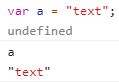
Let's start with something simple, Variables. A variable is something that stores data and can be changed later. You can define a variable by doing something like the following: ``` var a = "text"; ``` This will define the variable "a" with the value of "text" if you were to type in the console "a" after running this snippet of code, it would return "text" as seen in the attachment
 Ultrilliam:
Does that makes sense so far?
 ThisGirlPretty:
Yes sir :P
 Elsa213:
Yesh. e.e
Ultrilliam:
Alright, you guys try now, define a variable and call it
ThisGirlPretty:
Can't I'm on mobile x.x
Ultrilliam:
Oh, something I forgot to mention. Syntax. at the end of each code line you want to have a `;`, that declares the end of the line. It's not required in JavaScript, but it's very good to know and a good practice to follow.
Elsa213:
``` var b = "test"; ```
Elsa213:
Like that? o:
Ultrilliam:
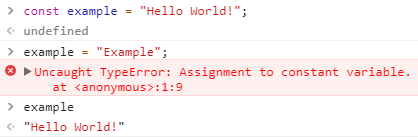
Indeed. Now then, constants. Similar to variables a constant stores data, however a constant cannot be changed after being defined You can define a constant by using `const` in place of `var`. Attempting to change a constant after being defined will result in a error, which you can see in the attachment.
 Ultrilliam:
Make sense?
Elsa213:
Yes.
Ultrilliam:
(code used in above example) ``` const example = "Hello World!"; example = "Example"; ```
Elsa213:
You can never change a constant? o:
Ultrilliam:
Nope
ThisGirlPretty:
It does :P
Elsa213:
Is it necessary to include `example = "Example";` ?
Ultrilliam:
No, that was just to show that it would throw a error attempting to change the value
Elsa213:
Ooooooo ``` const example = "test"; ```
Elsa213:
Correct?
Ultrilliam:
Indeed.
Ultrilliam:
Now let's talk about the different datatypes that one can pass to a variable. The main ones are as follows: Integers: Numbers, such as 5 or 292 Strings: Text, such as "testing" Objects: More on this later, it is essential a key -> value data store such as `{"a":"b"}` Arrays: More on this later, Multiple values in the same string, example would be `["test",1,{"a":"b"}]`
Elsa213:
``` ["testing",5,{"b":"c"}] ``` e.e
Ultrilliam:
Arrays aren't just limited to that by the way They can be something like this: ``` ["test","example","dog"] ``` Or something much more complex combining all other data types into one.
Ultrilliam:
Make sense?
ThisGirlPretty:
Yes I get it ;P
Elsa213:
How do you combine all the other data types in one? e.e
Ultrilliam:
The first example I gave, gave a example of that. We'll get more into that later
Ultrilliam:
Does this all make sense so far dude?
 dude:
dude:
Yes, though `ctrl+shft+j` doesn't work for me
Ultrilliam:
Because you're on mac. It's `cmd+opt+j` on mac
Ultrilliam:
Now let's talk about a comment A comment is something that can be written down in the code, but won't execute. A single line comment is done with `//` A multi line comment starts with `/*` and ends with `*/`
Ultrilliam:
In some languages, a single line comment is `#` (pointing that out incase anyone looks at other languages)
Ultrilliam:
Make sense so far?
dude:
HeydontmentionotherlanguagesweareonlytalkingaboutJavaScript,itcangetconfusingsometimes at least for me
Ultrilliam:
Noted
Ultrilliam:
What about you @Elsa213
Ultrilliam:
K elsa died, moving on
Ultrilliam:
Next let's do functions. ``` function function_name() { //code goes here } ``` That is the basic syntax for functions. You can run what's in a function by calling it Calling something refers to running it's name For a variable you would run it's name, however for a function, you would run it's name with () for example, in this instance we would call our function with `function_name()` Make sense so far?
ThisGirlPretty:
What kind of function :P
dude:
If the name is longer than a word does it use underscores as spaces?
Ultrilliam:
Correct, or you can just capitalize the next word likeThis
Ultrilliam:
Now lets talk about how you can pass data to a function, and return data from a function You can pass data to a function by defining a variable with the function within the parenthesis. You can return data by using the `return` keyword. This also stops execution of the function any further. As a example: ``` function example(hello) { return hello; } ``` This will return whatever is passed to the first variable of the function. Passing data to the function when running it is done by having that data in the parenthesis when running it ``` function example(hello) { return hello; } example("Hello World!"); ``` This example will return "Hello World!" to the console. Still with me?
ThisGirlPretty:
Yes :P
dude:
Yup
Ultrilliam:
You can pass multiple parameters to functions by separating each value with a "," for example... ``` function example(hello,world) { return hello+world; } example("Hello","World"); ``` the `+` in this example combines the 2 variables together, and then the `return` outputs them. Make sense?
ThisGirlPretty:
Yes :D
Ultrilliam:
Dude you still with me?
dude:
Yes x'D
Ultrilliam:
Alright, next let's do a assignment to make sure you guys were paying attention =P I want you to construct a small script, that defines a variable, and a constant, as well as a function. That function should be declared accepting 2 parameters, outputting them both. You should then pass the variable and constant you declared before the function to the function.
Ultrilliam:
Judging by the fact that it's been 20 minutes, and it took me 15 seconds to write what I described above (although I expected it would take a maximum of ~5 minutes), I assume you're all struggling on this?
dude:
So I can define a variable, constant but having troubles with functions
Ultrilliam:
Let me see what you got and I can explain what went wrong ^_^
dude:
 I already defined dood
Ultrilliam:
You're telling the function to return itself, not the variable you defined in the function scope "testing"
dude:
oh, well then
dude:
How would I fix that?
Ultrilliam:
change the return line to ``` return dood+testing ```
dude:
Ohh okay I see
 The `+` doesn't put a space?
Ultrilliam:
No, just combines the two variables.
Ultrilliam:
It also adds if you have 2 integers I.E. ``` var a = 42; var b = 91; var c = a + b; ```
dude:
I've tried that before ;o
Ultrilliam:
@Elsa213 Are you following so far? =P
Ultrilliam:
Should I reveal the answer, or do you have it now dude?
dude:

Ultrilliam:
Should I reveal the answer?
dude:
wait answer? o-o
Ultrilliam:
the answer to the assignment I gave...
dude:
Oh well I guess I was the only one that did the hw ¯\_(ツ)_/¯
Ultrilliam:
(it's pretty freeform, but in the end still gets the same result)
ThisGirlPretty:
NO IM GERE
dude:
How do you type the code out with colors?
Ultrilliam:
\```javascript code here \```
dude:
Ah like discord x'D
Ultrilliam:
I mean, technically discord is like us, even OS had it like that long before discord was even a thought lol
Ultrilliam:
Shall we move on?
Ultrilliam:
Or are you still catching up TGP?
ThisGirlPretty:
Catching up, one second
ThisGirlPretty:
Okie, I copied and pasted the steps in the colors of red and purple. Purple = important. Red = very important. Got it
Ultrilliam:
You said you were going to try to do the assignment?
ThisGirlPretty:
Yes sir
Ultrilliam:
waits
ThisGirlPretty:
I don't get where to put the variable at :|
Ultrilliam:
You define the variable before the function
ThisGirlPretty:
do i remove everything? o-o
Ultrilliam:
(or after, doesn't really matter so long as it's defined before it's used)
Ultrilliam:
What do you mean do you remove everything? O_o What do you have so far?
 Ultrilliam:
Don't worry about that, it has nothing to do with any code you were doing x'D
ThisGirlPretty:
Oops LOL
ThisGirlPretty:
wut to do for the code thingy
 563blackghost:
hrmmm |dw:1520038200661:dw| uhhh like dis?
563blackghost:
spelled celestial wrong >.>
ThisGirlPretty:
How ._.
Ultrilliam:
Yes, however you forgot one part, you were supposed to pass a variable to the function (by defining the variable before using it)
563blackghost:
hrmmm
ThisGirlPretty:
Bg how'd you do that
563blackghost:
im confused e.e
Ultrilliam:
Alright, let me give you example
Ultrilliam:
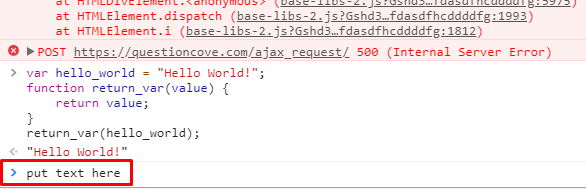
``` var hello_world = "Hello World!"; function return_var(value) { return value; } return_var(hello_world); ``` Output is "Hello World!" Get it now?
ThisGirlPretty:
*hits head on desk repeatly*
563blackghost:
i think so e.e
Ultrilliam:
Alright, try it =P
Ultrilliam:
TGP where are you stuck?
ThisGirlPretty:
Where to type it in 😂
Ultrilliam:
The chrome console
Ultrilliam:
You had it there

 ThisGirlPretty:
OHHH
563blackghost:
so like dis? |dw:1520039955836:dw| hrmmmm
563blackghost:
honestly im still confused >.>
Ultrilliam:
Back, had to eat dinner. You did it correctly, now split it into 2 variables (1 of them a constant)
Ultrilliam:
@563blackghost
563blackghost:
hrmmmm e.e
Ultrilliam:
Should I show you the solution?
563blackghost:
let meh try one more time, then put it okie?
Ultrilliam:
Kk
563blackghost:
what do you mean by split to two variables? i add another besides star? (in my case dat is)
 Shadow:
How come when you define a variable, you get returned with "undefined"
Ultrilliam:
Because you didn't specify anything to be returned, so since nothing returns, the return is undefined shadow
Ultrilliam:
I mean have 2 variables like you did in your first attempt, but using variables instead (and one of those variables using the `const` prefix)
Ultrilliam:
(as in predefined BOTH values you pass to the function)
Shadow:
Can you define multiple variables in the same line?
Ultrilliam:
Yes, like this ```javascript var example="a",test=2,extra="testing"; ``` Put a comma inbetween each variable you want to define. You can also define variables without a value until your ready for a value like this: ```javascript var example,test,extra; var example = "a"; var test = 2; var extra = "testing"; ```
563blackghost:
i dont get it ultri ;-; i understand adding the var but i dont know how to add da consts ;-; its const example = "test"; right?
Ultrilliam:
Correct
Ultrilliam:
BTW you might want to put code like this: \`code here\`
dude:
```javascript const people = "something" var ghost = "boo" ```
Ultrilliam:
```javascript const vara = "Hello"; var varb = "World!"; function demo(a,b) { return a+b; } demo(vara,varb); ``` Alright, here's how it should look =P
563blackghost:
O-O
563blackghost:
oh
dude:
I read coordinate points.
563blackghost:
*taking note*
 mhchen:
[\begin{ var a = "a";} \]
mhchen:
How do you make a block of code * '^' *
 BlankSpace:
Okay look @mhchen
BlankSpace:
do
BlankSpace:
No do this ```
BlankSpace:
BlankSpace:
``` words under it
BlankSpace:
BlankSpace:
BlankSpace:
``` test ``` see?
mhchen:
Normal Text ``` var code = "Codey Text"; ``` Normal text
mhchen:
Yesh I got it. Can't wait for Ultri's next javascript tutorials.
BlankSpace:
``` test ``` ``` test ``` ``` test ``` ``` test ``` ``` test ``` ``` test ``` And the boxes can be repeated and repeated as shown ^
 Falconmaster:
could you teach me the code of the jedi and the code to be mod?
Join our real-time social learning platform and learn together with your friends!
 KBaby:
Verse 1 We left our names in the dust of the driveway Watched the old town shrink
KBaby:
Lyrics Generator Use AI to write the lyrics for a song. Suggested Genres: Pop Hip
KBaby:
Verse 1 We left our names in the dust of the driveway Watched the old town shrink
KBaby:
Lyrics Generator Use AI to write the lyrics for a song. Suggested Genres: Pop Hip

 aitexturegenerator:
How are you all handling AI-generated textures for 3D models and game assets without losing the hand-made feel? I've been doing a small stylized environment
aitexturegenerator:
How are you all handling AI-generated textures for 3D models and game assets without losing the hand-made feel? I've been doing a small stylized environment

 Demon25:
Woke up feeling like that girl and that dude well he still aint crap pluse the du
Demon25:
Woke up feeling like that girl and that dude well he still aint crap pluse the du
 playtsec:
how do I get rid of stress from teachers... I just feel like running out the classroom and leaving on my own.
playtsec:
how do I get rid of stress from teachers... I just feel like running out the classroom and leaving on my own.
 JohnnyLFowler0812:
What type of gamer would play something and then get off for a while. Why not sta
JohnnyLFowler0812:
Which is better? Metallica Rap Country R&B hiphop Medal Gospel Chill Which 3 opti
JohnnyLFowler0812:
What type of gamer would play something and then get off for a while. Why not sta
JohnnyLFowler0812:
Which is better? Metallica Rap Country R&B hiphop Medal Gospel Chill Which 3 opti