
 kittybasil:
Tips on how to use Excel to code data sets? This is an assignment for a CS class. (Instructions attached in the file section. I do not need an entire run-through, just tips.)


 jaynater:
I don't know how to use Excel, nor do I know much about code, but I think that if you somehow were able to take certain data values ( let's say 753 and 1001) and tell the computer what certain values need to be (let's say less than 950) or if values exceed a number ( let's say greater than 950), then you can tell the computer to lay out the numbers that exceed that set number or are less than that set number. This way, the computer can lay out those values at position x and position y (let's say the numbers that are less than 950 are set to (1,1) while values greater than 950 would be (1,2) as you've probably already figured out). It's a rough idea of how it could be done, but I have no clue as to how to input the data to the computer and tell it how to complete those tasks, sorry if this didn't answer your question.
jaynater:
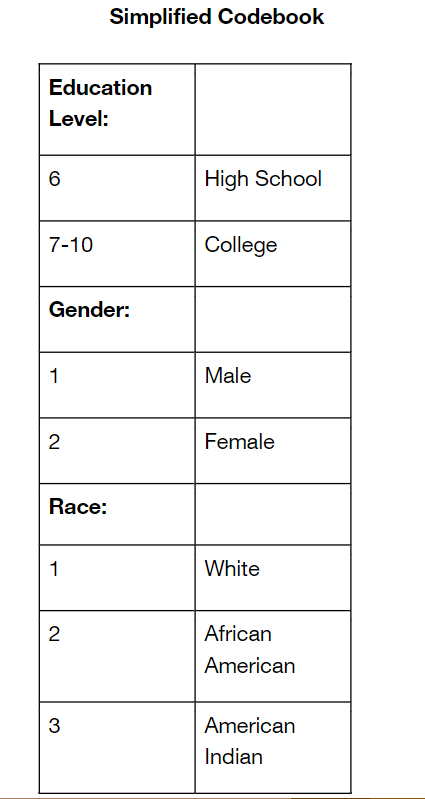
You might also be able to take values already set (like the number for the race) and rename them to their proper name (3 to American Indian) and place them in the location where they need to be set.
 imqwerty:
use the formula bar
kittybasil:
Formula bar? @imqwerty
imqwerty:
|dw:1587255523143:dw|
kittybasil:
Oh, that. has zero Excel knowledge aside from random formulas
kittybasil:
I mean, I have a rough idea of what to do but there are so many parameters for a first-timer. No wonder the professor is notorious for being the most difficult on campus at least in CS
imqwerty:
The given questions are the standard ones; you will be able to find formulas for them online. for example, if you want the median of the cells F2 to F2500 and you want to store it in cell I2 then you simply click on I2 and type `=MEDIAN(F2:F2500)` However, if you get stuck anywhere, you may tag me
kittybasil:
The first step after cloning the data to a new sheet asks that I code certain categories in the data to match this format. While it says I can use any method/formula, I don't exactly know how to go about this yet.
 kittybasil:
-
Saving links for myself: Google Sheets tips
- SWITCH formula
- TO_TEXT (thanks to Hero)
- Decoding
kittybasil:
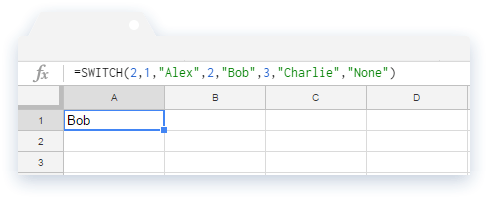
Looks like the SWITCH formula might be the answer to my problems. If anyone disagrees please let me know ASAP lol[/s[
imqwerty:
i'm not familiar with excel and switch gave me this error: "#NAME?"
imqwerty:
an alternative would be an \(IF~statement\), it worked for me
kittybasil:
I don't know what an IF statement is, but SWITCH is said to be very similar so...
imqwerty:
is the switch thing working for ya?
kittybasil:
Currently in progress 👌🏻
imqwerty:
coolio
 kittybasil:
Er... I meant the article. But also that.
imqwerty:
ye, i saw that article as well :]
imqwerty:
i tried this: =SWITCH(C2, 1, "MALE", 2, "FEMALE", "null") but it gave me that error
kittybasil:
...no, that doesn't have enough parameters for me
kittybasil:
btw, SWITCH is working on my end, but idk how to make it apply to an entire column...
 imqwerty:
great :-]
Join our real-time social learning platform and learn together with your friends!
 Demon25:
For a hoco proposal with a cheerleader and football player, what else should be a
Demon25:
For a hoco proposal with a cheerleader and football player, what else should be a

 Breathless:
TOC: "MGF any confirmation on the commander? we require confirmation as soon as[radio static].
Breathless:
TOC: "MGF any confirmation on the commander? we require confirmation as soon as[radio static].
 EdwinJsHispanic:
I wrote something that I don't know if I want it as a poem or song, Please let me know on yours thoughts about it, I'm still doing this! "Broken promises an
EdwinJsHispanic:
I wrote something that I don't know if I want it as a poem or song, Please let me know on yours thoughts about it, I'm still doing this! "Broken promises an
 thehearken:
hi um I don't know if this is the right section for this, but can someone go over my poem and tell me if its good enough to give my English professor for a
thehearken:
hi um I don't know if this is the right section for this, but can someone go over my poem and tell me if its good enough to give my English professor for a
 heartlessprophet:
Aye what's 19z%u00f74p=9u03c0 my teacher thinking of impossible questions for us
heartlessprophet:
Aye what's 19z%u00f74p=9u03c0 my teacher thinking of impossible questions for us
 kippppp:
does anyone have any good tips for writing stories? i'm trying to write a dnd campaign but i'm not that great of a writer yet.
kippppp:
does anyone have any good tips for writing stories? i'm trying to write a dnd campaign but i'm not that great of a writer yet.
 GRIZZLEY19:
Y'all let me know what y'all think about this beat I made I took me like a hour maybe rate it 0/10 https://drive.
GRIZZLEY19:
Y'all let me know what y'all think about this beat I made I took me like a hour maybe rate it 0/10 https://drive.
 Ultrilliam:
Welcome to the 10th Anniversary Update! (Part 2) Sorry this one passed the date a
Ultrilliam:
Welcome to the 10th Anniversary Update! (Part 2) Sorry this one passed the date a
 Twaylor:
was walking downtown and my adhd brain wanted to make some (rock?) lyrics: There'
Twaylor:
was walking downtown and my adhd brain wanted to make some (rock?) lyrics: There'