
 CoolRekterizer:
Learning LaTeX with CoolRekt
CoolRekterizer:
It's been a while since I've done LaTeX, but anyways, let us start with sizes.
CoolRekterizer:
Before you decide to put in stuff, you must type in this command for every LaTeX prompt that you want to apply in your text: `\(\[size]{[text of your choice}\)`
CoolRekterizer:
So for example, if I wanted to do a large font, I could perhaps say `\(\LARGE{HELLO}\)`, which would give me this: \(\LARGE{HELLO}\)
CoolRekterizer:
As for the different sizes, here are a list of sizes you can use to apply to your text to live out your text or make it so people have to look twice. Tiny = \tiny = \(\tiny{HELLO}\) Size of Scripts \scriptsize = \(\scriptsize{HELLO}\) Small = \small = \(\small{HELLO}\) Normal = \normalsize = \(\normalsize{HELLO}\) Large = \large = \(\large{HELLO}\) Larger = \Large = \(\Large{HELLO}\) Even Larger = \LARGE = \(\LARGE{HELLO}\) Huge = \huge = \(\huge{HELLO}\) Even Huge = \Huge = \(\Huge{HELLO}\)
 Kagura:
okie
CoolRekterizer:
Next we will go through colors. Colors has a similar command as sizes, it will be `\(\color[color of your choice]{[textofyourchoice]}\)`
CoolRekterizer:
Let's say you want your text to be blue... you could put `\(\color{blue}{blue.}\)`, which will give you \(\color{blue}{blue.}\)
CoolRekterizer:
As for the colors that you can put, I'm assuming you can put any, just not things like red-orange or green-blue...
 Midnight97:
coding love it this kinda what i do
CoolRekterizer:
Now we can go on to fonting. Now fonting is a little bit more complex for those who don't know much about LaTeX, but a prompt like `\(\[font of your choice]{text of your choice}\)` should work fine.
Kagura:
thx rek
 Spectrum:
Let's try something different.
 Illuminous:
Hm?
Illuminous:
Seeing kind of the same tutorials these days.
CoolRekterizer:
CoolRekterizer:
Maybe perhaps I could do bbcode and html instead of LaTeX?
Spectrum:
\(\overset{\huge\color{#ff78ae}{\heartsuit~\heartsuit~\heartsuit}}{\Huge\bf\color{#ff78ae}{Love}}\)
Spectrum:
I forgot how to do it and taught myself
CoolRekterizer:
This would be pretty cool to teach tbh
Spectrum:
\(\overset{Hi}{\underset{Hi}{Hello}}\)
 Redogforever21:
Spectrum:
OH GOT IT
CoolRekterizer:
Redogforever21:
WOW
Redogforever21:
i ddnt work
CoolRekterizer:
Hm..
Spectrum:
\(\huge\overset{\color{#ff78ae}{\huge{\heartsuit~Love~\heartsuit~Love~\heartsuit}}}{\underset{\color{#ff78ae}{\huge{\heartsuit~Love~\heartsuit~Love~\heartsuit}}}{\Huge\color{#ffb3c8}{Spread~The~Love}}}\)
Spectrum:
WOOO THATS THE BEST I HAVE DONE IN FOREVER
CoolRekterizer:
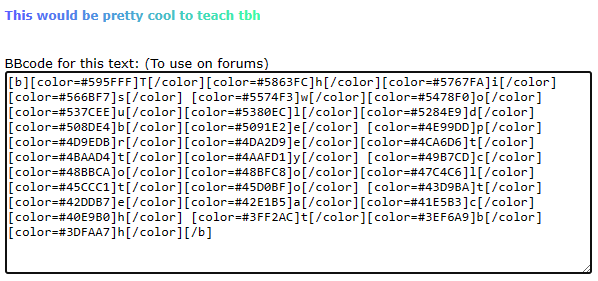
So the reason I say you should use the link is because this is what the coding prompt actually looks like on the text I made with colors.
 Spectrum:
I don't cheat.
CoolRekterizer:
It is possible, but it takes a lot of time. In your case, your using the same color for each piece of text, however the one I'm writing has a different color for each letter, making it a lot more complicated to put together.
Spectrum:
Spectrum:
 Astrid1:
\[ \LARGE\color{#F1C0E8}{.}\color{#F1C0E8}{.}\color{#FFCFD2}{\heartsuit}\color{#FDE4CF}{.}\color{#FBF8CC}{.} \color{#FFADAD}{R}\color{#FFD6A5}{a}\color{#FDFFB6}{i}\color{#CAFFBF}{n}\color{#9BF6FF}{b}\color{#A0C4FF}{o}\color{#BDB2FF}{w}\color{#CFBAF0}{.}\color{#F1C0E8}{.}\color{#FFCFD2}{\heartsuit}\color{#FDE4CF}{.}\color{#FBF8CC}{.}\] AHEUHEUHDGJDK
Join our real-time social learning platform and learn together with your friends!
 DoltonCarlee:
what are y'all's options on S A T essays because honestly their not that bad
DoltonCarlee:
what are y'all's options on S A T essays because honestly their not that bad

 thereneelg:
Can someone give me a summary of article 231, The war guilt clause?? I need to explain what it is, but I can't find any shortened version of what it is and
thereneelg:
Can someone give me a summary of article 231, The war guilt clause?? I need to explain what it is, but I can't find any shortened version of what it is and
 luisaam2:
What should you do when the person you want to talk to the most is the one making
luisaam2:
What should you do when the person you want to talk to the most is the one making
 Breathless:
https://medal.tv/games/roblox/clips/nAYivIl6oXB6q9QAI?invite=cr-MSxCSk4sMTY4OTA4N
Breathless:
https://medal.tv/games/roblox/clips/nAYivIl6oXB6q9QAI?invite=cr-MSxCSk4sMTY4OTA4N
 Twaylor:
I'm not that good at law can someone fact check this without bias? June 29, 2026, the Supreme Court decided Chatrie v.
Twaylor:
I'm not that good at law can someone fact check this without bias? June 29, 2026, the Supreme Court decided Chatrie v.
 Demon25:
For a hoco proposal with a cheerleader and football player, what else should be a
Demon25:
For a hoco proposal with a cheerleader and football player, what else should be a
