
 Aratox:
The long-awaited BBCode tutorial is here!
Aratox:
Aratox's Guide to Pinging Users Utilizing BBCode Hi there! After recently discovering BBCode, I thought I'd make a guide for QuestionCove users on a full list of BBCode commands. Yes, I know that I'm nowhere nearly as advanced as some users here on QuestionCove (@extrinix, @ultrilliam, @astrid1, and others, the list goes on and on), so I'm not doing that (YET), but I thought that I'd make a unique post about how to "ping" people, seeing as James (@ultrilliam) hasn't implemented real pings yet. What is a ping? A ping, according to Google, is "essentially, a notification—primarily for smartphones". (Please note, this tutorial will NOT send anyone a notification unless you send this within the user's DMs.) How do I ping a user here on QC? Please note: there is no current implementation for real pings yet (it exists in the site code, but hasn't been released by James yet due to some bugs). Anyways, I'm here to teach you how to create and use the most realistic-looking pings. Note the user's name color. There are Yellow users (levels 0-19), Orange users (levels 20-49), Purple users (levels 50-74), Blue users (levels 75-89), Green users (levels 90-99), and Moderators and Administrators. Here are the hex codes for the colors: - Yellow - #FFA500 - Orange - #F36100 - Purple - #CDA0FF - Blue - #23B7F3 - Green - #6AAA25 - Moderators and Administrators - #00C5C5 These are important to refer to, as they will provide the colors for the user's ping. Note a user's profile page link It's important, in my eyes, to link a user's profile page to their ping. Don't ask me why, it just seems proper. To do this, use the `[url]` tag. For example: `[url=https://www.questioncove.com/users/ultrilliam]Look! It's the owner's profile![/url]` would output this: [/url]Look! It's the owner's profile! (PLEASE NOTE: you can find the user's profile link by hovering above their nickname and then by clicking "View Profile". After that, go up to the URL bar, select the URL of the page, and press "ctrl" and "c" on your keyboard to copy the link.) Bold text The [b] tag regulates bold text. Bold text looks like this. The following is an example of the bold tag: `[b]Example text[/b]` would output Example text. Pings Now, for the moment you've all been waiting for: PINGS! To create a ping, we combine all three code examples above (colors, links, and bold text). First, you'll want to utilize the `[url]` tag, changing the link to the specified user's profile link. Then, use the `[color]` tag to set it to one of the username colors as shown in the table above. Lastly, use the `[b]` tag to bold their name. After that, type in "@", followed by their username. Lastly, close all three tags: the closing `[/b]` tag FIRST, the closing `[/color]` tag second, and finally the closing `[/url]` tag. PLEASE NOTE THE SLASH IN THE CLOSING TAGS. After all of this, a "ping's" code should look something like this: `[url=https://www.questioncove.com/users/ultrilliam][color=#00C5C5][b]@ultrilliam[/b][/color][/url]` This will output the following: @ultrilliam (This works in the All Subjects & Miscellaneous chats, as well as DMs) Thank you for taking your time to read this post. If you have any questions about BBCode, please DM me. I'll also post a screenshot of what the ping looks like in All Subjects below. (Again, please note, this does NOT send a notification to anyone, unless this is sent in DMs.)
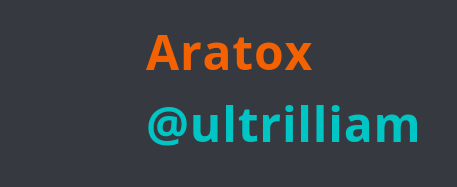 Aratox:
Please also note that pings are distorted on posts due to the leveling system
Aratox:
Aratox:
@ultrilliam @dude @shadow may one of you please lock this post
 steak:
BBC
 curriful:
:3
 hannahj:
i dont understand
Aratox:
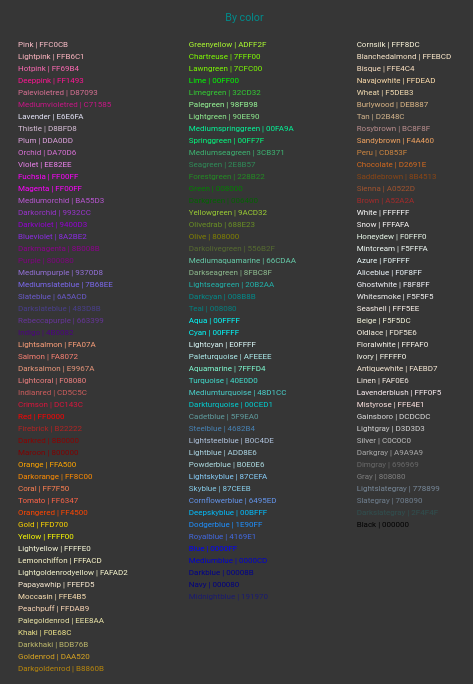
Here's a full list of colors that are compatible with BBCode. Please note that all HEX CODES (#FFFFFF-#000000) work, not just those listed in the image below.
 2hrs:
2hrs:
it really took u 500thsouand years to do this isn't that crxy
 Flowerpower54:
Whats this?
 SnowyBreaks:
Yeaaaaa how do i use these codes???? They aint usable.
 alphaXtiger:
huh?
Aratox:
 kikidoyoulovememwa:
oop
alphaXtiger:
i thought the mods of this place mostly post that stuff or somthing i am confused
Aratox:
SnowyBreaks:
Aratox:
SnowyBreaks:
 Timmyspu:
I know @extrinix made one a while back that @umm might be able to bump up.
Aratox:
 Manny300303199:
a lot of deatil
Manny300303199:
detail*
 GoatyGoat:
yeah um nokt reading all dat
Aratox:
GoatyGoat:
dont mind the k :)
GoatyGoat:
GoatyGoat:
The name is crazy tho " Aratox's Guide to Pinging Users Utilizing BBCode"
Aratox:
GoatyGoat:
 Extrinix:
Blue level also represents the Ambassador's Anarchy symbol (A with a circle)
Extrinix:
Aratox:
Extrinix:
Ambassadors don't have an official color, they only get an anarchy symbol next to their names
Aratox:
Extrinix:
Yup
 Tsukage:
Im impressed Aratox. Ill wait patiently for that YouTube video though. This'll make me dyslexic by the time im finished comprehending the first segment.
 OppStoppax:
bbc >//<
 L8RVAL:
W
L8RVAL:
 jessistocutelol:
w
 luhivqqcherry:
erm i still dont understand.
 boredperson955:
🤫🧏
 Alexis1415:
Thank you, i legit forgot how to do all of this a long time ago 😭😭
 StevenisGhost:
thanks!
 forgetmylife:
W forgot all about this
Join our real-time social learning platform and learn together with your friends!
 DoltonCarlee:
what are y'all's options on S A T essays because honestly their not that bad
DoltonCarlee:
what are y'all's options on S A T essays because honestly their not that bad

 thereneelg:
Can someone give me a summary of article 231, The war guilt clause?? I need to explain what it is, but I can't find any shortened version of what it is and
thereneelg:
Can someone give me a summary of article 231, The war guilt clause?? I need to explain what it is, but I can't find any shortened version of what it is and
 luisaam2:
What should you do when the person you want to talk to the most is the one making
luisaam2:
What should you do when the person you want to talk to the most is the one making
 Breathless:
https://medal.tv/games/roblox/clips/nAYivIl6oXB6q9QAI?invite=cr-MSxCSk4sMTY4OTA4N
Breathless:
https://medal.tv/games/roblox/clips/nAYivIl6oXB6q9QAI?invite=cr-MSxCSk4sMTY4OTA4N
 Twaylor:
I'm not that good at law can someone fact check this without bias? June 29, 2026, the Supreme Court decided Chatrie v.
Twaylor:
I'm not that good at law can someone fact check this without bias? June 29, 2026, the Supreme Court decided Chatrie v.
 Demon25:
For a hoco proposal with a cheerleader and football player, what else should be a
Demon25:
For a hoco proposal with a cheerleader and football player, what else should be a
