
 Ballery1:
i have a question.
 Ballery1:
@imqwerty
 Ballery1:
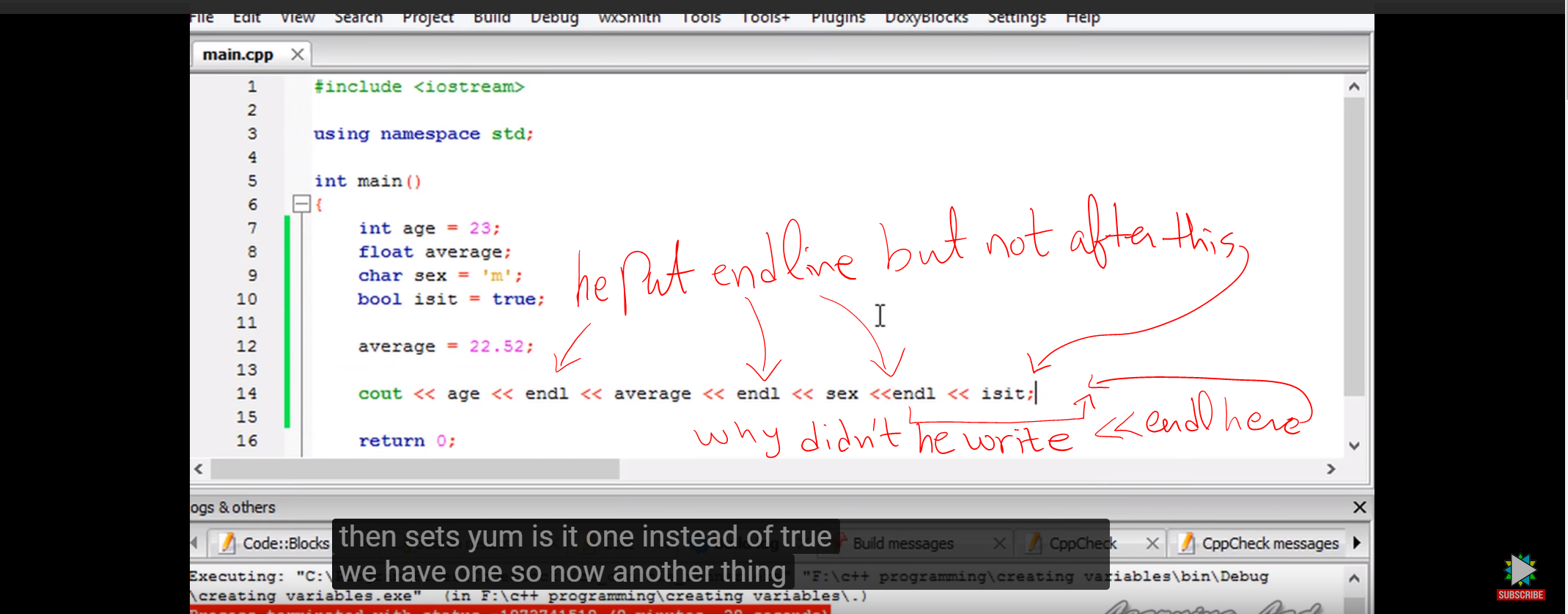
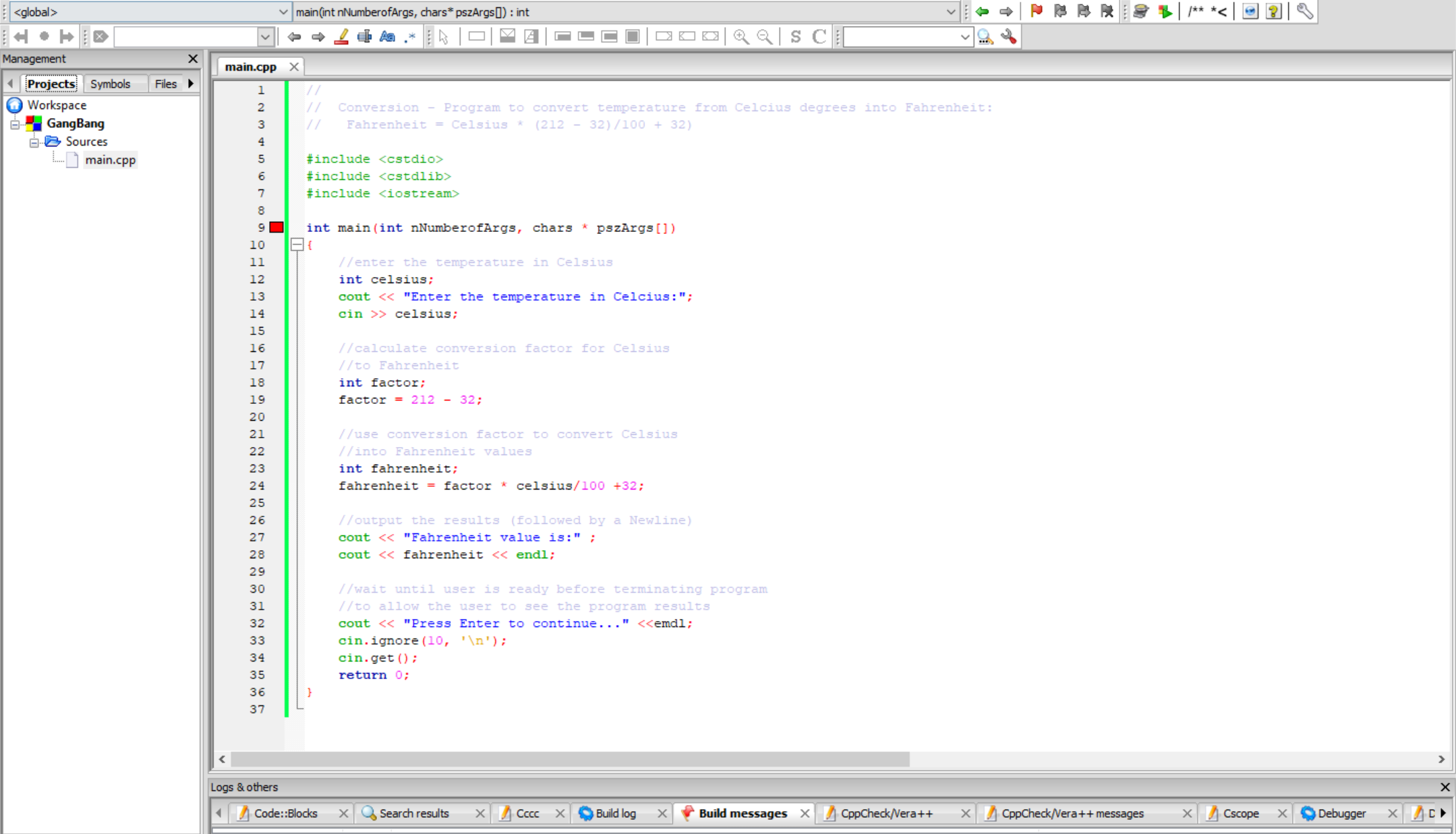
``` // // Conversion - Program to convert temperature from Celcius degrees into Fahrenheit: // Fahrenheit = Celsius * (212 - 32)/100 + 32) #include <cstdio> #include <cstdlib> #include <iostream> int main(int nNumberofArgs, chars * pszArgs[]) { //enter the temperature in Celsius int celsius; cout << "Enter the temperature in Celcius:"; cin >> celsius; //calculate conversion factor for Celsius //to Fahrenheit int factor; factor = 212 - 32; //use conversion factor to convert Celsius //into Fahrenheit values int fahrenheit; fahrenheit = factor * celsius/100 +32; //output the results (followed by a Newline) cout << "Fahrenheit value is:" ; cout << fahrenheit << endl; //wait until user is ready before terminating program //to allow the user to see the program results cout << "Press Enter to continue..." <<emdl; cin.ignore(10, '\n'); cin.get(); return 0; } ```
 imqwerty:
\(\color{#0cbb34}{\text{Originally Posted by}}\) @Ballery1 \(\color{#0cbb34}{\text{End of Quote}}\) you use \(\color{blue}{endl}\) whenever you want to start writing from a new line endl is similar to the new line character \(\color{green}{\backslash n}\) which can be used instead of endl to denote a new line it's not at all necessary to use endl, you just use it whenever you want to start from a new line.
Ballery1:
i see. i have few more questions :)
imqwerty:
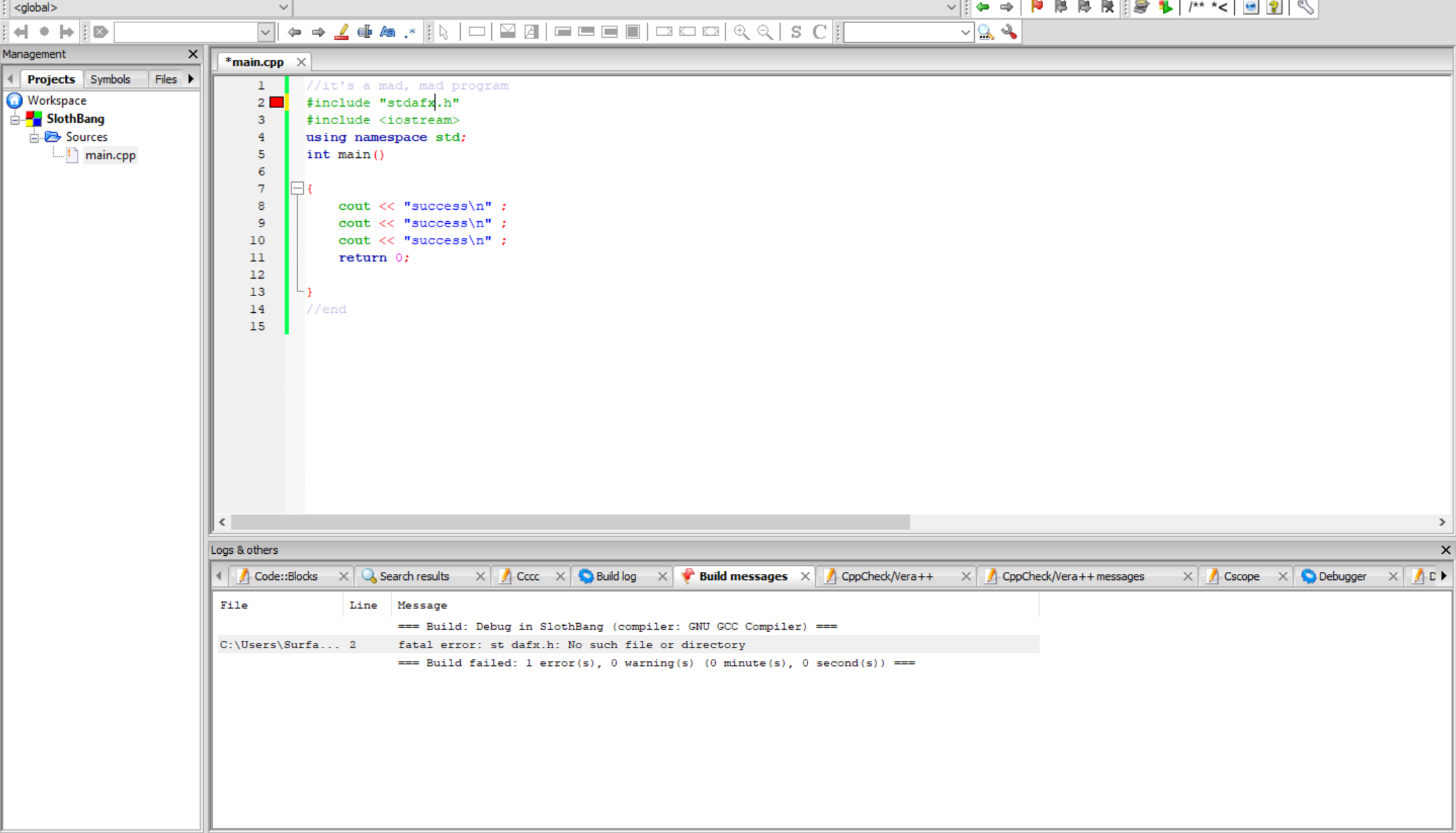
\(\color{#0cbb34}{\text{Originally Posted by}}\) @Ballery1 also, can someone tell me what have i done wrong on line 2??? \(\color{#0cbb34}{\text{End of Quote}}\) i think stdafx.h is only limited to VS Code? you might have to copy the stdafx file into your project folder from VS Code to make it run just comment out the second line, you don't need it anyways bcz you're just using cout
Ballery1:
instead of that *stdafx.h* i inserted stacked and the code worked. idk why ? lol
imqwerty:
\(\color{#0cbb34}{\text{Originally Posted by}}\) @Ballery1 instead of that *stdafx.h* i inserted stacked and the code worked. idk why ? lol \(\color{#0cbb34}{\text{End of Quote}}\) what's stacked? lol
Ballery1:
what does that mean? i'm scared *~* int ain (int nNumberofArgs, chars * pszArgs) what does the stuff in the brackets represents?
imqwerty:
\(\color{#0cbb34}{\text{Originally Posted by}}\) @Ballery1 what does that mean? i'm scared *~* int ain (int nNumberofArgs, chars * pszArgs) what does the stuff in the brackets represents? \(\color{#0cbb34}{\text{End of Quote}}\) nvm, it's \(\large\color{green}{{char}}\) and not \(\large\color{red}{chars}\)
Ballery1:
no but i need to know what's *nNumberofArgs* and *pszArgs* mean?
imqwerty:
add this as well: using namespace std;
Ballery1:
what's Args? and pszArgs?
imqwerty:
the main function is the first function that executes so if you wanted to parse some arguments into the main function you'd do you right when you invoke your program from the command line int main(int nNumberofArgs, char * pszArgs[]) those arguments refer to the command line arguments, so if you do g++ fileName.cpp x y z a b c then the value of nNumberofArgs will be 6 and you pszArgs will be an array having elements as {'x', 'y', 'z', 'a', 'b', 'c'}
Ballery1:
what do you mean by "Parse some arguments into the main function"? i'm sorry, idk these technical words.
Ballery1:
Also ``` // This program calculates the user's pay. #include <iostream> using namespace std; int main() { double hours, rate, pay; // Get the number of hours worked. cout <<"How many hours did you work?" ; cin >> hours; // Get the hourly pay rate. cout <<"How much do yo uget paid per hour?" ; cin >> rate; // Calcualte the pay. pay = hours * rate; //Display the pay. cout << "You have earned $ " << pay << endl; return 0; } ``` on line 8, why's there a "double" beside hours, rate, pay?? what does it mean ?
imqwerty:
\(\color{#0cbb34}{\text{Originally Posted by}}\) @imqwerty the main function is the first function that executes so if you wanted to parse some arguments into the main function you'd do you right when you invoke your program from the command line int main(int nNumberofArgs, char * pszArgs[]) those arguments refer to the command line arguments, so if you do g++ fileName.cpp x y z a b c then the value of nNumberofArgs will be 6 and you pszArgs will be an array having elements as {'x', 'y', 'z', 'a', 'b', 'c'} \(\color{#0cbb34}{\text{End of Quote}}\) correction- it should be- $ g++ filename.cpp -o main $ ./main x y z a b c instead of $ g++ filename.cpp x y z a b c
imqwerty:
double is a datatype, just like int and char use it whenever you're dealing with decimal values
Ballery1:
does it help calculate decimal values or what ?
imqwerty:
yeah, you can't work with decimal values if your variables are int, you need to have a double or float
imqwerty:
\(\color{#0cbb34}{\text{Originally Posted by}}\) @Ballery1 what do you mean by "Parse some arguments into the main function"? i'm sorry, idk these technical words. \(\color{#0cbb34}{\text{End of Quote}}\) are you familiar with functions?
Ballery1:
i'm only familiar with like four functions and even they're sucking the soul out of my life rn. int, bool, void and char
imqwerty:
those are not functions
Ballery1:
oof RIP
Ballery1:
are they called variables ?
imqwerty:
int, bool and char are primitive data types and void is a return type
Ballery1:
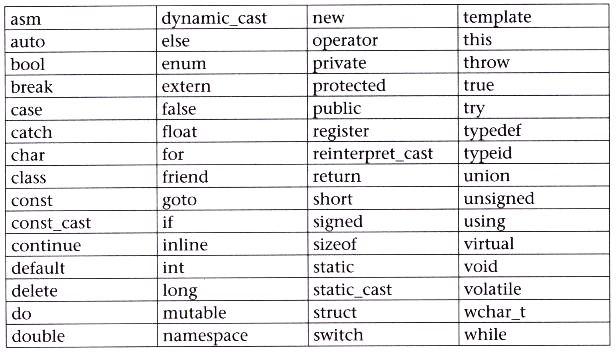
i was literally gonna ask you about this list of things i have saved as a picture. i was gonna ask you, do i need to remember all of them and their applications???
 imqwerty:
you don't have to memorize that
Ballery1:
even for the exams and test ?
imqwerty:
it's like how you meet people, you don't have to memorize their names, and faces you just get familiar with them over time? lol
Ballery1:
i see... so what were you talking about functions??
Ballery1:
doesn't the function starts from int main() ? so like everything inside the curly brackets is the function ???
imqwerty:
main() is a function, but you can have more functions
imqwerty:
before starting functions you should atleast know what a return type is and the concept of datatypes
Ballery1:
listening* :) <3
imqwerty:
``` #include<iostream> using namespace std; void function1(){ cout<<"I'm Speaking from function1"; } int function2(){ return 2; } int function3(int a, int b){ reuturn a+b; } int main(){ cout<<"Hello World"; function1(); int x = function2(); int z = function3(1,6); return 0; } ```
imqwerty:
i've made 4 functions in this example
Ballery1:
what if i run them??? what will i get?
Ballery1:
i guess you didn't make every function a returning function correct?
imqwerty:
yep function1 is void
imqwerty:
void functions don't have to return anything
Ballery1:
why does it look so intimidating ?
imqwerty:
i'll explain it, it's rlly not that complicated
imqwerty:
so there are four functions their names: main, function1, function2, function3
imqwerty:
i'll start by explain what each function does and then we'll see how to program runs
Ballery1:
listening* :)))))))))))))
imqwerty:
function1 the return type of function1 is \(void\) so it doesn't have to return anything whenever the function1 is called it just does what it's supposed to do and ends without returning anything in this case, the function1 outputs this string: I'm Speaking from function1
imqwerty:
how to know the reuturn type of a function? it's specified before the name of the function \(\color{green}{void~}{~function1(){ ... }}\)
Ballery1:
i see, i have a quick question here master. :))))))))) so if you're running 4 different functions and 3 of them are return functions. how will it show on the cmd?? like do you have to draw long horizontal lines between each function to distinguish each one??? if not...can you still do it?
Ballery1:
master, did you mean "return" or "reuturn"? please clarify that :)))))
imqwerty:
nope you don't have to draw any lines lol, we'll come to that later and yes *return
Ballery1:
icy now
imqwerty:
for now, just know what each function is supposed to do, after that we'd see how all the functions get executed
Ballery1:
okie dokie :))))))))
Ballery1:
btw i can't run your code on my silly code block *~*
imqwerty:
is it clear what function1 is supposed to do when it gets called?
Ballery1:
because i have like 3 different projects opened already :/
Ballery1:
i'm trying to absorb this. please give me few minutes to make sense of all this :)))))
imqwerty:
you can run it on any online IDE i made some fixes in the code- https://ide.geeksforgeeks.org/zafi4XrTNt
Ballery1:
oh yes i see now.... so what you want to do with a function is define by the name of the function in the very beginning... if you want to calculate integers... you put int, if you want no return.. you put void, if you are working with characters, you put chars etc
imqwerty:
wdym by define the name of the function at the very beginning?
imqwerty:
\(\color{#0cbb34}{\text{Originally Posted by}}\) @Ballery1 oh yes i see now.... so what you want to do with a function is define by the name of the function in the very beginning... if you want to calculate integers... you put int, if you want no return.. you put void, if you are working with characters, you put chars etc \(\color{#0cbb34}{\text{End of Quote}}\) you can stick to this definition for now, but it's not exactly perfect
Ballery1:
one second plz. i'm trying to find an example...
imqwerty:
aight
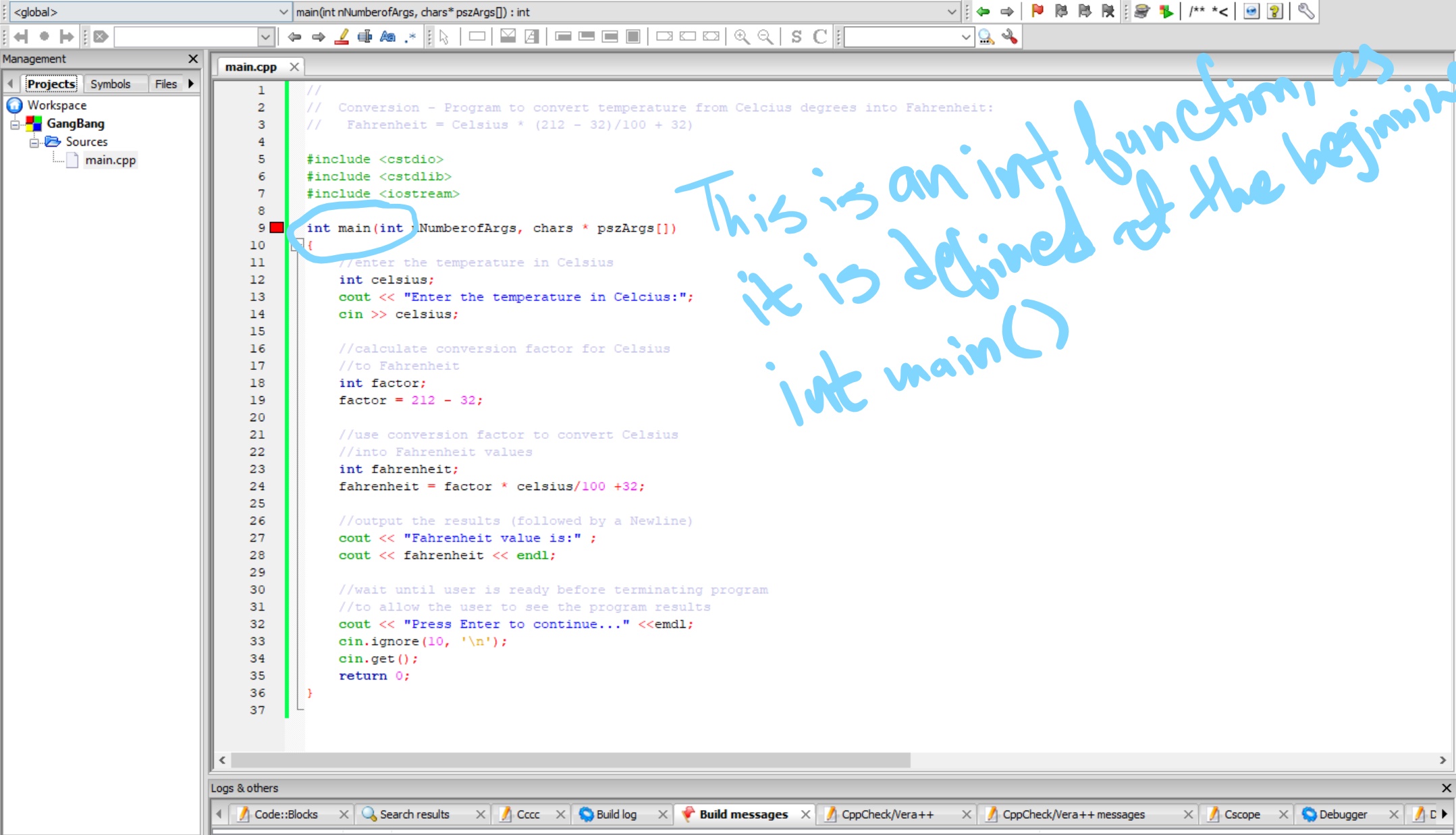 Ballery1:
that's what i mean... like you wrote 4 different types of functions... each one has its own function and its own purpose.
Ballery1:
o so i have a question... so know when you put cout and cin.....is it true that when you tpe cout the arrows are always pointing to the left like this << and when you type cin, the arrows are pointing to the right like this >>??please clarify that :))
imqwerty:
yep, it has to be like cout << and cin >>
Ballery1:
ok thanks ... i'm teaching myself how to print anything and i tried stuff in the list form and they're not showing up for some reason... one sec let me post.
Ballery1:
``` #include <<iostream>> using namespace std; int main; { cout << "Need For Speed Carbon!" << endl; cout << "King of fighters" << endl; cout << "Density" << endl; return 0; } ```
Ballery1:
what am i doing wrong here master? :)))))))
imqwerty:
the first line, it should be #include<iostream>
Ballery1:
do i not.....nvm o///o
Ballery1:
``` #include <iostream> using namespace std; int main() { cout << "Need For Speed Carbon!" << endl; cout << "King of fighters" << endl; cout << "Density" << endl; return 0; } ```
Ballery1:
why is this still not printing??? *~*
Ballery1:
i've corrected everything :/
imqwerty:
what error does it throw? did you save it / compiled before running?
Ballery1:
it says return wasn't declared i nthe scope
 imqwerty:
it could be because return 0; isn't aligned properly
imqwerty:
\(\color{#0cbb34}{\text{Originally Posted by}}\) @Ballery1 this is what i'm getting \(\color{#0cbb34}{\text{End of Quote}}\) that should be *return
imqwerty:
run this instead- i fixed some bugs ``` #include<iostream> using namespace std; void function1(){ cout<<"I'm Speaking from function1"<<endl; } int function2(){ return 2; } int function3(int a, int b){ return a+b; } int main(){ cout<<"Hello World, I'm speaking from the main function"<<endl; function1(); int x = function2(); int z = function3(1,6); cout << "x is: " << x << endl << "z is: " << z << endl; return 0; }
Ballery1:
i think the reason it isn't working because i have multiple projects opened...
Ballery1:
let me close them and run em one by one.
Ballery1:
yup, your code worked just fine. let me test each of them one by one.
Ballery1:
``` // // Conversion - Program to convert temperature from Celcius degrees into Fahrenheit: // Fahrenheit = Celsius * (212 - 32)/100 + 32) #include <cstdio> #include <cstdlib> #include <iostream> int main(int nNumberofArgs, char * pszArgs[]) { //enter the temperature in Celsius int celsius; cout << "Enter the temperature in Celcius:"; cin >> celsius; //calculate conversion factor for Celsius //to Fahrenheit int factor; factor = 212 - 32; //use conversion factor to convert Celsius //into Fahrenheit values int fahrenheit; fahrenheit = factor * celsius/100 +32; //output the results (followed by a Newline) cout << "Fahrenheit value is:" ; cout << fahrenheit << endl; //wait until user is ready before terminating program //to allow the user to see the program results cout << "Press Enter to continue..." <<emdl; cin.ignore(10, '\n'); cin.get(); return 0; } ``` i'm getting error on line 14, 28, and 32
Ballery1:
i'm getting errors on line 14, 28, and 32. what am i doing wrong master? :))))))
imqwerty:
you forgot using namespace std;
Ballery1:
oof... can u tell which line???
imqwerty:
#include <cstdio> #include <cstdlib> #include <iostream> \(\large\color{blue}{using~namespace~std}\)
Ballery1:
yay!! it worked!! WOOOOOOOOOOOOOOW! XD
Ballery1:
yeah XD
imqwerty:
lmao you should be debugging it yourself
Ballery1:
i literally just started programming like less than 2 days ago... XD gimme some time master
Ballery1:
also, can you please tell me if i need to write all those three preprocessors at the top???
Ballery1:
wouldn't just iostream do the trick ?
imqwerty:
yep, you just need iostream
Ballery1:
okie dokie :)))
Ballery1:
btw what is the first two preprocessors are used for?
Ballery1:
let's see if my code knows that at -45 F the celsius is also -45 khekhekhekhe
imqwerty:
i don't exactly know but ig cstdlib have functions which can be used to allocate memory from the heap and cstdio probaby has some input output functions
Ballery1:
ok thanks :))))))
imqwerty:
np
Join our real-time social learning platform and learn together with your friends!
 KBaby:
Verse 1 We left our names in the dust of the driveway Watched the old town shrink
KBaby:
Lyrics Generator Use AI to write the lyrics for a song. Suggested Genres: Pop Hip
KBaby:
Verse 1 We left our names in the dust of the driveway Watched the old town shrink
KBaby:
Lyrics Generator Use AI to write the lyrics for a song. Suggested Genres: Pop Hip

 aitexturegenerator:
How are you all handling AI-generated textures for 3D models and game assets without losing the hand-made feel? I've been doing a small stylized environment
aitexturegenerator:
How are you all handling AI-generated textures for 3D models and game assets without losing the hand-made feel? I've been doing a small stylized environment

 Demon25:
Woke up feeling like that girl and that dude well he still aint crap pluse the du
Demon25:
Woke up feeling like that girl and that dude well he still aint crap pluse the du
 playtsec:
how do I get rid of stress from teachers... I just feel like running out the classroom and leaving on my own.
playtsec:
how do I get rid of stress from teachers... I just feel like running out the classroom and leaving on my own.
 JohnnyLFowler0812:
What type of gamer would play something and then get off for a while. Why not sta
JohnnyLFowler0812:
Which is better? Metallica Rap Country R&B hiphop Medal Gospel Chill Which 3 opti
JohnnyLFowler0812:
What type of gamer would play something and then get off for a while. Why not sta
JohnnyLFowler0812:
Which is better? Metallica Rap Country R&B hiphop Medal Gospel Chill Which 3 opti