
 Gucchi:
programming help
Gucchi:
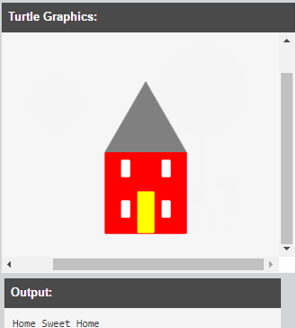
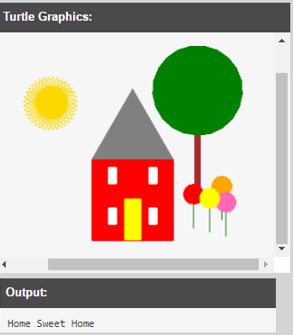
Write a program to draw a picture by defining functions and using Turtle Graphics. Use the following guidelines to write your program. Give your artwork a name. Print the name to the output Draw a picture using the turtle. You can pick the subject of your picture. Some suggestions include a house, a car, a face, a robot. At least two programmer-defined functions must be used. Use at least one color apart from black. The picture should include color.
 Gucchi:
@smokeybrown and heres that video: https://drive.google.com/file/d/1esakvSILRb55X2pcEpiQ91AydGQCmNSs/view
Gucchi:
basically were doing the same program but with color
 SmokeyBrown:
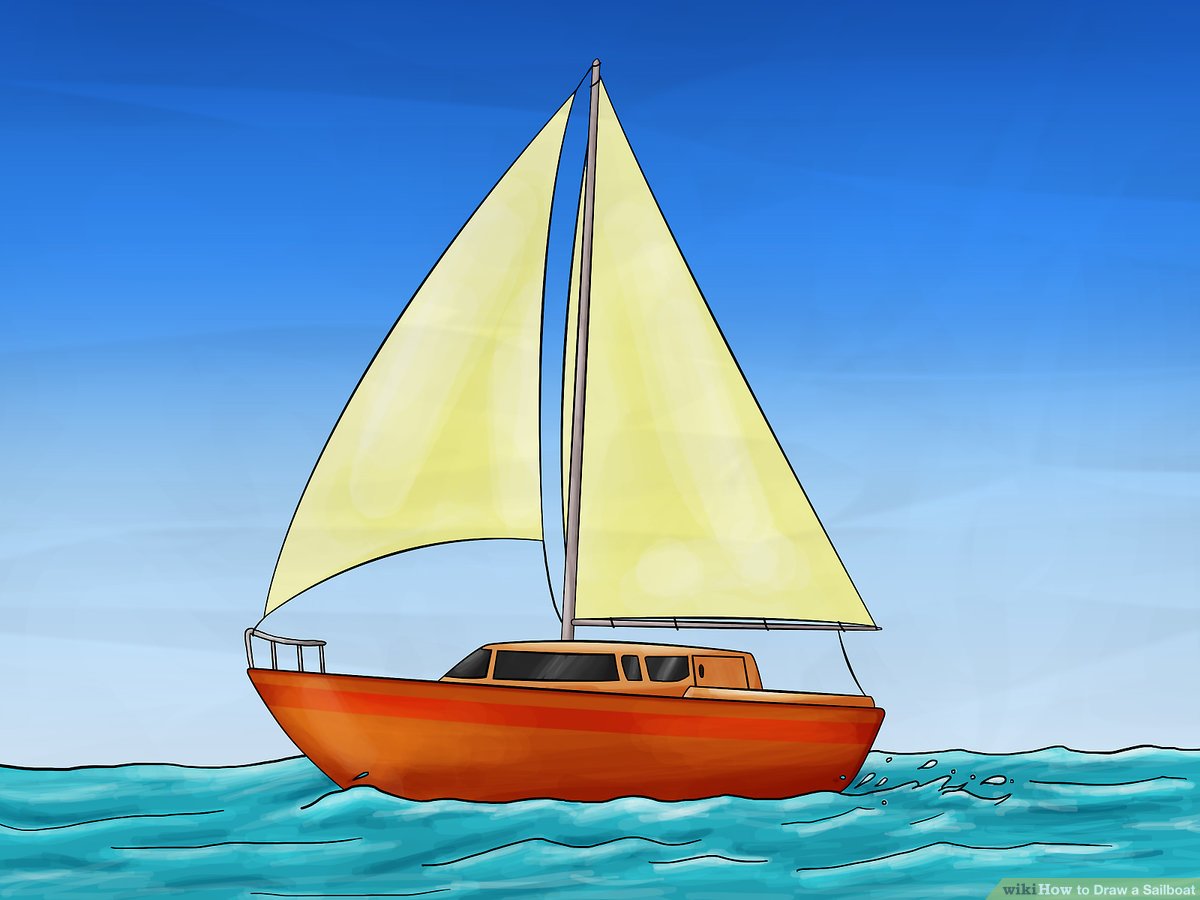
Seems pretty ambitious! It seems like we can use a lot of the same knowledge from our previous program. And like you rightly pointed out, we'll be using solid colored shapes this time around, instead of just lines. Very cool. Well, the pictures may seem complicated, but it looks like they can be broken down into various simple shapes, so that might be a good place to start. I have a feeling we're going to need quite a bit of trial and error for this one...
Gucchi:
hmm, yeah, this one may have a lot of steps
Gucchi:
first we start with import turtle, then def main() so
Gucchi:
import turtle def main()
SmokeyBrown:
Yup, I'd say that's a good start. Before we go any further, I want to make sure you're ok with the drawing we've chosen. I mean, the one in the screenshot above is just an example, so you don't have to use that one. Of course, you can if you want to
Gucchi:
i was thinking we can do a boat
Gucchi:
like a sailboat, a simple one
Gucchi:
what do you think?
SmokeyBrown:
Yeah, that sounds good to me! A sailboat would be less complicated, made up of a few simple shapes. In terms of the structure of the code, we could probably define a function for the bottom of the boat, the mast, and the sail
SmokeyBrown:
More specifically, I guess the bottom of the boat would be some sort of polygon, the mast would probably be a rectangle, and the sail would probably be a triangle
Gucchi:
Gucchi:
wait first i would = turtle.Turtle() im going to name it "kitt"
Gucchi:
so kitt = turtle.Turtle()
 RodWav3:
i want to learn how to program i never tried it
SmokeyBrown:
Since we'll be using some different shapes in the drawing (meaning we want the drawing tool to behave differently), I think it would be appropriate to define a function for each of the simple shapes we'll need. The function definition would be similar to in the video, basically def <function name>(<parameters>): <body of the function> For example, if you wanted to define a function to draw a red rectangle of a given length and width at a given position, you could define a function like def rectangle(turtle, xCoord, yCoord, length, width): turtle.color("red") turtle.setPos(xCoord, yCoord) for i in range(2): turtle.forward(length) turtle.right(90) turtle.forward(width) turtle. right(90) And then you'd be able to call the "rectangle" function with the appropriate parameters in the main function every time you wanted your program to draw a rectangle. You could even add a parameter for color if you wanted that to be changeable, or you could take away certain parameters if you wanted the size or position of the rectangle to be pre-defined. The point of functions is they allow your program a lot of flexibility with their parameters and they save you the trouble of rewriting code that you expect to reuse. It's good that you're getting some practice in how to use them!
SmokeyBrown:
Gucchi:
SmokeyBrown:
Back to the program we're looking at, it might make sense for us to define a function for the sail and a function for the base of the boat at least. We can add other functions if needed as we go Consider what details of these shapes should be adjustable, and that will inform the parameters you give the function. The body of the function should include the behavior for drawing the shape itself, plugging in the parameters as needed
SmokeyBrown:
Yeah, I think defining a function to draw a polygon would be a good place to start
RodWav3:
but theres a lot of codes and stuff
RodWav3:
like numbers and letters and i be forgettin them
RodWav3:
only know this code
SmokeyBrown:
Gucchi:
RodWav3:
SmokeyBrown:
Gucchi:
so: def main def polygon
Gucchi:
ohh wait
Gucchi:
mb
Gucchi:
def polygon def main() like this
SmokeyBrown:
Closer. Make sure that def polygon(): and def main(): are on the same level of indentation so that your main definition doesn't end up inside your polygon definition or vice-versa. It's important that we keep the functions separate for this program.
Gucchi:
i need help with the coords though, im always confused with these
SmokeyBrown:
Oh sure, the coordinates could take a bit of trial-and-error, but I think there is some reasoning to them. Whenever you use the .setPos() function (I think I wrote that correctly), you're picking up the "turtle" and putting it down at the coordinate you set. That's the point that it will start drawing from the next time it moves So, suppose our turtle, dan, starts at (0,0) and we make it draw a 10-length line to the right. After it finishes drawing the line, it ends up at (10,0). Then, if we want the turtle to start drawing from the middle of that line, we could use dan.setPos(5,0) to put him at that point. The next line or shape dan starts drawing will be from the coordinate point we set him at Kind of a silly example, but I hope that makes things easier to understand
SmokeyBrown:
In terms of the sailboat drawing we're working on, the shapes we're drawing do have some positional relationship to each other. For instance, the polygon that represents the base of the boat will be somewhere below the triangle that represents the sail. If we have a rectangle to represent the mast, that would probably be above the base and to the side of the sail. And so on. In other words, the coordinates don't matter in an absolute sense, but they do matter in a relative sense, so that the shapes we're using fit together nicely in the final image
Gucchi:
okay ill brb give me 5 minutes
Gucchi:
i think i understand this a bit better now
SmokeyBrown:
I think the best way to figure it out would be to start at a position and draw from there, then make adjustments as needed. If the shape is a little too far to the left, for example, we could increase the x-coordinate. If it's too far to the bottom, increase the y-coordinate. Etc. Just a matter of trial-and-error, even in the worst case
SmokeyBrown:
I would also like to correct myself; I've been using the function "setPos()" when it should be written as goto(). I repeat, goto() is the correct function for setting the coordinate position. Guess my wires got crossed :)
Gucchi:
so i started the code like: import turtle def polygon(turtle, 0,0): def main():
Gucchi:
it would start at 0,0 right?
Gucchi:
and for length and width
Gucchi:
also for the speed?
Gucchi:
would we put 10?
SmokeyBrown:
 SmokeyBrown:
Ah, a trapezoid. Good choice for the base of a boat. I thought you might suggest that, so I put together a piece of code for drawing a trapezoid while I was waiting Please note that you can adjust the lengths and angles of the trapezoid based on your preference. In any case, the code might look something like this: import turtle def boatBase(turtle, xCoord, yCoord): turtle.penup() turtle.goto(xCoord, yCoord) turtle.pendown() turtle.forward(40) turtle.left(30) turtle.forward(30) turtle.left(150) turtle.forward(90) turtle.left(150) turtle.forward(30) turtle.left(30) def main(): donald = turtle.Turtle() donald.color("brown") boatBase(donald, 5,5) main() I'm happy to break down any parts of the code you like, if that would make it easier to understand. Naturally, I don't encourage you to blindly copy-paste this code I've written, but I hope it can serve as a guide or inspiration for your own code :)
Gucchi:
for the x coord and y coord, do i have to put anything there because it created a trapezoid for me?
 SmokeyBrown:
 SmokeyBrown:
Gucchi:
Okay
Gucchi:
so how we fill in the boat with color now?
SmokeyBrown:
I want to emphasize again that the parameters you choose to define for any given function depend entirely on how much flexibility or control you want over the behavior of that function. We could take away the xCoord and yCoord parameters from the boatBase() function, which would be perfectly fine. We would be sacrificing the flexibility of choosing where the shape, but we would get more control in the sense that the position of the shape would always be the same. In the same way, we could add parameters for color, distance, speed, etc. Or we could define these values as set and unchanging inside the function itself, kind of as they are.
SmokeyBrown:
Gucchi:
Okay
SmokeyBrown:
Ok, looks like it worked :) Here is the code I used, with the addition of those fill commands import turtle def boatBase(turtle, xCoord, yCoord): turtle.penup() turtle.goto(xCoord, yCoord) turtle.pendown() turtle.begin_fill() turtle.forward(40) turtle.left(30) turtle.forward(30) turtle.left(150) turtle.forward(90) turtle.left(150) turtle.forward(30) turtle.left(30) turtle.end_fill() def main(): donald = turtle.Turtle() donald.color("brown") boatBase(donald, 5,5) main() Notice that we place turtle.begin_fill() right before we start drawing the shape and turtle.end_fill() right after the shape is finished and we want to fill it. One neat thing about these commands is that, if the lines of the shape were not connected, it would close the shape automatically (I think, with a straight line connecting the start and end points) and then fill the whole thing. Seems like the default fill color is the turtle's current color, so you can set this manually. You can also use the command .fillcolor() to change the color used for the fill.
SmokeyBrown:
While we're talking about useful commands, I might as well share a resource I found explaining some of the common Turtle commands we might end up using: https://www.geeksforgeeks.org/turtle-programming-python/#:~:text=Commonly%20used%20turtle%20methods%20are%3A%20%20%20,the%20turtle%20clockwise%20%2015%20more%20rows%20
SmokeyBrown:
And I do apologize, but I need to go for dinner soon. I'll try to be back online later. In the meantime, feel free to make as much progress as you can :)
Gucchi:
Gucchi:
Gucchi:
SmokeyBrown:
Nice! Now that we've worked with one example of how functions can be used to draw a shape, you may have some idea of how to define the functions for the other shapes you'll be using. Best of luck for now, and I'll be back later~
SmokeyBrown:
Oop, false alarm. Dinner won't be ready for me until the next hour or so, haha. In the meantime, I suppose I'll hang around here if you need anything :)
Gucchi:
@smokeybrown i made some progress check it out: import turtle def boatBase(turtle, xCoord, yCoord): turtle.penup() turtle.goto(xCoord, yCoord) turtle.pendown() turtle.begin_fill() turtle.forward(40) turtle.left(30) turtle.forward(30) turtle.left(150) turtle.forward(90) turtle.left(150) turtle.forward(30) turtle.left(30) turtle.end_fill() def poleBase(turtle, xCoord, yCoord): turtle.penup() turtle.goto(xCoord, yCoord) turtle.pendown() turtle.forward(25) turtle.left(90) turtle.forward(95) turtle.right(125) def sailBase(turtle, xCoord, yCoord): turtle.penup() turtle.goto(xCoord, yCoord) turtle.pendown() turtle.begin_fill() turtle.right(45) turtle.forward(91) turtle.right(133) turtle.forward(64) turtle.end_fill() def main(): donald = turtle.Turtle() donald.color("brown") boatBase(donald, 5,5) pluto = turtle.Turtle() pluto.color("gray") poleBase(pluto, 3,5) goofy = turtle.Turtle() goofy.color("yellow") sailBase(goofy, 28,100) main()
SmokeyBrown:
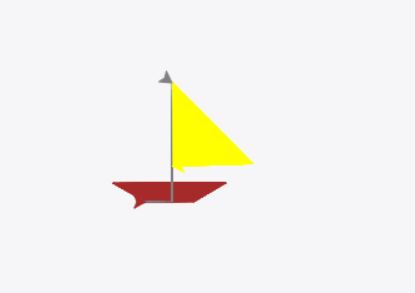
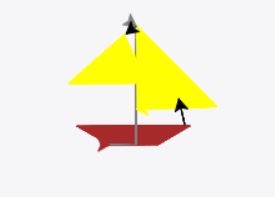
Hey, looking pretty good! That's the image I got when I ran your code. Excellent work :)
 SmokeyBrown:
Also, pretty fun names for the "turtles" lol
Gucchi:
 SmokeyBrown:
No worries, I think the names go well together :) I'd say the drawing turned out pretty similar to the reference pic, considering the tool we're using. I guess we could write another bit of code to get the sail on the left side if we wanted to, but I personally thing the picture looks good as it is, so it's up to you whether you want to pursue that. As for the rest of the requirements for this assignment, I think you've covered just about everything!
SmokeyBrown:
Well, if you're satisfied with the result, I guess we can call it a job well done! Again, good work putting things together like that. I think you ought to be pretty pleased with your work :)
Gucchi:
SmokeyBrown:
Sounds good, take your time. I'm going to eat in a bit (for real this time), so I'll try to check in once I'm back :)
Gucchi:
@smokeybrown i have finished the program. Here it is: import turtle def boatBase(turtle, xCoord, yCoord): turtle.penup() turtle.goto(xCoord, yCoord) turtle.pendown() turtle.begin_fill() turtle.forward(40) turtle.left(30) turtle.forward(30) turtle.left(150) turtle.forward(90) turtle.left(150) turtle.forward(30) turtle.left(30) turtle.end_fill() def poleBase(turtle, xCoord, yCoord): turtle.penup() turtle.goto(xCoord, yCoord) turtle.pendown() turtle.forward(25) turtle.left(90) turtle.forward(95) turtle.right(125) def sailBase(turtle, xCoord, yCoord): turtle.penup() turtle.goto(xCoord, yCoord) turtle.pendown() turtle.begin_fill() turtle.right(45) turtle.forward(91) turtle.right(133) turtle.forward(64) turtle.end_fill() def blackLine(turtle, xCoord, yCoord): turtle.penup() turtle.goto(xCoord, yCoord) turtle.pendown() turtle.left(103) turtle.forward(21) def bblackLine(turtle, xCoord, yCoord): turtle.penup() turtle.goto(xCoord, yCoord) turtle.pendown() turtle.left(219) turtle.forward(10) def ssailBase(turtle, xCoord, yCoord): turtle.penup() turtle.goto(xCoord, yCoord) turtle.pendown() turtle.begin_fill() turtle.right(139) turtle.forward(59) turtle.left(139) turtle.forward(64) turtle.end_fill() def main(): donald = turtle.Turtle() donald.color("brown") boatBase(donald, 5,5) pluto = turtle.Turtle() pluto.color("gray") poleBase(pluto, 3,5) goofy = turtle.Turtle() goofy.color("yellow") sailBase(goofy, 28,100) mickey = turtle.Turtle() mickey.color("black") blackLine(mickey, 67,21) minnie = turtle.Turtle() minnie.color("black") bblackLine(minnie, 28,100) daisy = turtle.Turtle() daisy.color("yellow") ssailBase(daisy, 19,93) print("SailBoat") main()


 Gucchi:
thanks man
Gucchi:
you were a huge help
Gucchi:
i understand this whole turtle graphic thing way better now
SmokeyBrown:
I'm very glad to hear that! Just like most things in life, if you spend more time exposing yourself and practicing with a concept or technique, you'll definitely understand it better I'm glad I could help :)
Join our real-time social learning platform and learn together with your friends!
 VERNEISH:
Two objects are moving along separate linear paths where each path is described by position, d, and time, t.
VERNEISH:
Two objects are moving along separate linear paths where each path is described by position, d, and time, t.

 Maci:
what are the best stock apps for people who want to start investing?
Maci:
what are the best stock apps for people who want to start investing?
 Twaylor:
genuienly how do i get better self control i keep watcing youtube and theres this
Twaylor:
genuienly how do i get better self control i keep watcing youtube and theres this
 IzzyCookie:
|dw:1792074056138:dw| Uhm, I don't know where to ask this, but I'm in college welding at my community college, and I need help learning vertical welding for
IzzyCookie:
|dw:1792074056138:dw| Uhm, I don't know where to ask this, but I'm in college welding at my community college, and I need help learning vertical welding for

 thehearken:
not sure if this is considered spam, im sorry if it is, but does anyone have tips
thehearken:
not sure if this is considered spam, im sorry if it is, but does anyone have tips