
 Gucchi:
Programming help
Gucchi:
Have your eye on a new gadget? A new game? Maybe some new clothes? Well, now's your chance to create a program that calculates the total cost of three items on your wish list, including tax and shipping. Follow these steps to begin your planning: 1. Create a wish list by selecting at least three items you want. 2. Do your research. Find the online store(s) where you can purchase your wish list items and record the price of each one. 3. Think about what user input is required for others to use your program. 4. Think about how you will write an equation to calculate the subtotal of your three items, the tax, and the total purchase cost with tax and shipping. Note: Use 6.5% tax and a $5.99 flat-rate shipping fee for your program. 5. The output must include the following: name of each item, item price, subtotal for items, total amount of tax, shipping fee, and total purchase cost with tax and shipping.
Gucchi:
i have to do this
 Gucchi:
thats my wishlist
Gucchi:
and this is what i have to include in my code: • Input statements • Ask the user for at least three numeric values. • Show proper use of the int() and float() functions. • Calculations required to achieve correct output. • Use proper order of operations. • Use any appropriate math functions. • Output statements • Create clear and well organized output to share the data and results of the calculations. • Show proper use of the str() function.
Gucchi:
can anyone help me on how to start?
Gucchi:
@vocaloid can you help..
Gucchi:
and what does it mean by three numeric values?
 SmokeyBrown:
The three numeric values would be the price of the three items. Since the items have dollars and cents, it would make sense to represent them as floats. You could get these values as inputs from the user with code similar to this, for example; float price1 = input("What is the price of the first item?") float price2 = input("What is the price of the second item?") float price3 = input("What is the price of the third item?"
Gucchi:
so would i have to give the user my wishlist?
Gucchi:
whats the point of the wishlist
SmokeyBrown:
Or, more accurate to preferred Python syntax, price1 = float(input("What is the price of the first item?")) The program would be meant for other users to calculate the prices of the items on the wishlist. My interpretation is that you're using items from your own wishlist to make sure the program works properly, as an example
SmokeyBrown:
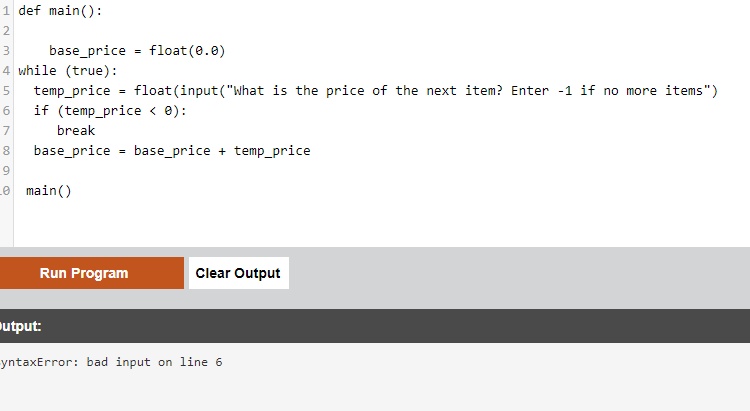
Actually, since the program doesn't need the prices of the individual items, it might be easier from the perspective of resources to only store the total base price of the items before doing the calculations. This approach might be better, since we don't necessarily know in advance how many items the user will have, so we can't hard-program how many inputs to ask in advance. Rather, we might use a loop that the user can opt to manually exit once they are done inputting prices. For instance: base_price = float(0.0) while (true): temp_price = float(input("What is the price of the next item? Enter -1 if no more items") if (temp_price < 0): break base_price = base_price + temp_price Which should allow the program to get the total base price of all the items on the user's list, no matter how many items the user might have
SmokeyBrown:
Assuming we use the variable called "base_price" for the total price without tax and shipping, can you come up with a way to calculate the total price with tax and shipping?
Gucchi:
Gucchi:
?
Gucchi:
im working on the tax and shipping rn btw
SmokeyBrown:
I think you should be good to start defining your method based on the example code I provided. Assuming I didn't mess up the syntax, it should run, at least!
Gucchi:
def main() base_price = float(0.0) while (true): temp_price = float(input("What is the price of the next item? Enter -1 if no more items") if (temp_price < 0): break base_price = base_price + temp_price
Gucchi:
like this?
Gucchi:
then tax at bottom obviously
SmokeyBrown:
Yup, I think you could do it like that! From there, calculating the total price would be outside of the loop, of course. And it would depend on tax as well as shipping cost, which are both provided in the problem
Gucchi:
okay so the only question the user will answer would be the price right?
Gucchi:
what about the three numerical values i have to add?
SmokeyBrown:
If we approach the problem like this, that should be the only input required, yes. We could imagine a program where the user might be asked for other input, such as the number of items they have or the tax or shipping information, but it's not required for this particular case, since that information is already given to us
Gucchi:
SmokeyBrown:
Gucchi:
oh ok so thats already added in the code
Gucchi:
can you also give an idea on how to write the tax and shipping code?
Gucchi:
im trying to make it rn but i want to make sure im doing it right
SmokeyBrown:
Sure, I can try to break it down a bit. For the tax rate, it's a percentage of the total base price, so you would multiply the number representing the tax rate by the base price. For the shipping cost, it's a flat rate, which means you would simply add it to the cost to get the total price (after calculating tax, since there's no tax applied to shipping). The equation for the total cost could look something like: total_cost = base_price * tax_rate + shipping Of course, you would have to define the variables "tax_rate" and "shipping" before that. Since you already know what values to store in each one, it should be pretty simple
Gucchi:
okay once i do that ill paste the code here so you can see it
SmokeyBrown:
Sounds good. I'll look forward to seeing what you come up with :)
Gucchi:
wait, i still dont understand the purpose of the wishlist, why did i have to list three items?
 Gucchi:
SmokeyBrown:
Haha, no worries. I guess you really could choose any numbers you wanted to test the program. Maybe your instructor wanted to give the assignment a sense of realism, so they had you find real prices? That's my guess
 Gucchi:
btw i recieved this error
Gucchi:
do you have any idea on how to fix that?
Gucchi:
@smokeybrown take a look at this vid i found online on the same thing im doing, i want to try doing it like his: https://drive.google.com/file/d/1Jdgo1zRfBQ0lsIdXMEDsmyOncPQkM71H/view
Gucchi:
and i want ask for quantity as well as price
 Timmyspu:
@vocaloid
 Rylee88:
@ultrilliam Is good at computers.
Gucchi:
i want to make mine exactly like his code if i can
SmokeyBrown:
I see. That example video helps make the problem more clear, so thanks for that. Since we seem to be assuming that the user has exactly 3 types of items on their wishlist, we don't need to use a loop at all, and we can go back to our original design of asking about each of the pre-defined 3 items, this time with the addition of the quantity. We could even use an input for String to ask for the name of the item, to make the program more user-friendly and natural sounding if we wanted, like so: item_name1 = str(input("What is the name of your first item?")) item_quant1 = int(input("How much of ", item_name1, " will you buy?")) item_price1 = float(input("What is the price of ", item_name1, "?")) And you could collect the information for these variables for items 1, 2, and 3. Then, to calculate the base price, you could compute: base_cost = float((item_quant1 * item_price1) + (item_quant2 * item_price2) + (item_quant3 * item_price3)) And proceed with the tax and shipping cost computations
Gucchi:
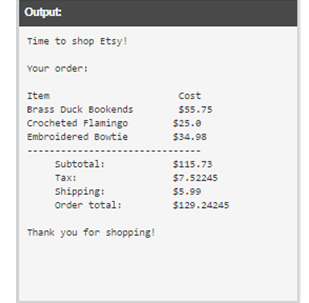
oh and
 Gucchi:
Gucchi:
okay so i would start like
SmokeyBrown:
SmokeyBrown:
Gucchi:
in the video it says welcome shopper message, so how would this go? Like "Time to shop best buy" or any shop i choose?
SmokeyBrown:
Sure, that would work. Since the welcome message doesn't impact the rest of the program, it's fine as long as it makes sense
Gucchi:
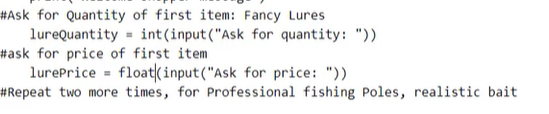
are we going to ask for the quantity?
 Gucchi:
like this?
Gucchi:
thats the example from the vid
SmokeyBrown:
You could do it like that, yes. In fact, that's quite similar to the example I showed in this post
Gucchi:
oh ok yeah ill just go with name, its the same things anyways
Gucchi:
thing*
Gucchi:
so the item_name would be headset_name since the headset is on my wishlist?
Gucchi:
and i would do the same with the other two? so like keyboard_name and moniter_name
Gucchi:
def main(): print("You are shopping with Best Buy!") headset_name1 = str(input("What is the name of your first item?")) headset_quant1 = int(input("How much of ", item_name1, " will you buy?")) headset_price1 = float(input("What is the price of ", item_name1, "?"))
Gucchi:
i did this so far
Gucchi:
im going to do the same with the other two items?
Gucchi:
SmokeyBrown:
That's the basic idea, yeah. You can call the variables whatever you like. Since you know what the items on your wishlist are, I suppose "headset_name," "keyboard_name", "monitor_name", etc. make sense. I went with generic "item_name1," "item_name2," etc assuming that we don't know the user's items in advance, but it's really just a nitpick on the naming convention and doesn't affect the performance of the program
Gucchi:
okay
Gucchi:
def main(): print("You are shopping with Best Buy!") headset_name1 = str(input("What is the name of your first item?")) headset_quant1 = int(input("How much of ", item_name1, " will you buy?")) headset_price1 = float(input("What is the price of ", item_name1, "?")) keyboard_name1 = str(input("What is the name of your first item?")) keyboard_quant1 = int(input("How much of ", item_name1, " will you buy?")) keyboard_price1 = float(input("What is the price of ", item_name1, "?")) moniter_name1 = str(input("What is the name of your first item?")) moniter_quant1 = int(input("How much of ", item_name1, " will you buy?")) moniter_price1 = float(input("What is the price of ", item_name1, "?")) is this good so far?
SmokeyBrown:
That looks functional to me. So with that code, you'll have variables for the names, quantities, and individual prices of your three items. So far, so good! Next, I think you'd want to calculate the total base price, as well as the total price including tax and shipping. After that, you should be able to return your output based on the results, and we can work on formatting that so it looks how you want it to as well
Gucchi:
headsetTotal = headsetQuant * headsetprice
Gucchi:
like this but do i add ones at the end of headsetQuant * headsetprice like headsetQuant1 * headsetprice1 since we added a 1 on the variables here: headset_name1 = str(input("What is the name of your first item?")) headset_quant1 = int(input("How much of ", item_name1, " will you buy?")) headset_price1 = float(input("What is the price of ", item_name1, "?"))
Gucchi:
does it even matter?
SmokeyBrown:
Good point. With the naming convention you've chosen, I guess the "1" is a bit unneeded on the variable names. At the end of the day, variable names are only there for ease of reading and understanding, so you can make them whatever you feel makes sense. I think the approach you're taking is good. You're calculating the total price of each type of item by multiplying the quantity by the price. Makes sense to me
Gucchi:
def main(): print("You are shopping with Best Buy!") headsetName1 = str(input("What is the name of your first item?")) headsetQuant1 = int(input("How much of ", item_name1, " will you buy?")) headsetPrice1 = float(input("What is the price of ", item_name1, "?")) keyboardName1 = str(input("What is the name of your first item?")) keyboardQuant1 = int(input("How much of ", item_name1, " will you buy?")) keyboardPrice1 = float(input("What is the price of ", item_name1, "?")) moniterName1 = str(input("What is the name of your first item?")) moniterQuant1 = int(input("How much of ", item_name1, " will you buy?")) moniterPrice1 = float(input("What is the price of ", item_name1, "?")) headsetTotal = headsetQuant1 * headsetPrice1 keyboardTotal = keyboardQuant1 * keyboardPrice1 moniterTotal = moniterQuant1 * moniterPrice1
Gucchi:
looks good to me
Gucchi:
now the tax and shipping
Gucchi:
wait not yet
Gucchi:
now is our subtotal
Gucchi:
so headsetTotal + keyboardTotal + moniterTotal?
Gucchi:
or does it go differently
SmokeyBrown:
Good catch. You can calculate the tax amount from the subtotal. And you're totally correct, the subtotal would be the added sum of the total prices of the three items. Very nice
Gucchi:
Gucchi:
okay
Gucchi:
so the tax rate is 6.5
Gucchi:
what would i multiply by it?
SmokeyBrown:
You would multiply the tax rate by the subtotal to get the amount of tax paid. Keep in mind that the tax rate is a percentage, so it wouldn't be subtotal * 6.5; rather, the tax paid would be subtotal * 0.065 (which is 6.5/100)
Gucchi:
so like this? headsetTotal + keyboardTotal + moniterTotal * 0.065
SmokeyBrown:
That's the right idea, but you might need to watch out for order of operations. If you write the expression, that way, it will end up multiplying only 0.065 by moniterTotal. If you write (headsetTotal + keyboardTotal + moniterTotal) * 0.065 then the addition inside the parentheses will be calculated before the multiplication, which is what we want. Alternatively, you can define another variable subtotal = headsetTotal + keyboardTotal + moniterTotal taxPaid = subtotal * 0.065 This may be preferable, since you'll be printing the subtotal in the output later on anyway, but these approaches are functionally quite similar
Gucchi:
alright same with shipping so: (headsetTotal + keyboardTotal + moniterTotal) + 5.99 (5.99 is the shipping rate)
Gucchi:
is that correct?
SmokeyBrown:
Well, since shipping is a flat rate, so you don't actually need to add it until the very end. Like in your previous screenshot with the output, shipping is in its own section and just gets added to the subtotal and tax to compute the final total. In other words, there's nothing very special you need to do with the shipping amount, other than adding it with the subtotal and the tax rate to get the total and printing it as part of the output
 Gucchi:
the person in the video wrote this, doesnt mean anything right?
Gucchi:
Gucchi:
nvm, you dont put anything for shipping until the end
Gucchi:
like how you said
SmokeyBrown:
Gucchi:
oh is that necessary?
SmokeyBrown:
No, not really. Generally, you would put comments in your code to make it more readable and easier to understand, but you don't usually need to be that detailed, especially for parts of the code that are self-explanatory. I think this code was probably written with more comments than you'd usually use for the purposes of instruction, to help you follow along
Gucchi:
oh ok so we'll write the shipping rate later in the code
Gucchi:
yeah i really dont have time for comments
Gucchi:
i know its for organizing my code, but dont need it
SmokeyBrown:
That's fair. Commenting can be more important if you're writing long, complicated code or collaborating with another programmer. For a short, relatively straightforward assignment like this, comments aren't a huge priority
Gucchi:
yeah, okay so calculating final total is next
Gucchi:
how would this go?
SmokeyBrown:
Right, calculating the final total is what most of these steps have been leading up to. It's a good thing we already calculated the subtotal and tax rate and have the shipping rate. With these pieces of information, the final total is simply the sum of the subtotal, the tax rate, and the shipping rate. Simple addition!
Gucchi:
ok so subtotal + tax rate + shipping rate
SmokeyBrown:
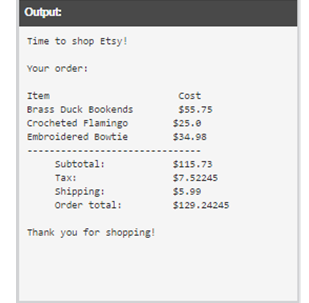
Nice. And with that, it seems like you should have all the pieces of information needed for the output too. We can go off of the output template in the screenshot you shared earlier...
Gucchi:
would it be headsetTotal + keyboardTotal + moniterTotal + 0.065?
Gucchi:
i havent added the shipping to that yet but thats how itll go?
SmokeyBrown:
Not quite. We already calculated the tax rate by computing (headsetTotal + keyboardTotal + moniterTotal) * 0.065 You would certainly include the tax rate as part of the output, but we should have that information already
Gucchi:
(headsetTotal + keyboardTotal + moniterTotal) * 0.065 + 5.99?
SmokeyBrown:
That would be the formula for the final order total, yes :)
Gucchi:
def main(): print("You are shopping with Best Buy!") headsetName1 = str(input("What is the name of your first item?")) headsetQuant1 = int(input("How much of ", item_name1, " will you buy?")) headsetPrice1 = float(input("What is the price of ", item_name1, "?")) keyboardName1 = str(input("What is the name of your first item?")) keyboardQuant1 = int(input("How much of ", item_name1, " will you buy?")) keyboardPrice1 = float(input("What is the price of ", item_name1, "?")) moniterName1 = str(input("What is the name of your first item?")) moniterQuant1 = int(input("How much of ", item_name1, " will you buy?")) moniterPrice1 = float(input("What is the price of ", item_name1, "?")) headsetTotal = headsetQuant1 * headsetPrice1 keyboardTotal = keyboardQuant1 * keyboardPrice1 moniterTotal = moniterQuant1 * moniterPrice1 headsetTotal + keyboardTotal + moniterTotal (headsetTotal + keyboardTotal + moniterTotal) * 0.065 (headsetTotal + keyboardTotal + moniterTotal) * 0.065 + 5.99
Gucchi:
thats the code right nwo
SmokeyBrown:
The calculations look ok, but remember that you may want to save the subtotal and tax rate information as variables to make the output easier In particular, those last three lines could be rewritten as: subtotal = headsetTotal + keyboardTotal + moniterTotal tax = subtotal * 0.065 orderTotal = subtotal + tax + 5.99 That way, you have access to the variables subtotal, tax, and orderTotal when presenting the final output. (You could even have additional variables taxRate = float(0.065) and shipping = float(5.99) in place of those values. This could make the code easier to maintain in case you ever needed to adjust those values, but it's not strictly necessary)
Gucchi:
print("You are shopping with Best Buy!") headsetName1 = str(input("What is the name of your first item?")) headsetQuant1 = int(input("How much of ", item_name1, " will you buy?")) headsetPrice1 = float(input("What is the price of ", item_name1, "?")) keyboardName1 = str(input("What is the name of your first item?")) keyboardQuant1 = int(input("How much of ", item_name1, " will you buy?")) keyboardPrice1 = float(input("What is the price of ", item_name1, "?")) moniterName1 = str(input("What is the name of your first item?")) moniterQuant1 = int(input("How much of ", item_name1, " will you buy?")) moniterPrice1 = float(input("What is the price of ", item_name1, "?")) headsetTotal = headsetQuant1 * headsetPrice1 keyboardTotal = keyboardQuant1 * keyboardPrice1 moniterTotal = moniterQuant1 * moniterPrice1 subtotal = headsetTotal + keyboardTotal + moniterTotal tax = subtotal * 0.065 orderTotal = subtotal + tax + 5.99
Gucchi:
like this?
SmokeyBrown:
Fantastic. At this point, it looks like you have all the pieces you need to present your final output. Assuming we're going with the template in this screenshot, it looks like you'll want to call on each of the item names as well as the total price for each type of item; then the subtotal, tax, and shipping rate; and finally, of course, the order total This can all be handled with print statements, so it should be straightforward, although formatting it to look "nice" might be a bit tricky, to be fair
 Gucchi:
im getting confused with the code when i run the program though
Gucchi:
its asking me what is the name of your first item three items, this means thaat i have to change the sentences right?
Gucchi:
three times*
Gucchi:
headsetName1 = str(input("What is the name of your first item?")) headsetQuant1 = int(input("How much of ", item_name1, " will you buy?")) headsetPrice1 = float(input("What is the price of ", item_name1, "?")) keyboardName1 = str(input("What is the name of your first item?")) keyboardQuant1 = int(input("How much of ", item_name1, " will you buy?")) keyboardPrice1 = float(input("What is the price of ", item_name1, "?")) moniterName1 = str(input("What is the name of your first item?")) moniterQuant1 = int(input("How much of ", item_name1, " will you buy?")) moniterPrice1 = float(input("What is the price of ", item_name1, "?")) these
SmokeyBrown:
SmokeyBrown:
Another benefit of saving the item names in variables is that you can call on them again in the output, when we get back to that. That is, you want to display the item name next to the total for that item, which you can easily do since you have the name variables
 Gucchi:
also its only asking "how much of"
Gucchi:
how do i fix that?
Gucchi:
i actually want it to say "how many headsets would you like to purchase" instead of How much of ", item_name1, " will you buy?"
SmokeyBrown:
I see. Is that screenshot taken after you've replaced "item_name1" with the appropriate variable? For instance, in the input for "headsetQuant1", input("How much of ", headsetName1, " will you buy?"), etc
SmokeyBrown:
And depending on the wording, you might consider rewording the message, for instance "how many..." instead of "how much of...". I'll leave that as a judgement call for you to make :)
Gucchi:
Gucchi:
Gucchi:
it still saying " how much of" maybe the quotation marks are in the wrong places?
SmokeyBrown:
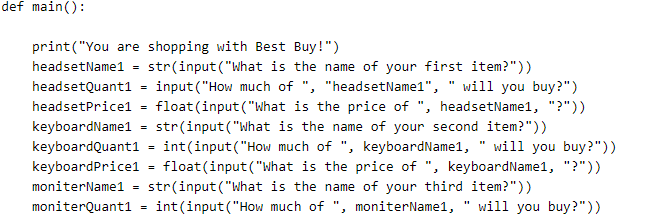
Perhaps so. It looks like the prompt is being cut off without including the other parts of the message. Do you mind showing me the code you have written for that input prompt?
 SmokeyBrown:
It looks like you put "headsetName1" in quotation marks (in line 5, I think?). Since that's the name of a variable, you don't want the quotation marks. You want the program to call the value stored inside the variable, not the name of the variable itself. Removing the quotation marks around "headsetName1" might fix the issue
Gucchi:
oh yeah i was just testing the code that wasnt the issue
SmokeyBrown:
Darn. Let me take another look, then. In the meantime, make sure headsetQuant1 is cast as an int, just like keyboardQuant1 and moniterQuant1. I wonder why the rest of the input prompt isn't showing up? A couple of clarifying questions: What are you typing when the program prompts you for the item names? And does the issue you described happen for all three items?
Gucchi:
Yes for all three
Gucchi:
and im typing headsets, keyboard, basically the items for the names
Gucchi:
i tried retyping it to headsetQuant1 = int(input("How much of ", headsetName1, " will you buy?") but then theres an error on line 6
Gucchi:
i added an "int" on that code, dk if that makes a difference
SmokeyBrown:
Gucchi:
nope that wasnt the issue either
SmokeyBrown:
Gucchi:
 mhchen:
Could you paste your whole code real quick?
Gucchi:
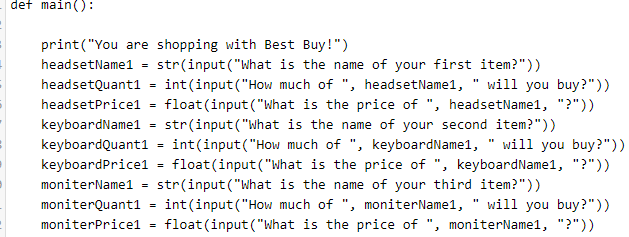
@vocaloid i am working on my code and i have gotten an issue where it is asking "how much of" instead of asking int(input("How much of ", item_name1, " will you buy?")). is there a problem somewhere in that code?
 SmokeyBrown:
I think I may have gotten the syntax for the input() function wrong; I assumed the prompt worked similarly to the print() function wherein you could combine strings with variables. Here's a workaround so we can get the prompt displaying properly. headsetName1 = str(input("What is the name of your first item?")) headsetQuantPrompt = Str("How much of ", headsetName1, " will you buy?") headsetQuant1 = int(input(quantPrompt)) It's a bit clumsy, but I'm basically setting the entire prompt as a separate string in a variable, which can be called in the input function in order to display the proper message. If you'd like, you can give it a try, and if it works, we can rewrite the other sections of code to reflect this change
SmokeyBrown:
Ahem, headsetQuant1 = int(input(headsetQuantPrompt)) it would be helpful if I typed the variable names correctly :)
Gucchi:
print("You are shopping with Best Buy!") (remove) headsetName1 = str(input("What is the name of your first item?")) (remove) headsetQuant1 = int(input("How much of ", item_name1, " will you buy?")) headsetPrice1 = float(input("What is the price of ", item_name1, "?")) keyboardName1 = str(input("What is the name of your second item?")) keyboardQuant1 = int(input("How much of ", item_name1, " will you buy?")) keyboardPrice1 = float(input("What is the price of ", item_name1, "?")) moniterName1 = str(input("What is the name of your third item?")) moniterQuant1 = int(input("How much of ", item_name1, " will you buy?")) moniterPrice1 = float(input("What is the price of ", item_name1, "?")) headsetTotal = headsetQuant1 * headsetPrice1 keyboardTotal = keyboardQuant1 * keyboardPrice1 moniterTotal = moniterQuant1 * moniterPrice1 subtotal = headsetTotal + keyboardTotal + moniterTotal tax = subtotal * 0.065 orderTotal = subtotal + tax + 5.99
Gucchi:
i remvoe the first two right?
Gucchi:
not the price?
SmokeyBrown:
Alternatively, we could forgo this complication and just simplify the prompt with something like "How many of this item will you buy" and "How much does this item cost?" This seems like a better way to go about this, honestly, since using the item names inside the prompt is not really necessary, just a "nice" bit of "flavor text"
Gucchi:
alright lol so what would i have to remove from this code now?
SmokeyBrown:
I think you can keep the code as is but change the prompt message for the item quantities and prices to something simpler and more generic. It would be a silly point for us to get hung up on, after all
Gucchi:
SmokeyBrown:
So, instead of the prompt ("How much of ", item_name1, " will you buy?") or ("How much does", item_name1, "cost?"), you could simply say ("How many of this item will you buy") and ("How much does this item cost?") It's simpler to code and just as easily understood by the user
SmokeyBrown:
Right, since the price input also combines strings with variables in the prompt (which it seems we can't really do), we would probably want to adjust that to a simpler form as well, since I'd expect that we run into a similar issue there
Gucchi:
okay so these three lines need to be changed: headsetName1 = str(input("What is the name of your first item?")) headsetQuant1 = int(input("How much of ", item_name1, " will you buy?")) headsetPrice1 = float(input("What is the price of ", item_name1, "?"))
Gucchi:
i would replace the first two lines with: headsetName1 = str(input("What is the name of your first item?")) headsetQuantPrompt = Str("How many of ", headsetName1, " will you buy?") headsetQuant1 = int(input(quantPrompt))
Gucchi:
like this?
SmokeyBrown:
Gucchi:
SyntaxError: bad input on line 2
Gucchi:
line 2: headsetName1 = str(input("What is the name of your first item?"))
Gucchi:
nvm im stupid, i forgot to add def main at top.
SmokeyBrown:
Gucchi:
TypeError: str() takes at most 1 arguments (3 given) on line 5
Gucchi:
line 5: headsetQuantPrompt = str("How many of ", headsetName1, " will you buy?")
Gucchi:
whats this mean
SmokeyBrown:
Ah, that means that when we use the str() function, we're only supposed to put in one string at a time. We used 3 strings in that line, which caused the error. My bad, I misunderstood how that function worked as well, rip We could certainly keep troubleshooting this issue, but I think it's probably more trouble than it's worth. I think it might be a better use of our time to simplify the prompt messages as I suggested up above
SmokeyBrown:
If you're really invested in making the above work, I think the proper syntax would be headsetQuantPrompt = str("How many of " + headsetName1 + " will you buy?") a technique called "string concatenation". But like I said, it's probably more trouble than it's worth right now to pursue this line of thinking too far
Gucchi:
headsetName1 = str(input("What is the name of your first item?")) headsetQuantPrompt = str("How many of ", headsetName1, " will you buy?") headsetQuant1 = int(input(quantPrompt)) headsetPrice1 = float(input("What is the price of ", item_name1, "?")) okay, so what do i fix first in here
Gucchi:
can you rewrite these correctly: headsetName1 = str(input("What is the name of your first item?")) headsetQuantPrompt = str("How many of ", headsetName1, " will you buy?") headsetQuant1 = int(input(quantPrompt)) headsetPrice1 = float(input("What is the price of ", item_name1, "?")) so i can fix the other two items? idk if this is too much to ask
Gucchi:
i mean i can rewrite them, but what would i change and remove from this code first
SmokeyBrown:
My apologies, it was a simple syntax error. Instead of using commas in those input statements, use plus signs to join the strings together, like this: headsetName1 = str(input("What is the name of your first item?")) headsetQuant1 = int(input("How much of " + headsetName1 + " will you buy?")) headsetPrice1 = float(input("What is the price of " + headsetName1 + "?"))
SmokeyBrown:
In this way, the input is treated as one concatenated (combined) string, rather than several separate string parameters. I think that is why this works, while the code we had before does not
Gucchi:
its saying 'how much of headset will you buy"
SmokeyBrown:
You can consider changing the message to "How many " + headsetName1 + "will you buy?" or some variation so the grammar flows better. Alternatively, something free from grammar like "Enter the number of " + headsetName1 + ":"
Gucchi:
my parents are calling me to eat, ill brb in only 15 minutes, will you be online?
SmokeyBrown:
No problem, take your time. I should still be online when you're back :)
Gucchi:
Okay
Gucchi:
okay im back
Gucchi:
SmokeyBrown:
I personally prefer something like "Enter the quantity of " + headsetName1 + ":" since it is less ambiguous and we can be sure we won't run into any grammar weirdness with the printed message. The other one sounds more like natural language, so it's just a matter of personal preference I think
Gucchi:
def main(): print("You are shopping with Best Buy!") headsetName1 = str(input("What is the name of your first item?")) headsetQuant1 = int(input("Enter the quantity of " + headsetName1 + ":")) headsetPrice1 = float(input("What is the price of " + headsetName1 + "?")) keyboardName1 = str(input("What is the name of your second item?")) keyboardQuant1 = int(input("How much of ", item_name1, " will you buy?")) keyboardPrice1 = float(input("What is the price of ", item_name1, "?")) moniterName1 = str(input("What is the name of your third item?")) moniterQuant1 = int(input("How much of ", item_name1, " will you buy?")) moniterPrice1 = float(input("What is the price of ", item_name1, "?")) headsetTotal = headsetQuant1 * headsetPrice1 keyboardTotal = keyboardQuant1 * keyboardPrice1 moniterTotal = moniterQuant1 * moniterPrice1 subtotal = headsetTotal + keyboardTotal + moniterTotal tax = subtotal * 0.065 orderTotal = subtotal + tax + 5.99 main()
Gucchi:
like this?
Gucchi:
personally, it sounds better
SmokeyBrown:
So far so good, but remember to edit the keyboard and monitor inputs too so they're consistent with this new format. Actually, you can try running the code first to make sure it works. If you're happy with the result, you can edit the other sections so that everything matches up
Gucchi:
Gucchi:
Enter the quantity of headset: is what it comes out as
Gucchi:
is that fine?
Gucchi:
@smokeybrown are you there?
SmokeyBrown:
Sorry, I stepped away for a bit. If that is the message you want, I think you would write it like: "Enter the quantity of " + headsetName1 + " you wish to purchase: "
Gucchi:
Gucchi:
okay now i will revise the other lines of code real quick
Gucchi:
then we can stark working on the actual receipt or output
SmokeyBrown:
Ok, sounds like a plan :)
Gucchi:
okay this is my code right now: def main(): print("You are shopping with Best Buy!") headsetName1 = str(input("What is the name of your first item?")) headsetQuant1 = int(input("Enter the quantity of " + headsetName1 + " you wish to purchase: " )) headsetPrice1 = float(input("What is the price of " + headsetName1 + "?")) keyboardName1 = str(input("What is the name of your second item?")) keyboardQuant1 = int(input("Enter the quantity of " + keyboardName1 + " you wish to purchase: " )) keyboardPrice1 = float(input("What is the price of " + keyboardName1 + "?")) moniterName1 = str(input("What is the name of your third item?")) moniterQuant1 = int(input("Enter the quantity of " + moniterName1 + " you wish to purchase: " )) moniterPrice1 = float(input("What is the price of " + moniterName1 + "?")) headsetTotal = headsetQuant1 * headsetPrice1 keyboardTotal = keyboardQuant1 * keyboardPrice1 moniterTotal = moniterQuant1 * moniterPrice1 subtotal = headsetTotal + keyboardTotal + moniterTotal tax = subtotal * 0.065 orderTotal = subtotal + tax + 5.99 main()
SmokeyBrown:
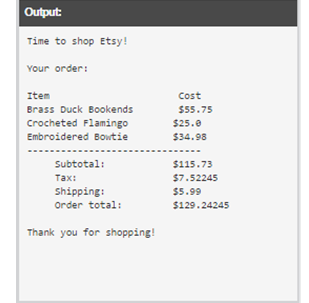
Alright, looks good to me. Now I guess the last step would be to output the results! Would you still like to use the template given by the screenshot?
 Gucchi:
Yes we can use that one
Gucchi:
first, the header
SmokeyBrown:
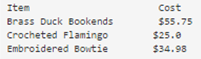
Generally, I think we'll just be using print() statements for the entirety of the output, so it should be pretty straightforward. We just need to know when to use the variables we already have saved from earlier in the program Starting out, it looks like there's some optional flavor text about the shop, then a column for Item and a column for Price. After that, we have of course the item names along with the total cost of each items. For the item name, of course, we would use the corresponding variables, headsetName1, keyboardName1, and moniterName1. For the prices, we likewise have headsetPrice1, keyboardPrice1, and moniterPrice1 We also have the variables corresponding to subtotal, tax, shipping, and order total. And then there's another bit of optional flavor text at the end. Apart from formatting, it doesn't look like there's too much to think about here. Simply plug the appropriate variables into your print statements along with some strings as needed for context, and you should be good to go!
 SmokeyBrown:
You could write something like print("Item Price") With lots of spaces between Item and Price Another way would be using /t, which is the same as a tab keystroke: print("Item /t Price") To achieve a similar effect. You can use either of these on any line with a large space between two words, for example print(headsetName1, " ", headsetPrice1) or print(headsetName1, "/t", headsetPrice1) I hope my syntax is correct this time or we'll have to troubleshoot some more. Fingers crossed!
SmokeyBrown:
Gucchi:
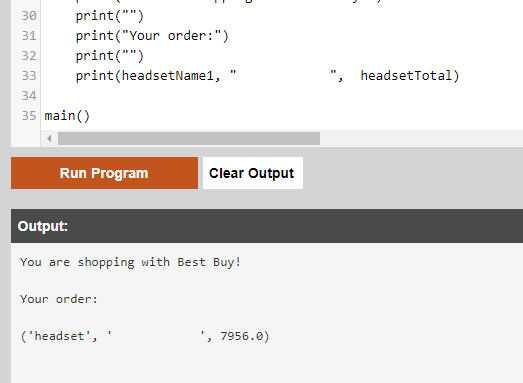
it just come out as "headsetName1, , headsetTotal"
Gucchi:
comes*
 SmokeyBrown:
That's interesting. Could this be another case where I'm using commas when it should be plus signs? Maybe you can try print(headsetName1 + " " + headsetPrice1) or print(headsetName1 + "/t" + headsetPrice1) to see if that fixes it?
Gucchi:
headsetprice1 or headsetTotal?
Gucchi:
TypeError: cannot concatenate 'str' and 'float' objects on line 33
Gucchi:
line 33: print(headsetName1 + " " + headsetPrice1)
SmokeyBrown:
Right, headsetTotal. I copy-pasted from earlier, my bad. And that's also right, we can't concatenate headsetName1, a string, with headsetPrice1, a float. How about print(headsetName1 + " " + str(headsetTotal)) Trying to convert headsetTotal from a float to a string before concatenating it with the rest?
SmokeyBrown:
Also, just a point I'm a bit confused on, it looks like headsetTotal comes out to 7956.0 in your output screenshot from earlier. This seems pretty high. Is that number correct?
Gucchi:
oh i just put in a random number when it asked me for an input
SmokeyBrown:
Ah gotcha. No worries then
Gucchi:
Okay it works but theres one problem
Gucchi:
print(headsetName1 + " " + str(headsetTotal))
Gucchi:
i added this
Gucchi:
i dont if your going to understand this but i put moniter as my first item, and the output showed up as moniter, isnt it supposed to show headset first because of "(headsetName1 + " " + str(headsetTotal))"?
Gucchi:
does that make sense?
SmokeyBrown:
Hold on, you typed "moniter" when the prompt asked you for your first item? The first input is saved in the variable called "headsetName1" so if you typed "moniter" for the first item, the variable "headsetName1" would have the string "moniter" saved inside it. This kind of situation is why I suggested earlier that it might be better to use ambiguous and general variable names like "itemName1". In any case, it should not affect the performance of the program, as long as the appropriate item names are grouped with the appropriate item prices. The only thing that will be confusing is the variable names, which the user is not able to see anyway. It does make things a bit frustrating for you, the coder in that case, I suppose
Gucchi:
Oh okay, as long as it doesnt make a difference for the user
 Gucchi:
i*
Gucchi:
I just want it to look organized
SmokeyBrown:
You could do something similar to what we've been doing print("Item Cost") You may have to adjust the exact number of spaces to get it looking the way you want If you don't want to count the number of spaces, you can also use the tab character, /t, which is kind of like a lot of spaces, but this may be less precise, e.g. print("Item /t Cost") or print("Item /t/t Cost") etc.
 SmokeyBrown:
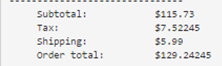
I think it would be very similar to what we did for the prices Perhaps something like print("subtotal: " + str(subtotal)) print("tax: " + str(tax)) print("shipping: 5.99") print("order total: " + str(orderTotal)) May have to make adjustments for formatting, but the important information is all there
Gucchi:
def main(): print("You are shopping with Best Buy!") headsetName1 = str(input("What is the name of your first item?")) headsetQuant1 = int(input("Enter the quantity of " + headsetName1 + " you wish to purchase: " )) headsetPrice1 = float(input("What is the price of " + headsetName1 + "?")) keyboardName1 = str(input("What is the name of your second item?")) keyboardQuant1 = int(input("Enter the quantity of " + keyboardName1 + " you wish to purchase: " )) keyboardPrice1 = float(input("What is the price of " + keyboardName1 + "?")) moniterName1 = str(input("What is the name of your third item?")) moniterQuant1 = int(input("Enter the quantity of " + moniterName1 + " you wish to purchase: " )) moniterPrice1 = float(input("What is the price of " + moniterName1 + "?")) headsetTotal = headsetQuant1 * headsetPrice1 keyboardTotal = keyboardQuant1 * keyboardPrice1 moniterTotal = moniterQuant1 * moniterPrice1 subtotal = headsetTotal + keyboardTotal + moniterTotal tax = subtotal * 0.065 orderTotal = subtotal + tax + 5.99 #createrecipt print("You are shopping with Best Buy!") print("") print("Your order:") print("") print("Item Cost") print(headsetName1 + " " + str(headsetTotal)) print(keyboardName1 + " " + str(keyboardTotal)) print(moniterName1 + " " + str(moniterTotal)) print("
") print("Subtotal: " + str(subtotal)) print("Tax: " + str(tax)) print("Shipping: 5.99") print("Order Total " + str(orderTotal)) print("") print("Thank you for shopping!") main()
Gucchi:
finished
Gucchi:
does it look good to you?
SmokeyBrown:
Looks pretty good to me! Have you tested that the code runs and that the output looks ok?
Gucchi:
what does that link bring you to?
Gucchi:
does it bring you to a python idle ?
SmokeyBrown:
Looks like an in-browser python editor, yeah. It's completely blank for me though, none of your code is there. I can just copy-paste it in to test, I suppose. But you did that yourself anyway, right?
Gucchi:
yeah, everything looked okay to me, if you want you can copy paste the code in there then run the program.
Gucchi:
thank you so much for your help
SmokeyBrown:
No worries, I trust your judgement, and I also have faith in the process we used to get up to this point. Glad we could work together to get the program running :)
Gucchi:
i dont think anyone else would have helped with this question for 7 hours lol
SmokeyBrown:
Haha, not non-stop, but yeah I guess we have been looking at this problem for a while lol
Gucchi:
yeah im excited to sleep
SmokeyBrown:
Have a good rest!
Gucchi:
you too bruv
Join our real-time social learning platform and learn together with your friends!
 VERNEISH:
Two objects are moving along separate linear paths where each path is described by position, d, and time, t.
VERNEISH:
Two objects are moving along separate linear paths where each path is described by position, d, and time, t.

 Maci:
what are the best stock apps for people who want to start investing?
Maci:
what are the best stock apps for people who want to start investing?
 Twaylor:
genuienly how do i get better self control i keep watcing youtube and theres this
Twaylor:
genuienly how do i get better self control i keep watcing youtube and theres this
 IzzyCookie:
|dw:1792074056138:dw| Uhm, I don't know where to ask this, but I'm in college welding at my community college, and I need help learning vertical welding for
IzzyCookie:
|dw:1792074056138:dw| Uhm, I don't know where to ask this, but I'm in college welding at my community college, and I need help learning vertical welding for

 thehearken:
not sure if this is considered spam, im sorry if it is, but does anyone have tips
thehearken:
not sure if this is considered spam, im sorry if it is, but does anyone have tips