
 Gucchi:
programming help
Gucchi:
Write a program to draw a repetitive pattern or outline of a shape using for loops and Turtle Graphics. Use the following guidelines to write your program. Decide on a repetitive pattern or the outline of a shape, such as a house, to draw. Give your artwork a name. Print the name to the output. Using for loops and the Turtle Module, draw the outline of a shape or a repetitive pattern. At least one for loop that repeats three or more times must be used. Use at least one color apart from black. Write the pseudocode for this program. Be sure to include any needed input, calculations, and output.
Gucchi:
this is what i have to complete
Gucchi:
was wondering if anyone can help me get started..
 Timmyspu:
@vocaloid
Gucchi:
btw i only have one more of these programming questions after this
Gucchi:
i dont need help on the pseudocode just the coding part.
 Vocaloid:
@smokeybrown when you get a chance
 SmokeyBrown:
I'm not very familiar with this "Turtle Module" and how it relates to drawing shapes and patterns. Unfortunately, I don't think I can be of much help for this problem. unless I get a chance to research the subject in more detail later (no promises!)
Gucchi:
Gucchi:
maybe this video can help
SmokeyBrown:
Thanks for sharing that resource, it certainly helps give a better idea of what the Turtle graphics module is used for. Indeed, the video showed how to change colors for your drawing and how to use loops to give instructions to the drawing tool. That just leaves the "design" of the shape or pattern to you--which is great because it's a purely creative task with no wrong answers! So, about the assignment, do you have some idea of what kind of shape or pattern you want to draw? Or perhaps you want to experiment a bit with the code and see what you can get? Either approach would be fine, I think.
Gucchi:
alright so i just finished this assignment i think i did it pretty good, heres my code for it: import turtle def main(): donald = turtle.Turtle() print ("My first turtle milkyway artwork!") donald.color("blue") donald.circle(95) donald.color("blue") donald.circle(90) donald.color("blue") donald.circle(85) donald.color("pink") donald.circle(80) donald.color("pink") donald.circle(75) donald.color("pink") donald.circle(70) donald.color("pink") donald.circle(65) donald.color("red") donald.circle(60) donald.color("red") donald.circle(55) donald.color("red") donald.circle(50) for side in range(4): donald.color("white") donald.circle(45) donald.color("white") donald.circle(40) donald.color("white") donald.circle(35) donald.color("white") donald.circle(30) donald.color("white") donald.circle(25) donald.color("white") donald.circle(20) donald.color("white") donald.circle(15) donald.color("white") donald.circle(10) donald.color("white") donald.circle(5) donald.color("white") donald.circle(0) donald.color("white") main()
Gucchi:
program*
Gucchi:
its supposed to be a milkyway type thing
Gucchi:
it turned out okay
Gucchi:
but please dont leave because i have one more programming i need help with
Gucchi:
do you think the code is good?
SmokeyBrown:
Sounds like a cool concept! I'll plug it into a python editor so I can see how it looks...
Gucchi:
heres one
Gucchi:
it doesnt look amazing but i tried
Gucchi:
i was also trying to draw a house but it was too hard
SmokeyBrown:
Oh, one thing I noticed is that you don't need to specify the color of your Turtle object every time it moves, only when you want the color to be different. So for the chunk of code that says donald.color("blue") donald.circle(95) donald.color("blue") donald.circle(90) donald.color("blue") donald.circle(85) It could be simplified to just donald.color("blue") donald.circle(95) donald.circle(90) donald.circle(85) Since the color stays blue that entire time
Gucchi:
so i just stuck with something circular
Gucchi:
Oh, ill revise that
SmokeyBrown:
It does end up being a pretty cool-looking pattern! Another critique I have is that the for-loop seems to just repeat over itself. Like, after the first time drawing the white circles, the drawing tool goes over the same circles 3 more times, which doesn't change the final appearance of the drawing. The result is essentially the same as if the code was written without a loop. That's not necessarily a problem, just something to be aware of. Though the loop doesn't really change the final appearance of the pattern, it can be kind of fun to watch the drawing tool go around and around on itself a few times :)
Gucchi:
it said: 4. At least one for loop that repeats three or more times must be used.
Gucchi:
so i thought thats what that meant
Gucchi:
another thing is that what would i put for my input for the pseudocode?
Gucchi:
6. Write the pseudocode for this program. Be sure to include any needed input, calculations, and output.
Gucchi:
do i just include the output?
SmokeyBrown:
In fact, I have a suggestion for how you can achieve the same effect with your pattern, since the size of your circles seems to decrement by a constant amount each time (smaller by 5, each time). Perhaps something like circleSize = 90 donald.color("blue") for (b in range(3)): donald.circle(circleSize) circleSize = circleSize - 5 donald.color("pink") for (p in range(4)) donald.circle(circleSize) circleSize = circleSize - 5 donald.color("red") for (p in range(3)) donald.circle(circleSize) circleSize = circleSize - 5 donald.color("white") for (p in range(9)) donald.circle(circleSize) circleSize = circleSize - 5 This kind of structure takes more advantage of the potential of loops, which makes writing and reading the code easier, I think. It works by defining how many circles of each color to draw and by decreasing the size of the circle incrementally each loop. You can try and see if it works, and if you're satisfied with the result, you can feel free to use that code :)
Gucchi:
okay this is my code right now: def main(): donald = turtle.Turtle() print ("My first turtle milky way artwork!") (remove) donald.color("blue") donald.circle(95) donald.circle(90) donald.circle(85) donald.color("pink") donald.circle(80) donald.circle(75) donald.circle(70) donald.circle(65) donald.color("red") donald.circle(60) donald.circle(55) (remove until here) donald.circle(50) for side in range(4): donald.color("white") donald.circle(45) donald.circle(40) donald.circle(35) donald.circle(30) donald.circle(25) donald.circle(20) donald.circle(15) donald.circle(10) donald.circle(5) donald.circle(0) main()
Gucchi:
do i remove the code until there?
SmokeyBrown:
Whoops, I'm not used to Python syntax :) I forgot that for-loop conditions are not supposed to be in parentheses, my bad. Also good to use different pointer variables for different loops. Should look more like this circleSize = 90 donald.color("blue") for b in range(3): donald.circle(circleSize) circleSize = circleSize - 5 donald.color("pink") for p in range(4) donald.circle(circleSize) circleSize = circleSize - 5 donald.color("red") for r in range(3) donald.circle(circleSize) circleSize = circleSize - 5 donald.color("white") for w in range(9) donald.circle(circleSize) circleSize = circleSize - 5
Gucchi:
or everything after that aswell
Gucchi:
def main(): donald = turtle.Turtle() print ("My first turtle milky way artwork!") circleSize = 90 donald.color("blue") for b in range(3): donald.circle(circleSize) circleSize = circleSize - 5 donald.color("pink") for p in range(4) donald.circle(circleSize) circleSize = circleSize - 5 donald.color("red") for r in range(3) donald.circle(circleSize) circleSize = circleSize - 5 donald.color("white") for w in range(9) donald.circle(circleSize) circleSize = circleSize - 5 main() like this right?
SmokeyBrown:
I think the revised version of the code you put in your last response looks good, definitely cleaner than before. My suggestion with loops for each color is just one way to do things, not the only way. And your code certainly works. I noticed some mistakes I made in the indentation and making sure that there are colons : after each for-loop condition. Apart from that, I think it looks good!
 Gucchi:
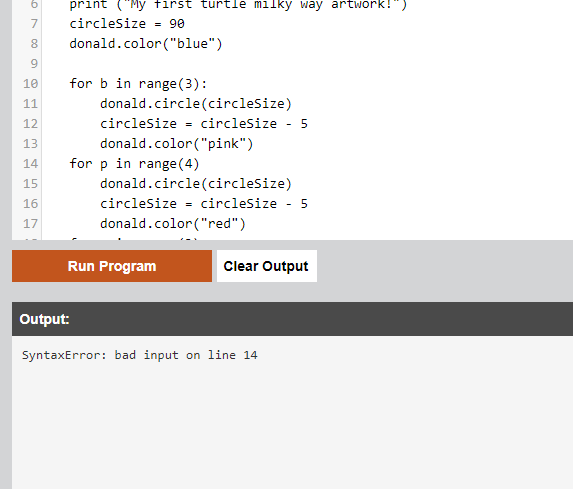
whats wrong in this pic?
Gucchi:
i think indented correctly
SmokeyBrown:
Ah, that's my bad. Missing colon at the end of line 14. Might want to check the other for-loop condition lines to make sure they have colons at the end as well. Just a little syntax detail, easy to fix if you can catch it
 kekeman:
U are missing :
Gucchi:
Gucchi:
another thing though
Gucchi:
for my pseudocode
Gucchi:
6. Write the pseudocode for this program. Be sure to include any needed input, calculations, and output
Gucchi:
so do i only put the output since theres no input or calculations?
SmokeyBrown:
There's definitely no input in this program, so you don't need to write anything about that. I guess calculating the decreasing size of the circles could count as a "calculation", but you'd probably include that detail when you're writing about the for-loops anyway, so there's not really a need to pay special attention to that Do you think you'll be ok writing the pseudocode to describe your program?
 kekeman:
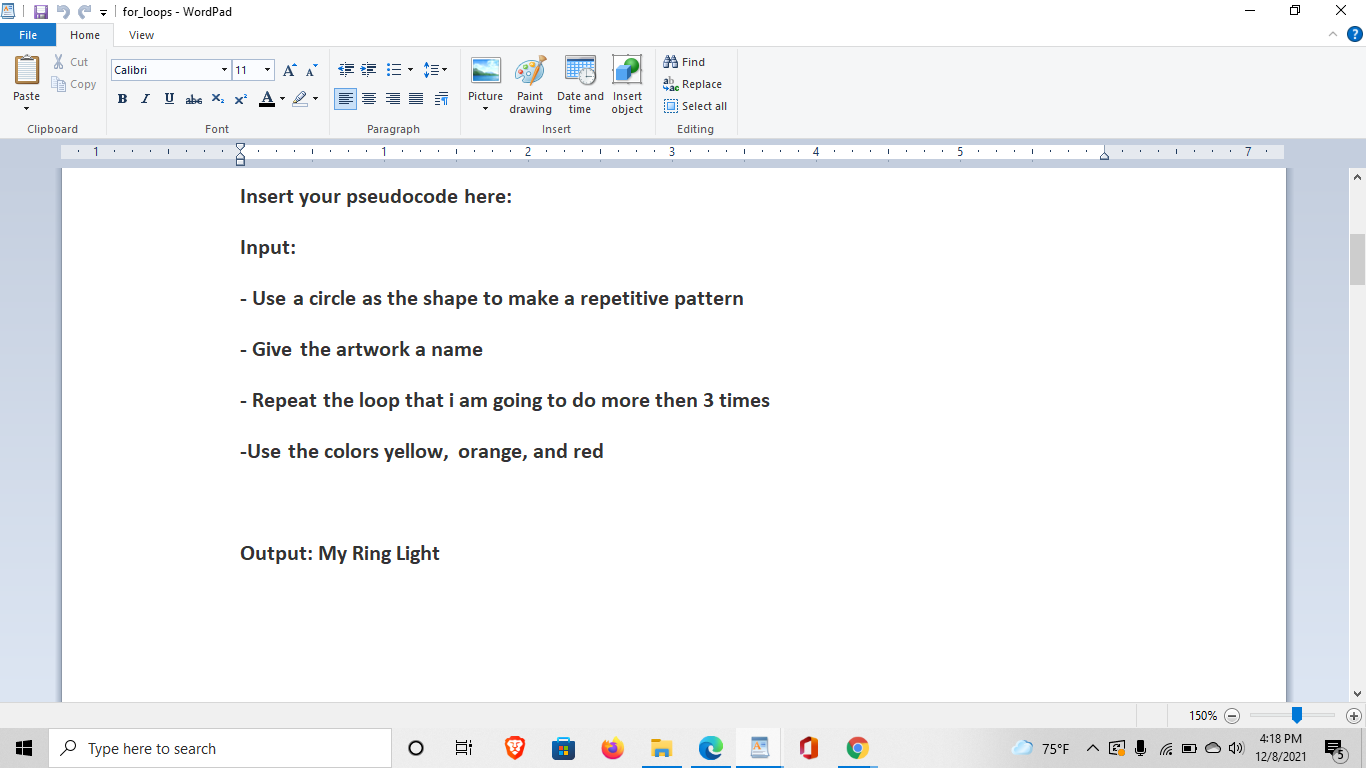
In the input you should be talking about the steps you went through or explain what you are doing for the code.
kekeman:
And as you see in the output you can just put "my milkyway"
Gucchi:
f
Gucchi:
SmokeyBrown:
No problem. I think there are many different conventions or styles for writing pseudocode. The important thing is to make your pseudocode easy to read and understand and, to some extent, make it easy to convert pseudocode to the code that actually makes up the program. I think kekeman's suggestion for how to write pseudocode is valid, although it is possible your instructor means something different when they ask you to describe "inputs". As with any writing, it is also important to keep in mind your audience; in this case, I think your best bet is to follow the pseudocode conventions you've been using in this course so far I won't be online constantly of course, but if I do need to step away for a bit, I'll make sure to check in frequently so you shouldn't have to wait too long for help :)
Gucchi:
Join our real-time social learning platform and learn together with your friends!
 VERNEISH:
Two objects are moving along separate linear paths where each path is described by position, d, and time, t.
VERNEISH:
Two objects are moving along separate linear paths where each path is described by position, d, and time, t.

 Maci:
what are the best stock apps for people who want to start investing?
Maci:
what are the best stock apps for people who want to start investing?
 Twaylor:
genuienly how do i get better self control i keep watcing youtube and theres this
Twaylor:
genuienly how do i get better self control i keep watcing youtube and theres this
 IzzyCookie:
|dw:1792074056138:dw| Uhm, I don't know where to ask this, but I'm in college welding at my community college, and I need help learning vertical welding for
IzzyCookie:
|dw:1792074056138:dw| Uhm, I don't know where to ask this, but I'm in college welding at my community college, and I need help learning vertical welding for

 thehearken:
not sure if this is considered spam, im sorry if it is, but does anyone have tips
thehearken:
not sure if this is considered spam, im sorry if it is, but does anyone have tips