import turtle
def main():
donald = turtle.Turtle()
donald.color("red")
print("Move the turtle around the screen!")
print("~~~~~~~~~~~~~~~~~~~~~~~~~~~~~~")
print("Menu of Movement Controls:")
print(" __________________ ")
print("| W = Move Foward |")
print("| A = Move Left |")
print("| S = Move Down |")
print("| D = Move Right |")
print("| Q = Quit |")
print("|__________________|")
movement = input("Enter a movement command w, a, s, d, q")
main()
Still Need Help?
Join the QuestionCove community and study together with friends!
Sign Up
Gucchi:
i wrote this code
Gucchi:
Part One: Programming
Write a program to move the Turtle based on the user’s request. Display a menu with options for the user to choose. Use the following guidelines to write your program.
1. Create a menu that gives the user options for moving the Turtle. The menu should contain letters or numbers that align with movements such as forward, backward, and/or drawing a particular pattern.
2. Use at least one if-else or elif statement in this program. It should be used to move the Turtle based on the user's input.
3. A loop is optional but may be used to ask the user to select multiple choices.
4. Use one color other than black.
5. Write the pseudocode for this program. Be sure to include any needed input, calculations, and output.
i really need help with the if else statements for when the user is inputting
Still Need Help?
Join the QuestionCove community and study together with friends!
Sign Up
Gucchi:
@vocaloid
Gucchi:
@extrinix
Gucchi:
@timmyspu can u help
Gucchi:
@gucchi wrote:
i really need help with the if else statements for when the user is inputting
i still need help
Vocaloid:
@smokeybrown would you mind taking a look at this when you get a chance
Still Need Help?
Join the QuestionCove community and study together with friends!
Sign Up
Gucchi:
@vocaloid wrote:
@smokeybrown would you mind taking a look at this when you get a chance
it would be a major help if he comes online
SmokeyBrown:
The problem says that you can use if-else checks to allow the user to move the turtle. So, you'll want to include some way for the user to enter inputs into the program. Then, based on how those inputs match up with the controls, you can execute actions for the turtle
SmokeyBrown:
Based on how the program is set up, it looks like you'll want to listen for input as long as the user hasn't quit.
In other words, you'll start by taking input from the user. Then, while input is not equal to Q, you'll continue to take in the next input from the user.
You can define what the turtle does for all other valid input using if-else statements:
if input is equal to W, move the turtle forward a certain number of units
if input is equal to A, turn the turtle left by a certain number of degrees
if input is equal to D, turn the turtle right by a certain number of degrees
if input is equal to S, move the turtle backward a certain number of units
You can put all of that inside a while statement that checks for input not equal to Q. And of course, when input is not equal to Q the program can stop running, so close your input, maybe print a goodbye message or something
SmokeyBrown:
And you won't need it for pseudocode, but when it comes time to write the real code for the program, here's a short reference for Python Turtle commands if you need it: https://docs.python.org/3/library/turtle.html
Gucchi:
@smokeybrown wrote:
Based on how the program is set up, it looks like you'll want to listen for input as long as the user hasn't quit.
In other words, you'll start by taking input from the user. Then, while input is not equal to Q, you'll continue to take in the next input from the user.
You can define what the turtle does for all other valid input using if-else statements:
if input is equal to W, move the turtle forward a certain number of units
if input is equal to A, turn the turtle left by a certain number of degrees
if input is equal to D, turn the turtle right by a certain number of degrees
if input is equal to S, move the turtle backward a certain number of units
You can put all of that inside a while statement that checks for input not equal to Q. And of course, when input is not equal to Q the program can stop running, so close your input, maybe print a goodbye message or something
can you give me an example of how you would write the code for the input of w
Still Need Help?
Join the QuestionCove community and study together with friends!
Sign Up
Gucchi:
i just an example of a while statement aswell
Gucchi:
its been so long since i have done this and just need a refresh
SmokeyBrown:
I'd be happy to give some examples.
The pseudocode for the structure I described might look something like this:
open input_source
input = input_source.get_user_input()
while(input NOT "Q") {
if (input == "W")
Turtle moves forward
if (input == "A")
Turtle turns left
if (input == "D")
Turtle turns right
if (input == "S")
Turtle moves backward
input = input_source.get_user_input()
}
SmokeyBrown:
Actually, for python, you don't need to open and close an input source like you would in java, so never mind about that.
The actual syntax could look something like
command = input("Please enter next command")
while (command != "Q") {
if (command == "W")
donald.forward(10)
....
....
}
etc.
Gucchi:
@smokeybrown wrote:
I'd be happy to give some examples.
The pseudocode for the structure I described might look something like this:
open input_source
input = input_source.get_user_input()
while(input NOT "Q") {
if (input == "W")
Turtle moves forward
if (input == "A")
Turtle turns left
if (input == "D")
Turtle turns right
if (input == "S")
Turtle moves backward
input = input_source.get_user_input()
}
for the "turtle moves forward" would the code be turtle.forward?
Still Need Help?
Join the QuestionCove community and study together with friends!
Sign Up
Gucchi:
OHH nevermind you explained it in the next message, thank you
Gucchi:
ill text back if i need any help
Gucchi:
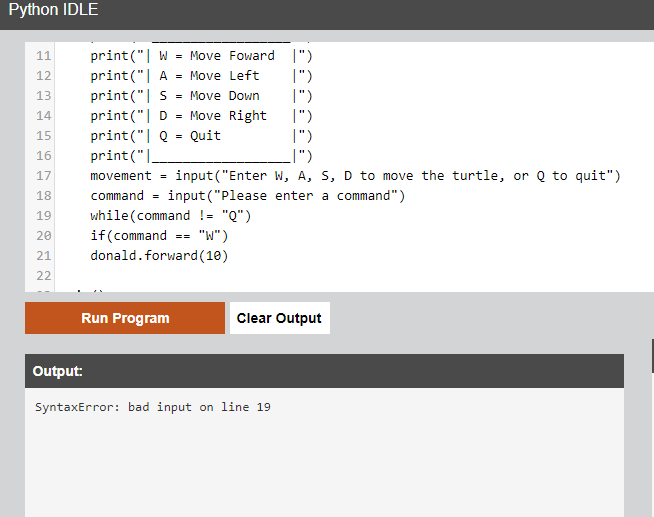
@smokeybrown it said there was a syntax error on line 19
Join the QuestionCove community and study together with friends!
Sign Up
Gucchi:
@timmyspu do you have any idea?
GreatScottMarty:
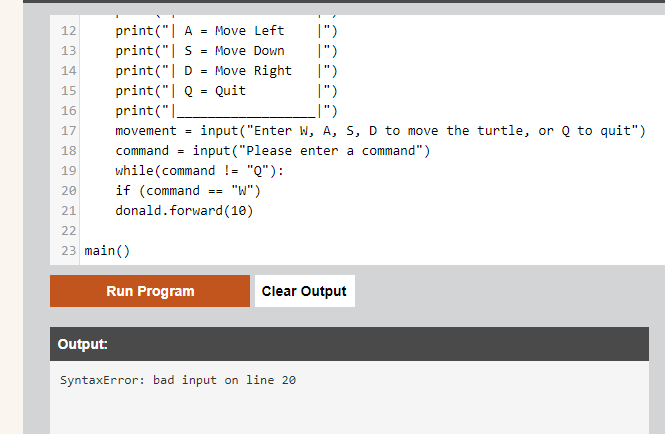
I know some Python. Try deleting one of the = signs. Maybe that will work?
GreatScottMarty:
The if/then signs usually have one = but I could be mistaken.
Gucchi:
nah didnt do anything
Gucchi:
idk man i even tried indenting the donald.forward by four spaces, and it still says the same time
Still Need Help?
Join the QuestionCove community and study together with friends!
Sign Up
Gucchi:
thing*
Gucchi:
im just waiting for smokey to come online
GreatScottMarty:
crap
Vocaloid:
If you have a while loop, the next line, as well as every line inside the while loop should be indented
Since you’re starting an if loop after that, the code inside the if loop also needs to be indented
Gucchi:
@vocaloid wrote:
If you have a while loop, the next line, as well as every line inside the while loop should be indented
Since you’re starting an if loop after that, the code inside the if loop also needs to be indented
works perfectly now thank you
Still Need Help?
Join the QuestionCove community and study together with friends!
Sign Up
Timmyspu:
@gucchi I have not done coding in a little while but I will try to get better at coding again because I am a little rusty. I will try my best to help answer your questions but I would ask smokey and voca before you ask me.
Gucchi:
@smokeybrown how do i make the turtle move continuously with user input instead of starting the turtle back at the original point again
Gucchi:
like if i move forward
Gucchi:
then i want to move right
Gucchi:
right after the forward input i just did
Still Need Help?
Join the QuestionCove community and study together with friends!
Sign Up
Gucchi:
without starting again, because the point of the assignment is to make the user control the turtle around the screen
Gucchi:
@smokeybrown wrote:
I'd be happy to give some examples.
The pseudocode for the structure I described might look something like this:
open input_source
input = input_source.get_user_input()
while(input NOT "Q") {
if (input == "W")
Turtle moves forward
if (input == "A")
Turtle turns left
if (input == "D")
Turtle turns right
if (input == "S")
Turtle moves backward
input = input_source.get_user_input()
}
when you say turtle turns left and right, can you put that in code cuz im confused
SmokeyBrown:
Sorry I don't come online that often. I must say, I'm glad Vocaloid was able to help out, and it's also encouraging to see so many people willing to pitch in and tackle the problem with you :)
I realize now that I should have made the indentations more obvious; a single space is pretty hard to see, especially in this format--I'll try indenting with multiple spaces for clarity
Looks like you've gotten one of the commands, W -> forward to work. That's great. Before moving ahead with the other commands, I'd like to point out that your while loop needs a way to update its condition.
In this case, the condition of the while loop (command != "Q") checks the value of the variable "command", so we should have a line inside the while loop that updates command. Otherwise, we have a situation where the while loop could continue forever, since the condition never changes. To address this, we can simply copy the line that sets "command = input("Please enter a command)" to the end of the while-loop. That way, after one command is done, the user has a chance to enter their next command. In general, loops should always have a way to update their conditions.
About the other commands, I think the commands for turning left and right are
turtle.left(angle)
and
turtle.right(angle)
respectively, where "angle" is the number of degrees we want the turtle to turn. You could set this to whatever you see fit--90 for a right-angle turn, 45 for half of that, etc.
For your if-conditions, they could look something like
if(command == "A")
donald.left(90)
if(command == "D")
donald.right(90)
And then the command for backwards would be similar, checking if the command variable is equal to "S" and if so performing donald.back()
You can also add a number parameter to the .forward() and .back() functions to specify how many units the turtle should move, but it seems that is optional, and the turtle moves some default amount if not specified
SmokeyBrown:
As a side note, in this case using if-statements and else-if statements would be interchangeable, since all of the conditions are exclusive to another anyway. That is, the "command" variable can only be equal to at most one of the options, so you won't encounter a situation where more than one of the conditions will be fulfilled. In a case where you wanted to make sure only one of a set of conditions passes, you could use if-else. In this case it's not really necessary because at most one condition can be true anyway
SmokeyBrown:
@gucchi wrote:
@smokeybrown how do i make the turtle move continuously with user input instead of starting the turtle back at the original point again
That's interesting. Was the turtle going back to the original position because you ran the program again from the beginning?
My guess is that your while-loop was looping infinitely because there was no opportunity for the condition to change. In that case, the turtle would keep moving forward until you reset the program from the beginning, which also resets the turtles position.
Once you fix the while loop by adding that line at the end to change the condition, you'll be able to control the turtle's movements at each step, and each step should build upon the turtle's previous position instead of resetting. This will be more obvious once you implement the other commands as well.
Best of luck, and I'll look forward to checking in to see how it goes :)
Still Need Help?
Join the QuestionCove community and study together with friends!
Sign Up
Ultrilliam:
Sorry just commenting off topic here to point out I've done this exact assignment a LONG time ago, probably 6 years ago now.
Also some tips for you smokey, and gucchi, 4 spaces is good to use in this if you can't use tabs. Also, codeblocks exist, \`text` for inline text, for codeblocks,
\```(optional language specification, by default attempts autodetect)
code
\```
example using code from earlier:
```
if(command == "A")
donald.left(90)
if(command == "D")
donald.right(90)
```
Gucchi:
@smokeybrown wrote:
@gucchi wrote:
@smokeybrown how do i make the turtle move continuously with user input instead of starting the turtle back at the original point again
That's interesting. Was the turtle going back to the original position because you ran the program again from the beginning?
My guess is that your while-loop was looping infinitely because there was no opportunity for the condition to change. In that case, the turtle would keep moving forward until you reset the program from the beginning, which also resets the turtles position.
Once you fix the while loop by adding that line at the end to change the condition, you'll be able to control the turtle's movements at each step, and each step should build upon the turtle's previous position instead of resetting. This will be more obvious once you implement the other commands as well.
Best of luck, and I'll look forward to checking in to see how it goes :)
thank you so much ill try everything out.
Gucchi:
if you have time, come online tmrw anytime, and check the post out if i have any problems
Gucchi:
cuz i get stuck and dk what to do
Gucchi:
@smokeybrown wrote:
Sorry I don't come online that often. I must say, I'm glad Vocaloid was able to help out, and it's also encouraging to see so many people willing to pitch in and tackle the problem with you :)
I realize now that I should have made the indentations more obvious; a single space is pretty hard to see, especially in this format--I'll try indenting with multiple spaces for clarity
Looks like you've gotten one of the commands, W -> forward to work. That's great. Before moving ahead with the other commands, I'd like to point out that your while loop needs a way to update its condition.
In this case, the condition of the while loop (command != "Q") checks the value of the variable "command", so we should have a line inside the while loop that updates command. Otherwise, we have a situation where the while loop could continue forever, since the condition never changes. To address this, we can simply copy the line that sets "command = input("Please enter a command)" to the end of the while-loop. That way, after one command is done, the user has a chance to enter their next command. In general, loops should always have a way to update their conditions.
About the other commands, I think the commands for turning left and right are
turtle.left(angle)
and
turtle.right(angle)
respectively, where "angle" is the number of degrees we want the turtle to turn. You could set this to whatever you see fit--90 for a right-angle turn, 45 for half of that, etc.
For your if-conditions, they could look something like
if(command == "A")
donald.left(90)
if(command == "D")
donald.right(90)
And then the command for backwards would be similar, checking if the command variable is equal to "S" and if so performing donald.back()
You can also add a number parameter to the .forward() and .back() functions to specify how many units the turtle should move, but it seems that is optional, and the turtle moves some default amount if not specified
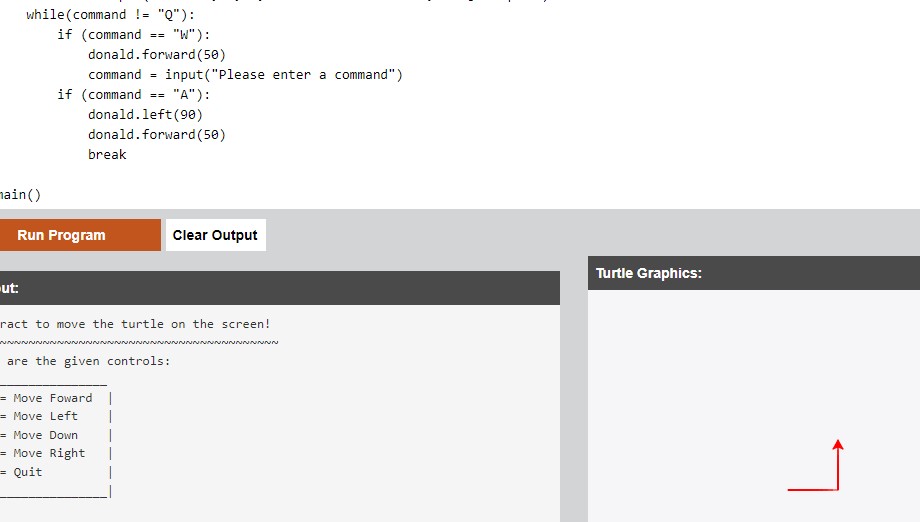
the annoying part is when i add the donald.left(90) and it starts making a shape and loops, how do i stop that?
Still Need Help?
Join the QuestionCove community and study together with friends!
Sign Up
SmokeyBrown:
@ultrilliam wrote:
Sorry just commenting off topic here to point out I've done this exact assignment a LONG time ago, probably 6 years ago now.
Also some tips for you smokey, and gucchi, 4 spaces is good to use in this if you can't use tabs. Also, codeblocks exist, `text` for inline text, for codeblocks,
```
(optional language specification, by default attempts autodetect)
code
```
example using code from earlier:
```
if(command == "A")
donald.left(90)
if(command == "D")
donald.right(90)
```
Cool feature! I'll give it a try.
```
system.out.println("Hello world");
```
Nice.
Ultrilliam:
Ah... It really did not like the quote did it? I don't think it properly quoted the backslash to cancel out the earlier example. Well that's a bug to add to the list
SmokeyBrown:
Aww, it looked good in the preview. Ah well, I'm sure I can still use it :)
Anyway,
@gucchi wrote:
the annoying part is when i add the donald.left(90) and it starts making a shape and loops, how do i stop that?
It might have something to do with where you put the line to update the value of the "command" variable? I imagine you'd want that to be the last line of your while loop, so that right before the loop checks the condition again the user gets a chance to enter a new command.
If you like, I can take a look at the code you have so far
Gucchi:
@smokeybrown wrote:
Sorry I don't come online that often. I must say, I'm glad Vocaloid was able to help out, and it's also encouraging to see so many people willing to pitch in and tackle the problem with you :)
I realize now that I should have made the indentations more obvious; a single space is pretty hard to see, especially in this format--I'll try indenting with multiple spaces for clarity
Looks like you've gotten one of the commands, W -> forward to work. That's great. Before moving ahead with the other commands, I'd like to point out that your while loop needs a way to update its condition.
In this case, the condition of the while loop (command != "Q") checks the value of the variable "command", so we should have a line inside the while loop that updates command. Otherwise, we have a situation where the while loop could continue forever, since the condition never changes. To address this, we can simply copy the line that sets "command = input("Please enter a command)" to the end of the while-loop. That way, after one command is done, the user has a chance to enter their next command. In general, loops should always have a way to update their conditions.
About the other commands, I think the commands for turning left and right are
turtle.left(angle)
and
turtle.right(angle)
respectively, where "angle" is the number of degrees we want the turtle to turn. You could set this to whatever you see fit--90 for a right-angle turn, 45 for half of that, etc.
For your if-conditions, they could look something like
if(command == "A")
donald.left(90)
if(command == "D")
donald.right(90)
And then the command for backwards would be similar, checking if the command variable is equal to "S" and if so performing donald.back()
You can also add a number parameter to the .forward() and .back() functions to specify how many units the turtle should move, but it seems that is optional, and the turtle moves some default amount if not specified
my bad i read this wrong. so i would add "command = input("Please enter a command)" to the while loop
Gucchi:
@smokeybrown wrote:
Aww, it looked good in the preview. Ah well, I'm sure I can still use it :)
Anyway,
@gucchi wrote:
the annoying part is when i add the donald.left(90) and it starts making a shape and loops, how do i stop that?
It might have something to do with where you put the line to update the value of the "command" variable? I imagine you'd want that to be the last line of your while loop, so that right before the loop checks the condition again the user gets a chance to enter a new command.
If you like, I can take a look at the code you have so far
i havent done anything so far, just came back on here
Still Need Help?
Join the QuestionCove community and study together with friends!
Sign Up
Gucchi:
ill post as soon as i make a few changes
Gucchi:
how would i add the "command = input("Please enter a command)" at the end tho
Gucchi:
while(command != "Q"): end of this right?
SmokeyBrown:
@ultrilliam wrote:
Sorry just commenting off topic here to point out I've done this exact assignment a LONG time ago, probably 6 years ago now.
Also some tips for you smokey, and gucchi, 4 spaces is good to use in this if you can't use tabs. Also, codeblocks exist, `text` for inline text, for codeblocks,
```
(optional language specification, by default attempts autodetect)
code
```
example using code from earlier:
```
if(command == "A")
donald.left(90)
if(command == "D")
donald.right(90)
```
I think I got it
```
Code code code
```
I tried adding a line break between the first set of ``` and "(optional language...)" and now the formatting seems to work. I guess it didn't recognize the ``` when it was on the same line as the rest of the text block?
SmokeyBrown:
@gucchi wrote:
how would i add the "command = input("Please enter a command)" at the end tho
I think I see what you mean. I'm talking about the body of your while-loop, that whole section where all the if-conditions are. After your last if-condition, on the next line is where I think you want to put the "command = input("Please enter a command)"
Still Need Help?
Join the QuestionCove community and study together with friends!
Sign Up
SmokeyBrown:
Based on the structure we described, this is what happens each time the while loop runs: First, the while condition checks if "command" is equal to "Q". If not, the program enters the body of the loop. Then, the body of the loop will go through each of the if-statements to see which action, if any, to perform. Then, the user gets the chance to enter a new value for "command". Then, the while-loop checks if the (updated) value of command is "Q"...
Also, I thought about it more, and I want to revise what I said about if-else statements here:
@smokeybrown wrote:
As a side note, in this case using if-statements and else-if statements would be interchangeable, since all of the conditions are exclusive to another anyway. That is, the "command" variable can only be equal to at most one of the options, so you won't encounter a situation where more than one of the conditions will be fulfilled. In a case where you wanted to make sure only one of a set of conditions passes, you could use if-else. In this case it's not really necessary because at most one condition can be true anyway
I still think that the logic of the program would work the same in this case, whether you use "if" or "else-if". But, there might be the potential to save a bit of time by using else-if. The reason for that is, when you use else-if, as soon as one of the conditions is fulfilled, the program doesn't need to check for the other conditions. In this case, since we're using all if-statements, the program will always check if "command" is "W"; if "command" is "A"; if "command" is "D"; if "command" is "S". Even if the condition passes and "command" is "W", it will still go through all of the other if-statements.
It's not a huge waste of time, but it is technically still a waste, so I would argue for using else-if statements in this case, if you care about that
not much added yet but just wanted to let u know that i added a "break" statement there after donald.forward, cuz it was just making squares and looping
Join the QuestionCove community and study together with friends!
Sign Up
Gucchi:
okay heres the code:
import turtle
def main():
donald = turtle.Turtle()
donald.color("red")
print("Interact to move the turtle on the screen!")
print("~~~~~~~~~~~~~~~~~~~~~~~~~~~~~~~~~~~~~~~~~~~")
print("Here are the given controls:")
print(" __________________ ")
print("| W = Move Foward |")
print("| A = Move Left |")
print("| S = Move Down |")
print("| D = Move Right |")
print("| Q = Quit |")
print("|__________________|")
command = input("Enter W, A, S, D to move the turtle, or Q to quit")
while(command != "Q"):
if (command == "W"):
donald.forward(50)
command = input("Please enter a command")
if (command == "A"):
donald.left(90)
donald.forward(50)
break
command = input("Please enter a command")
if (command == "S"):
donald.back(50)
break
command = input("Please enter a command")
if (command == "D"):
donald.right(90)
donald.forward(50)
break
main()
Gucchi:
but theeres another problem
Gucchi:
when i added command = input("Please enter a command")
Gucchi:
and it asks for user input
Gucchi:
i put in W and it kept on asking me nonstop
Still Need Help?
Join the QuestionCove community and study together with friends!
Sign Up
Gucchi:
but if i typed A, S, or D, the question would stop showing up. whys that?
Gucchi:
okay im done heres the final code, i solved the problem:
import turtle
def main():
donald = turtle.Turtle()
donald.color("red")
print("Interact to move the turtle on the screen!")
print("~~~~~~~~~~~~~~~~~~~~~~~~~~~~~~~~~~~~~~~~~~~")
print("Here are the given controls:")
print(" __________________ ")
print("| W = Move Foward |")
print("| A = Move Left |")
print("| S = Move Down |")
print("| D = Move Right |")
print("| Q = Quit |")
print("|__________________|")
command = input("Enter W, A, S, D to move the turtle, or Q to quit")
while(command != "Q"):
if (command == "W"):
donald.forward(50)
command = input("Please enter a command")
if (command == "A"):
donald.left(90)
donald.forward(50)
command = input("Please enter a command")
if (command == "S"):
donald.back(50)
command = input("Please enter a command")
if (command == "D"):
donald.right(90)
donald.forward(50)
command = input("Please enter a command")
main()
Gucchi:
i also removed the "break" statement cause i didnt need that
Gucchi:
because it says i should have atleast one if-else statement, can i put else somewhere in the code?
Gucchi:
@smokeybrown wrote:
Based on the structure we described, this is what happens each time the while loop runs: First, the while condition checks if "command" is equal to "Q". If not, the program enters the body of the loop. Then, the body of the loop will go through each of the if-statements to see which action, if any, to perform. Then, the user gets the chance to enter a new value for "command". Then, the while-loop checks if the (updated) value of command is "Q"...
Also, I thought about it more, and I want to revise what I said about if-else statements here:
@smokeybrown wrote:
As a side note, in this case using if-statements and else-if statements would be interchangeable, since all of the conditions are exclusive to another anyway. That is, the "command" variable can only be equal to at most one of the options, so you won't encounter a situation where more than one of the conditions will be fulfilled. In a case where you wanted to make sure only one of a set of conditions passes, you could use if-else. In this case it's not really necessary because at most one condition can be true anyway
I still think that the logic of the program would work the same in this case, whether you use "if" or "else-if". But, there might be the potential to save a bit of time by using else-if. The reason for that is, when you use else-if, as soon as one of the conditions is fulfilled, the program doesn't need to check for the other conditions. In this case, since we're using all if-statements, the program will always check if "command" is "W"; if "command" is "A"; if "command" is "D"; if "command" is "S". Even if the condition passes and "command" is "W", it will still go through all of the other if-statements.
It's not a huge waste of time, but it is technically still a waste, so I would argue for using else-if statements in this case, if you care about that
makes sense, can you give an example of how the else would like in the codde
Still Need Help?
Join the QuestionCove community and study together with friends!
Sign Up
SmokeyBrown:
It looks like you managed to figure out quite a bit through your own efforts. That's great! And we're not done yet :)
First I should address the issue you mentioned here:
@gucchi wrote:
i put in W and it kept on asking me nonstop
@gucchi wrote:
but if i typed A, S, or D, the question would stop showing up. whys that?
I'm pretty sure this is caused by the alignment of your code. Notice how all the if-statements after the first one are indented further (the first if-statement is indented 2 tabs, while the later ones are indented by 3 tabs)? Well, in Python, the code interprets this to mean that the further indented statements are *within* the less indented statements. In effect, this means that the program will only check for "A", "S", and "D" after it has confirmed that "command" is equal to "W", since the if-statements for "A", "S" and "D" are nested inside the if-statement for "W". This creates a situation where only the forward action can be performed because the other actions are unreachable.
To fix this, simply adjust the alignment on the if-statements so they are all equally aligned; that way, the if-statements are all inside the while-loop but not nested within other if-statements, in this case.
About the [command = input("Please enter a command")] statement, I think I could have been more explicit about where to add that. While your code does accomplish what you need it to by prompting for user input after every condition, you could achieve the same thing by including [command = input("Please enter a command")] only once, at the end of the while-loop body, outside of any if-conditions. After all, you want the program to prompt for user input no matter what, not only under certain conditions
In fact, the continuous looping you saw earlier here
@gucchi wrote:
not much added yet but just wanted to let u know that i added a "break" statement there after donald.forward, cuz it was just making squares and looping
was because the program was not hitting the [command = input("Please enter a command")] line; that statement was hidden inside a condition which wasn't being fulfilled, so there was no way to update the "command" value, and the loop would keep repeating the same behavior since the condition stayed the same.
It looks like you got around this issue by adding [command = input("Please enter a command")]. While I complement you for recognizing the issue and coming up with a workaround, it would probably be easier to simply place that statement once, at the end of the while-loop body, outside of any if-statements (again, alignment is important here). I'll demonstrate what I mean in the example below
If you want to use if-else statements, all you need to do is replace your "if" conditions with "else if"; this can apply to all of the ifs except for the first one. Starting from the first condition, the logic goes "if something is true, do this [if (<condition1>) <action1>]; and if that condition is not true and another condition is true, do something else [(else if (<condition2>) <action2>]; and if that condition is not true and another condition is true... etc.
I'll try rewriting the while-loop of your code with these adjustments so you can get a visual idea of how all this can be put together:
```
command = input("Enter W, A, S, D to move the turtle, or Q to quit")
while(command != "Q"):
if (command == "W"):
donald.forward(50)
elif (command == "A"):
donald.left(90)
donald.forward(50)
elif (command == "S"):
donald.back(50)
elif (command == "D"):
donald.right(90)
donald.forward(50)
command = input("Please enter a command")
```
Notice how the if-statements share the same alignment, so none of them are nested within each other; the [command = input("Please enter a command")] also shares the same alignment, because we want it to be inside the while-loop but not inside any if-statements.
I used this article to double-check my if-elif-else syntax. Feel free to use it as a reference for the logic and syntax of those statements, if you like:
https://www.programiz.com/python-programming/if-elif-else#:~:text=Python%20if...else%20Statement%201%20Syntax%20of%20if...else.%20The,is%20executed%20and%20the%20body%20of%20else%20
Gucchi:
@smokeybrown im finished with the assignment thank you so much everything came out perfect
Gucchi:
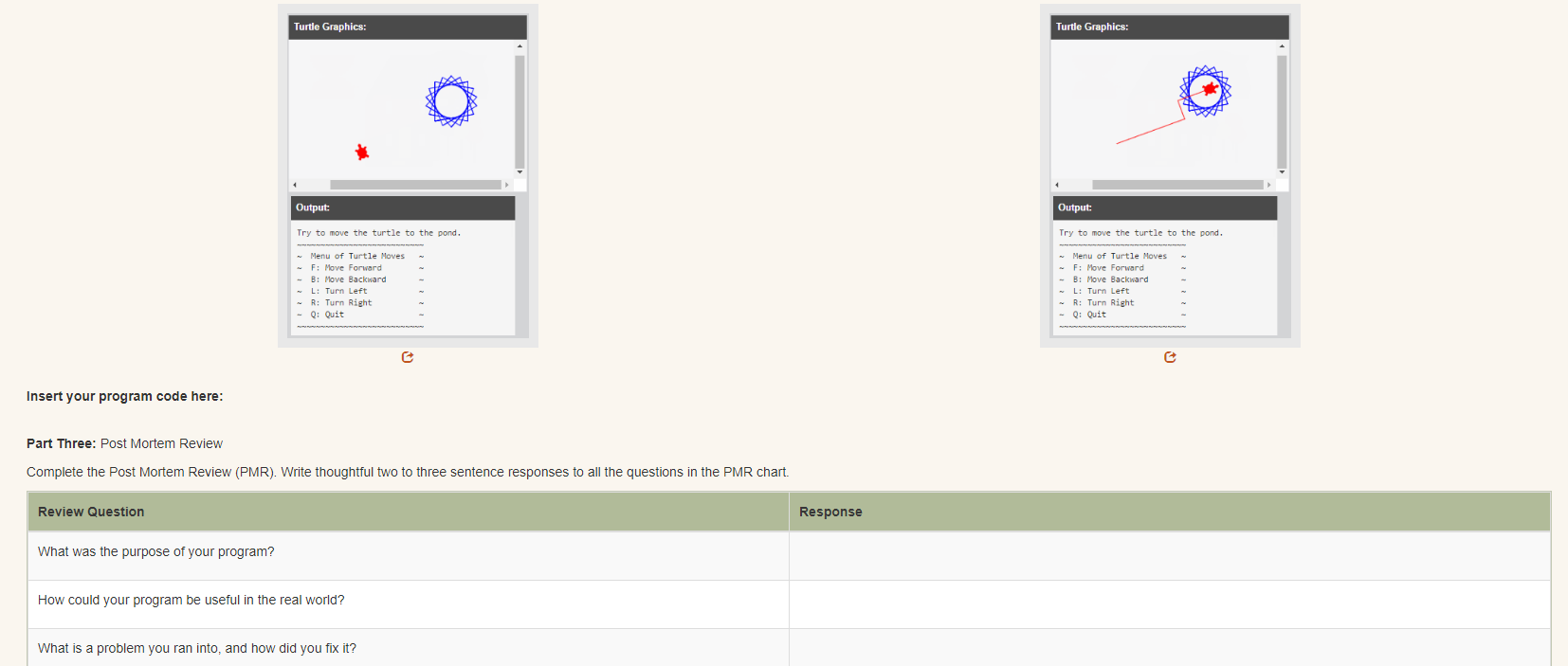
i have a few more, so if your not busy, are you able to help?

 Gucchi:
 Vocaloid:
 SmokeyBrown:
 GreatScottMarty:
 Timmyspu:
 Ultrilliam:


 Maci:
what are the best stock apps for people who want to start investing?
Maci:
what are the best stock apps for people who want to start investing?
 Twaylor:
genuienly how do i get better self control i keep watcing youtube and theres this
Twaylor:
genuienly how do i get better self control i keep watcing youtube and theres this
 IzzyCookie:
|dw:1792074056138:dw| Uhm, I don't know where to ask this, but I'm in college welding at my community college, and I need help learning vertical welding for
IzzyCookie:
|dw:1792074056138:dw| Uhm, I don't know where to ask this, but I'm in college welding at my community college, and I need help learning vertical welding for

 thehearken:
not sure if this is considered spam, im sorry if it is, but does anyone have tips
thehearken:
not sure if this is considered spam, im sorry if it is, but does anyone have tips