
 Gucchi:
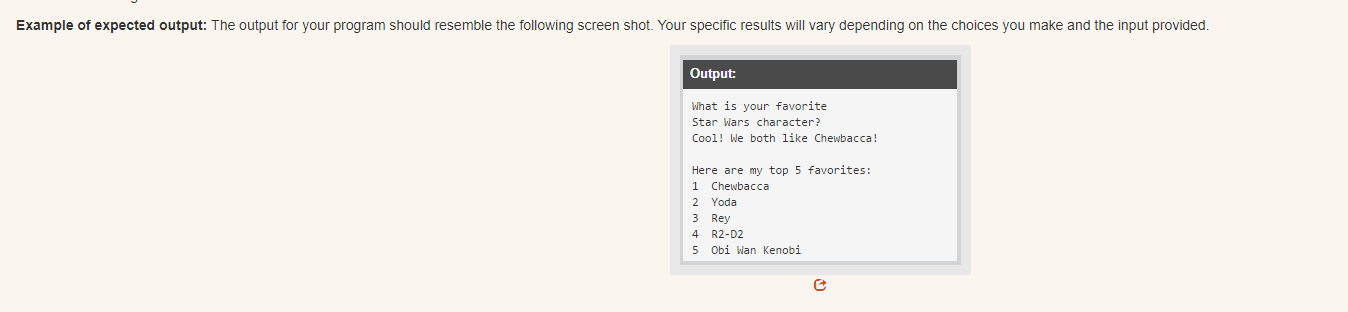
Part One: Programming Write a program to ask the user for their favorite item in a given category. Then provide feedback if their item is on your list. Use the following guidelines to write your program. Pick a category and make a list of your five favorite things. Suggested categories include your favorite: actors, books, cars, or something else of your choosing. Ask the user what their favorites are in your selected category. By creating a list, a loop, and if statements, print a message that lets the user know if their favorites matches the ones on your list. Neatly print your entire list to the screen. Be sure to number each item. Write the pseudocode for this program. Be sure to include any needed input, calculations, and output.
 Gucchi:
@smokeybrown heres the next one, let me know if we can go through it together
Gucchi:
i found this vid online, ig this is how i do it: https://drive.google.com/file/d/1k2ERHiB8-wFKq9x9Dpa7WZISC5JBeRgz/view
Gucchi:
also im just going to do my top 5 avengers so, 1. spider man 2. thor 3. hulk 4. iron man 5. captain america
Gucchi:
i wrote this so far: def main(): answer = input("Who is your favorite Avenger?") print("These are my top 5 favorites:") favAvengers = ["1 Spiderman", "2 Thor", "3 Hulk", "4 Iron Man", "5 Captain America"] for n in range(0, len(favAvengers)): print(favAvengers[n]) main()
Gucchi:
i just need help w the if statements after the answer = input
 SmokeyBrown:
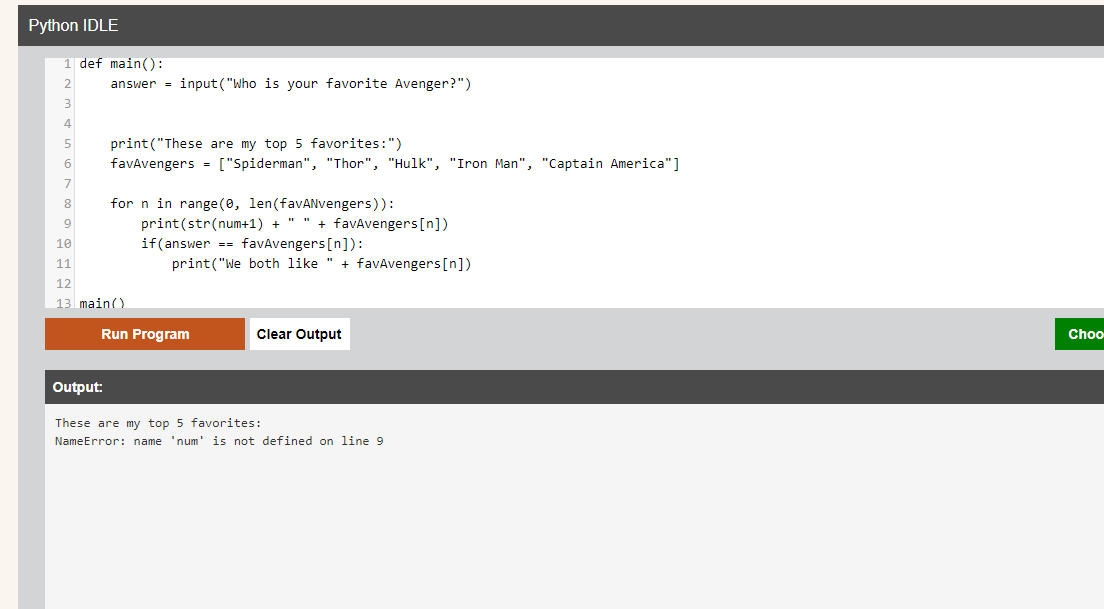
I think I understand. You can use an if-statement inside a for-loop to check if the user's input is in your list. It could look something like ``` for n in range(0, len(favAvengers)): if(answer == favAvengers[n]) print("We both like " + favAvengers[n]) ``` You would want to make sure the list favAvengers is defined before this for-loop, so you might have to move the line where that happens a bit earlier. Also, if you decide to check for matches with the input and the list like that, your list will have to contain the names exactly as you expect the user to type them, so we would probably want to remove the numbers in the list itself. That's ok, we can still add the numbers in the print statement of the for-loop you wrote. So, your list could look like ``` favAvengers = ["Spiderman", "Thor", "Hulk", "Iron Man", "Captain America"] ``` and your for-loop could look like ``` for n in range(0, len(favAvengers)): print(str(num+1) + favAvengers[n]) ```
SmokeyBrown:
Or maybe that second loop to print the list would look like ``` for n in range(0, len(favAvengers)): print(str(num+1) + " " + favAvengers[n]) ``` if you want to keep that space between the number and the hero name, like you have it written in the original list
 Gucchi:
am i doing something wrong here?
Gucchi:
wait so do i need to have the answer = input at the top?
 Gucchi:
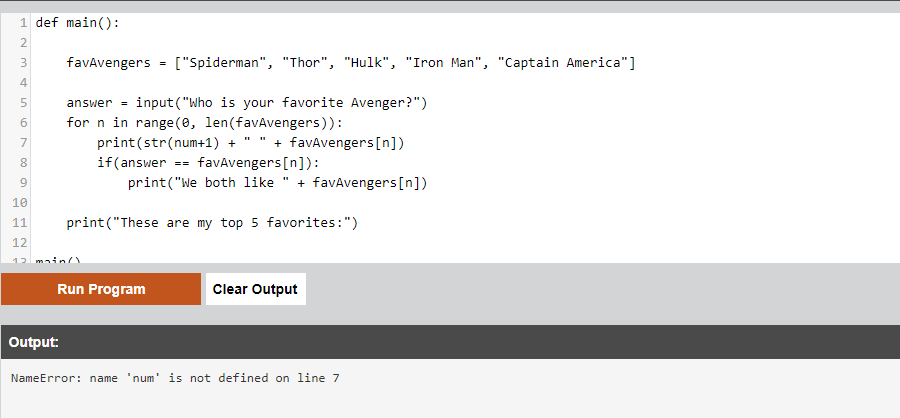
but im still getting an error
SmokeyBrown:
My bad, I made a typo. We didn't define any variable called "num" so the program is confused looking for something that doesn't exist. I meant "n", but I typed "num" by mistake. So, instead of ``` print(str(num+1) + " " + favAvengers[n]) ``` we should use ``` print(str(n+1) + " " + favAvengers[n]) ``` As for the question you had about the ordering, I think in this case you can choose to define the list first or get the user input first, and either will work. I do think the "These are my top 5 favorites:" message should come before you start the for-loop to start printing the list, right?
Gucchi:
 Gucchi:
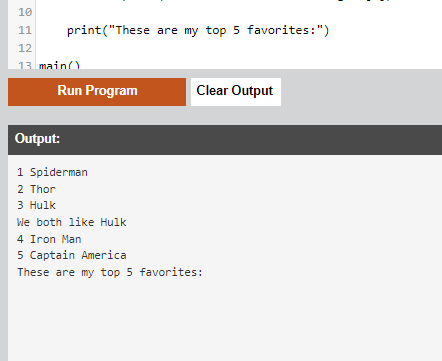
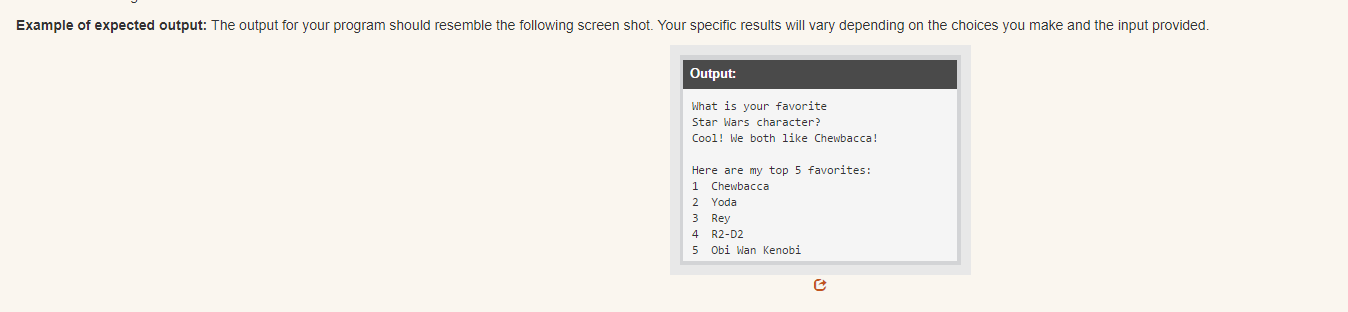
alright it worked but its just looking weird now
Gucchi:
the output
Gucchi:
 Gucchi:
SmokeyBrown:
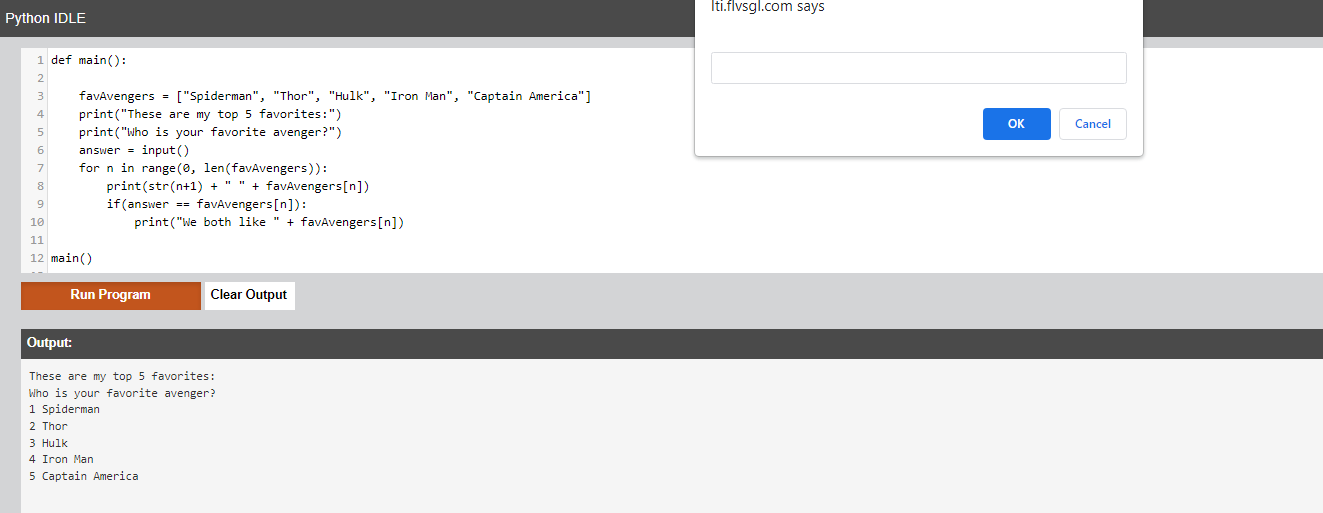
Looks like you figured out how to deal with the ordering of your print messages. That's good :) If the question is not showing up in the final output, you could try separating the message from the input statement. So, instead of ``` answer = input("Who is your favorite Avenger?") ``` You could try ``` print("Who is your favorite avenger?") answer = input() ```
SmokeyBrown:
If the question still doesn't show up in the output after trying that, you can try adding another print statement for "Who is your favorite avenger" to show the question right before the "These are my top 5 favorites:" message
 Gucchi:
but now the question doesnt even show up for the user
Gucchi:
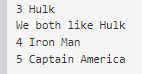
and when i answer for the user input, it always ends up in the middle of the list, instead at top
 SmokeyBrown:
I see. To get the question showing up at the right timing to prompt user input, I think you want to put this section of code ``` print("Who is your favorite avenger?") answer = input() ``` before ``` print("These are my top 5 favorites:) ```
SmokeyBrown:
Then, to get the "We both like <hero>" message to print above the list, I think we would want to use another for-loop that goes through the whole list before printing any of the list itself You can add this for-loop ``` for n in range(0, len(favAvengers)): if(answer == favAvengers[n]) print("We both like " + favAvengers[n]) ``` after ``` answer=input() ``` and before ``` print("These are my top 5 favorites:) ``` Which will check for a match inside the list and print the message before the second for-loop prints the list itself
 Gucchi:
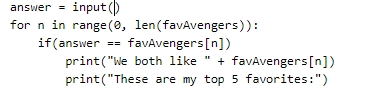
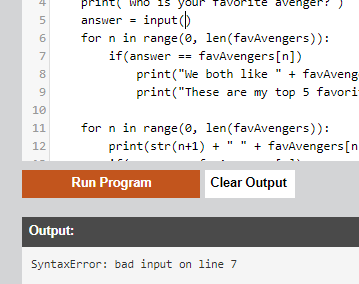
am i indenting something wrong?
 xxDeppressionxx:
What are you programming on?
 Gucchi:
it was a semicolon
Gucchi:
my bd
SmokeyBrown:
No worries :) It looks like you've put the "These are my top 5 favorites:" line inside the if-statement, inside the for-loop. But if you put it there, then the message will only print under that condition; and you want it to always print before the list, right? I suggest making the alignment of the line ``` print("These are my top 5 favorites:") ``` equal with the alignment of ``` for(n in range...) ``` so that it is outside of any loops or conditional checks and always prints once, right when you want it to
Gucchi:
Gucchi:
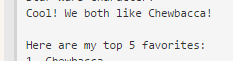
is there any statement in python that indents like two lines? on the example output, theres like a space between the "Cool" and "here"
 Gucchi:
and i want a space between "Wow" and "these"
Gucchi:
if that makes sense
SmokeyBrown:
xxDeppressionxx:
Ok sound good
SmokeyBrown:
Gucchi:
i dont think there has to be a special message if the user types in another answer or avenger
Gucchi:
cause there is nothing on the instructions
Gucchi:
SmokeyBrown:
Nice! That is one way to get an empty line, and you can also use the the \n character to make a new line within a print statement. So, if you wanted an empty line between messages you could do ``` print("We both like " + favAvenger[n] + \n) ``` It's looks a little neater in the code than making an empty print() each time you want a new line, but both do the same thing
SmokeyBrown:
Or maybe it would be ``` print("We both like " + favAvenger[n] + "\n") ``` One of those should work
Gucchi:
nice alright
Gucchi:
everything finished
Gucchi:
i have another one but ill post at night, are you available later today?
SmokeyBrown:
That sounds good to me. I'll try to check in later today and see if I can help :)
Gucchi:
alr thanks man
Join our real-time social learning platform and learn together with your friends!
 VERNEISH:
Two objects are moving along separate linear paths where each path is described by position, d, and time, t.
VERNEISH:
Two objects are moving along separate linear paths where each path is described by position, d, and time, t.

 Maci:
what are the best stock apps for people who want to start investing?
Maci:
what are the best stock apps for people who want to start investing?
 Twaylor:
genuienly how do i get better self control i keep watcing youtube and theres this
Twaylor:
genuienly how do i get better self control i keep watcing youtube and theres this
 IzzyCookie:
|dw:1792074056138:dw| Uhm, I don't know where to ask this, but I'm in college welding at my community college, and I need help learning vertical welding for
IzzyCookie:
|dw:1792074056138:dw| Uhm, I don't know where to ask this, but I'm in college welding at my community college, and I need help learning vertical welding for

 thehearken:
not sure if this is considered spam, im sorry if it is, but does anyone have tips
thehearken:
not sure if this is considered spam, im sorry if it is, but does anyone have tips